
A Shopify Flow workflow can pass every logic check and still create the wrong operational result. The trigger may fire before the required data exists. A wait can resume against newer store state. A retry can encounter an action that already succeeded. A connector can fail after an earlier store change completed.
The difficult decision is not whether a task can be automated. It is how much authority the workflow should receive, what evidence it must check, and how the team will detect and repair a wrong outcome.
Shopify Flow is currently a free Shopify-built app on Basic, Grow, Advanced, and Plus. Some capabilities remain plan-dependent, and connected apps can add their own costs and access requirements.[1][2] Treat Flow as an operating system for small decisions, not a collection of clever templates.
Decide whether Flow is the smallest safe system
Reader question: Does this task need a workflow at all?
Start with the narrowest system that can own the outcome.
| System | Use it when | What it should not own |
|---|---|---|
| Native Shopify setting | One platform setting already expresses the rule | Cross-object logic or external coordination |
| Manual checklist | Volume is low, context varies, and error cost is high | Repetitive high-volume triage |
| Shopify Flow | A Shopify or app event, available data, and a bounded action form a clear contract | Long-running multi-system transactions with weak recovery |
| Paid specialist app | A domain-specific trigger, action, UI, or operating queue is missing | Broad automation that only duplicates Flow |
| Middleware or custom integration | Several systems need durable state, idempotency, richer logs, or controlled reprocessing | A simple Shopify-native event and action |
Flow monitors Shopify and app events, evaluates conditions, and takes Shopify or connected-app actions.[1][5] That makes it useful for tagging, notifications, routing, holds, metadata, scheduled checks, and narrow integrations. It does not make every available action a safe automation boundary.
For example, automatically adding an internal review tag is easy to reverse and easy to inspect. Automatically canceling an order, changing inventory, sending a customer message, or calling an external system has a larger blast radius. The second group needs stronger evidence, ownership, and recovery even when the canvas looks equally simple.
Map the event, data, and action boundary
Reader question: What exactly enters the workflow, and what can it know at that moment?
Each Flow workflow has one trigger. Shopify documents triggers as literal events with distinct meanings. `Order created` and `Order transaction created`, for example, represent different moments. Shopify also warns that some fields might not exist when an early trigger fires. A newly created order might not yet have the fulfilment data a later step expects.[3]
The trigger also determines the initial data graph. Conditions use Shopify GraphQL Admin API fields and dot notation, so `order.tags`, `order.customer.tags`, and product tags reached through order line items are different paths.[4] Write the required path in the workflow contract before selecting a friendly label in the editor.
Map five things:
- **Event:** The exact state transition that should start the work.
- **Required data:** Every field, relationship, and freshness condition needed for a decision.
- **Authority:** The store or external state the workflow may change.
- **Evidence:** The run ID, resource ID, rule version, input state, action result, and exception reason the owner needs.
- **Recovery:** The stop, repair, retry, and reconciliation path.
A scheduled trigger begins without order, product, or customer data. It needs a Get data action. Shopify limits Get data actions to lists of up to 100 items, so a daily catch-up workflow must use a query window that cannot silently overflow.[14]
A Wait step creates another time boundary. Wait can delay a workflow for up to 90 days. When the run resumes, Flow refreshes store data, and Get, Sum, or Count results from before the wait are not available after it. More importantly, an edited active workflow resumes waiting runs against the updated steps, not the version that originally entered the wait.[7]
That behavior can be useful, but it changes the meaning of a workflow. Decide whether an after-wait condition should use the latest state or a recorded trigger-time fact. If the original fact matters, store it in a durable field or external record before waiting.
Grade authority before building logic
Reader question: How much control can the workflow receive safely?
Use a simple authority ladder.
| Tier | Example | Default control | Rollback evidence |
|---|---|---|---|
| Observe | Log state or send an internal alert | Automated | Run ID and resource link |
| Reversible edit | Add a namespaced tag or internal metafield | Automated after state check | Previous value and rule version |
| External effect | Send to Slack, Sheets, email, or an app | Automated only with destination and consent checks | Delivery result and dedupe key |
| Consequential change | Hold fulfilment, change inventory, cancel, refund, or message a customer | Human approval or tightly bounded rule | Before state, approver, result, repair owner |
This is an Inficial risk model, not a Shopify product classification. Its purpose is to prevent the presence of an action from becoming permission to use it.
For high-consequence work, split detection from execution. The first workflow can validate data, apply an internal review state, and notify the owner. A staff member then confirms the decision through a native Shopify action or a separate manual workflow. This preserves automation for evidence gathering while keeping the irreversible choice visible.
Do not use a customer or order tag as the only proof that an external system completed. Tags are useful state markers, but they are mutable and can be written by several apps. Pair the marker with a stable source ID and a result that the owner can reconcile.
Build guardrails into the workflow
Reader question: What stops a valid workflow from producing an invalid result?
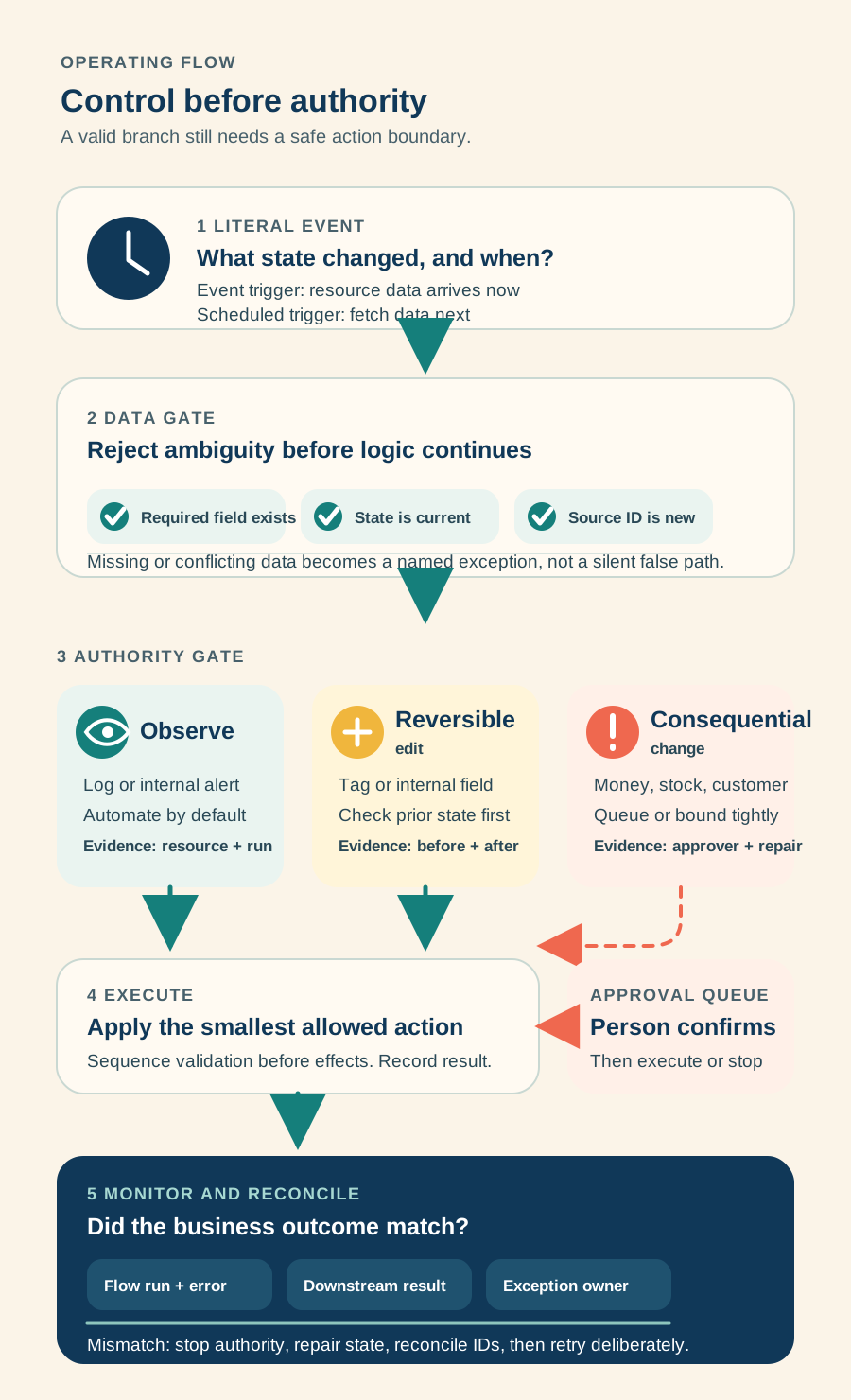
*Caption: Trigger logic decides whether a branch is valid. The control boundary decides whether the action is safe to run.*
The minimum guardrail pattern is:
- verify the required resource exists;
- verify the action has not already been applied for the same source event;
- verify current state still permits the change;
- route missing or ambiguous data to an exception branch;
- stop intentionally when a prerequisite fails;
- record enough evidence to reconcile the business result.
Shopify provides a Fail workflow run action that stops later steps and marks the run as failed with a supplied reason.[15] Use it for a broken invariant, not for an ordinary false condition. A false path can end normally; a missing order ID, invalid rule version, or absent approval record should be visible as an error.
Be careful with parallel branches. A failure in one branch does not undo a successful action in another. The workflow canvas is not a database transaction. Sequence dependent actions so that validation happens first, then the lowest-risk change, then the consequence. If partial completion is possible, define its exception state explicitly.
Run a reversible seven-day pilot
Reader question: How can the team prove the operating model before scaling it?
Shopify now lets merchants test Flow logic with recorded, manually created, or Sidekick-generated events. Test runs use real store data to evaluate variables but stop before an action changes the store. External service actions show a configuration preview rather than calling the service.[6]
That makes test mode necessary but not sufficient. It verifies logic paths, not connector delivery or end-to-end business reconciliation.
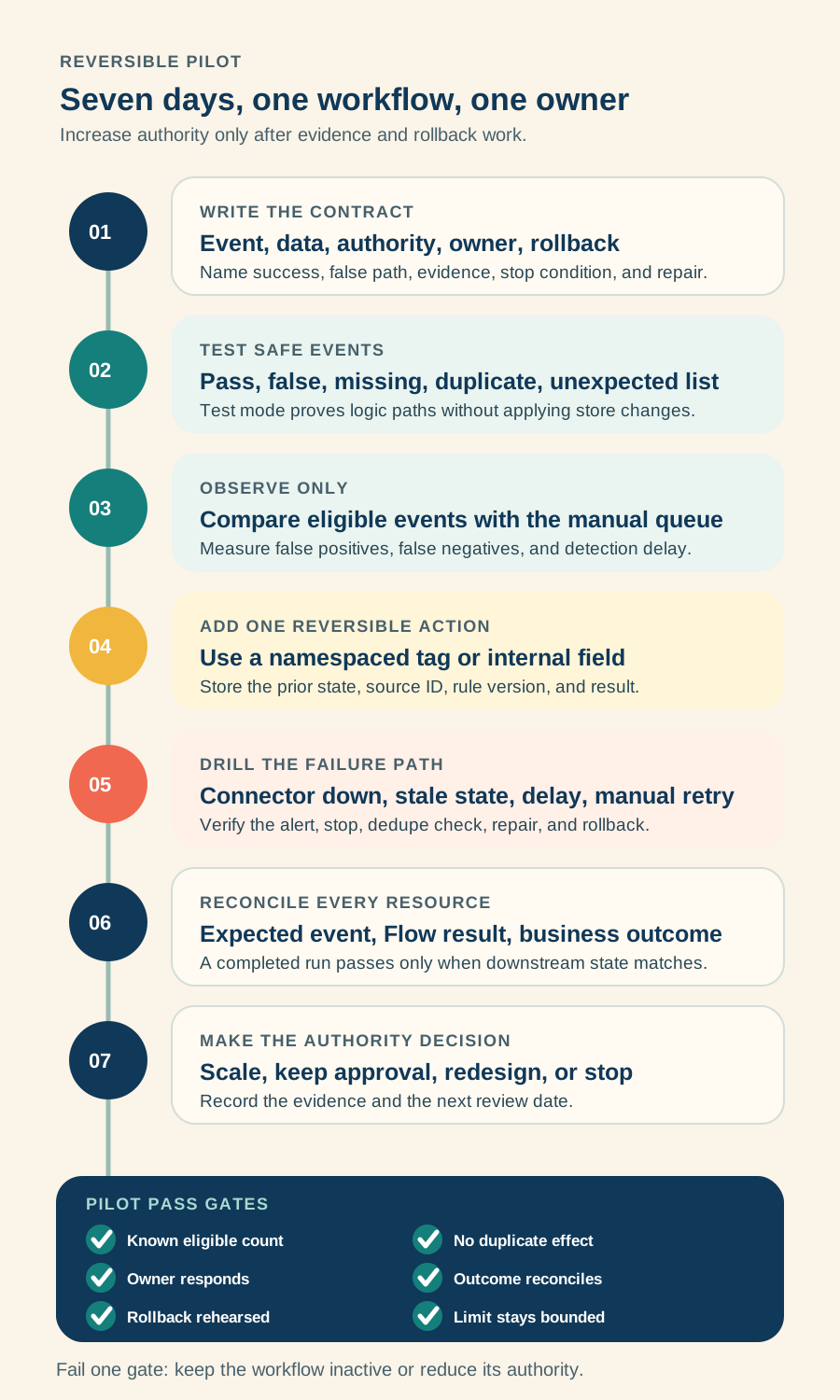
*Caption: Authority increases only after the previous stage produces usable evidence and a working rollback.*
Use one workflow and one owner:
- Write the event, required fields, false path, action, owner, success signal, stop condition, and rollback.
- Test a passing event, a false condition, missing data, an unexpected list, and a duplicate source ID.
- Run in observe-only mode. Compare eligible events with the existing manual queue.
- Enable one reversible internal edit, such as a namespaced order tag.
- Simulate connector failure, a changed record, a delayed run, and a manual retry.
- Reconcile every eligible resource against the expected outcome.
- Scale, keep queued approval, redesign, or turn the workflow off.
Use business signals, not only Flow status. Measure eligible events, actions taken, false positives, false negatives, time to detection, exception age, manual repair time, duplicate effects, and downstream mismatch. A completed run is evidence of executed steps, not proof that fulfilment, finance, support, or the customer received the correct outcome.
Own permissions, data, and connections
Reader question: Which people and systems can see or change the workflow?
The current Shopify App Store listing says Flow can access sensitive customer data, device and activity data, store owner and staff data, orders, subscription contracts, and app information.[2] Those categories describe the app's potential access, not a reason for every workflow to use every field.
Review three boundaries:
- **Shopify access:** Limit Flow app access to staff who own automation design or response. Separate the person who edits a consequential rule from the person who approves its production use when the risk justifies it.
- **Workflow data:** Use the smallest trigger dataset and variable paths needed. Do not place customer data, tokens, or full payloads in an email or log merely because Flow exposes them.
- **Connector access:** Flow connectors require a login and grant to the external service. Shopify recommends using the same account whenever that action is used.[12] Prefer an organization-owned integration identity where the service supports one, then document the credential owner and rotation path.
Flow itself does not add a storefront script simply because a background workflow exists. Theme or performance impact comes from the connected app, storefront extension, data mutation, or customer-facing feature the workflow invokes. Test that downstream surface separately.
Pricing was verified August 24, 2026. Flow is listed as free, but the total operating cost can include a higher Shopify plan, paid connected apps, external API usage, monitoring, and staff time.[1][2] Send HTTP Request is currently available on Grow, Advanced, and Plus, while tasks from custom partner apps are Plus-only. Flow usage also follows plan-governed API limits.[1]
Monitor outcomes, not only completed runs
Reader question: Who notices a silent miss or partial completion?
Assign one business owner and one technical owner. The business owner defines eligibility, consequence, and acceptable error. The technical owner manages fields, connections, failure alerts, change history, and repair. Finance, fulfilment, support, lifecycle marketing, or merchandising own any exceptions that land in their systems.
Flow stores completed run history for 14 days. Run details expose step data, resource IDs, results, errors, and retries.[8] If the evidence is needed for month-end reconciliation, customer disputes, or a longer operational audit, write the minimum required result to an approved system with a suitable retention policy.
Transient errors are retried automatically with increasing delay. Each section between wait steps has a combined 36-hour execution limit. Permanent errors, such as a missing required resource or invalid destination, fail without the same retry behavior.[9]
Manual retry is not a time machine. Shopify says it reuses the original trigger data, while Get data actions, conditions, and actions use current data and the active workflow. Before retrying, check whether any earlier action already succeeded and whether the current record is still eligible.[10] This repeatability check is an operational safeguard derived from Shopify's retry behavior.
Create a separate error-notification workflow, but do not rely on it as a per-event alarm. Shopify's Workflow error occurred trigger sends only one notification per workflow version within 30 days.[17] Pair it with a scheduled run review for consequential workflows and a downstream reconciliation count.
Know the limits and when Flow is not enough
Reader question: Which requirements should move the work to another system?
Keep Flow when Shopify is the main system of record, the event and action are well defined, the workflow fits the available data, and the team can repair partial completion.
Use a specialist app, middleware, or custom integration when the requirement needs several of these:
- a durable queue across several systems;
- long-term event and decision history;
- guaranteed deduplication across retries;
- approval interfaces with roles and service-level timers;
- transaction-style compensation across multiple actions;
- processing more than Flow's query or execution limits safely;
- backfill, replay, or bulk repair over long periods;
- a domain-specific operator interface for returns, fraud, subscriptions, or fulfilment.
Flow can have up to 1,000 active and inactive workflows. Shopify also warns when more than 10 active workflows share a trigger because fan-out can slow execution and consume resources. Large lists, nested conditions, and accidental feedback loops can cause GraphQL throttling that affects other workflows.[9]
Maintenance matters because Flow uses the GraphQL Admin API and adopts versioned API fields. Shopify notes that workflows can require updates when fields change or are deprecated.[16] Review critical workflows after Shopify Editions, app connector changes, plan changes, and internal schema or metafield changes.
Plan change, rollback, and exit
Reader question: What happens when the rule, owner, app, or connector changes?
Flow now records edits, activations, deactivations, exports, timestamps, and users in version history. The history itself does not let you revert directly, although Shopify documents that Sidekick can create a draft from an earlier version for review and activation. That recovers workflow logic, not downstream store or external effects. Version event data is retained for one year, and the history shows only the seven most recent changes by each user within a version.[11]
Before changing a consequential workflow:
- Export the current `.flow` file and remove sensitive destinations before sharing it.
- Record the change reason, owner, rule version, test events, expected effect, and rollback threshold in the workflow note.
- Check for in-progress and waiting runs.
- Duplicate and test the proposed logic.
- Turn off the old authority before enabling the new authority.
- Reconcile the transition window by resource ID.
Turning off a workflow can cancel in-progress runs. Deactivating or deleting a workflow also cancels waiting runs, while editing a workflow can change what a waiting run does when it resumes.[7][13] Rollback therefore means more than restoring logic. It includes stopping new runs, canceling or finishing work in progress, reversing safe changes, reconciling partial effects, and notifying the operational owner.
Before uninstalling Flow or a connected app, export workflows, identify every app trigger and action, disconnect external accounts deliberately, and verify that no waiting, rate-limited, or exception work remains. The largest switching cost is usually not the Flow canvas. It is the undocumented state and responsibility distributed across tags, metafields, external accounts, apps, and team habits.
Take one safe action this week
Reader question: What can the team improve without activating a workflow?
Choose one existing manual task that happens at least weekly. Fill one workflow-contract row with the exact event, required data path, authority tier, owner, false path, evidence, alert, stop condition, retry check, and rollback.
Then use Flow test mode only to simulate one passing event and one missing-data event. Do not activate the workflow. If the team cannot explain the missing-data path and repair owner from the test output, keep the task manual.
Inficial can help map the automation boundary, compare native Shopify, Flow, apps, middleware, and custom integration, design the approval and exception model, and run a reversible pilot.
No commercial relationship, sponsorship, affiliate arrangement, or endorsement involving Shopify or a connected app provider is known or implied.
Sources
- Shopify Help Center: Shopify Flow, accessed August 24, 2026
- Shopify App Store: Shopify Flow, accessed August 24, 2026
- Shopify Help Center: Understanding triggers in Shopify Flow, accessed August 24, 2026
- Shopify Help Center: Understanding conditions in Shopify Flow, accessed August 24, 2026
- Shopify Help Center: Shopify Flow reference, accessed August 24, 2026
- Shopify Help Center: Testing a workflow in Shopify Flow, accessed August 24, 2026
- Shopify Help Center: Wait action, accessed August 24, 2026
- Shopify Help Center: Finding and monitoring workflow runs, accessed August 24, 2026
- Shopify Help Center: Troubleshooting errors in Shopify Flow, accessed August 24, 2026
- Shopify Help Center: Retrying workflow runs in Shopify Flow, accessed August 24, 2026
- Shopify Help Center: Reviewing workflow version history, accessed August 24, 2026
- Shopify Help Center: Manage connections in Shopify Flow, accessed August 24, 2026
- Shopify Help Center: Manage, export, deactivate, or delete workflows, accessed August 24, 2026
- Shopify Help Center: Schedules, get data, and looping workflows, accessed August 24, 2026
- Shopify Help Center: Fail workflow run action, accessed August 24, 2026
- Shopify Help Center: Shopify Flow and GraphQL Admin API, accessed August 24, 2026
- Shopify Help Center: Workflow error occurred trigger, accessed August 24, 2026