
A Shopify store can look down for six different reasons, and only one of them is a platform-wide outage. The published theme might have regressed, an app proxy might be timing out, checkout could be healthy while the admin is unavailable, a feed could be serving stale availability, or orders could be queuing between Shopify and the warehouse.
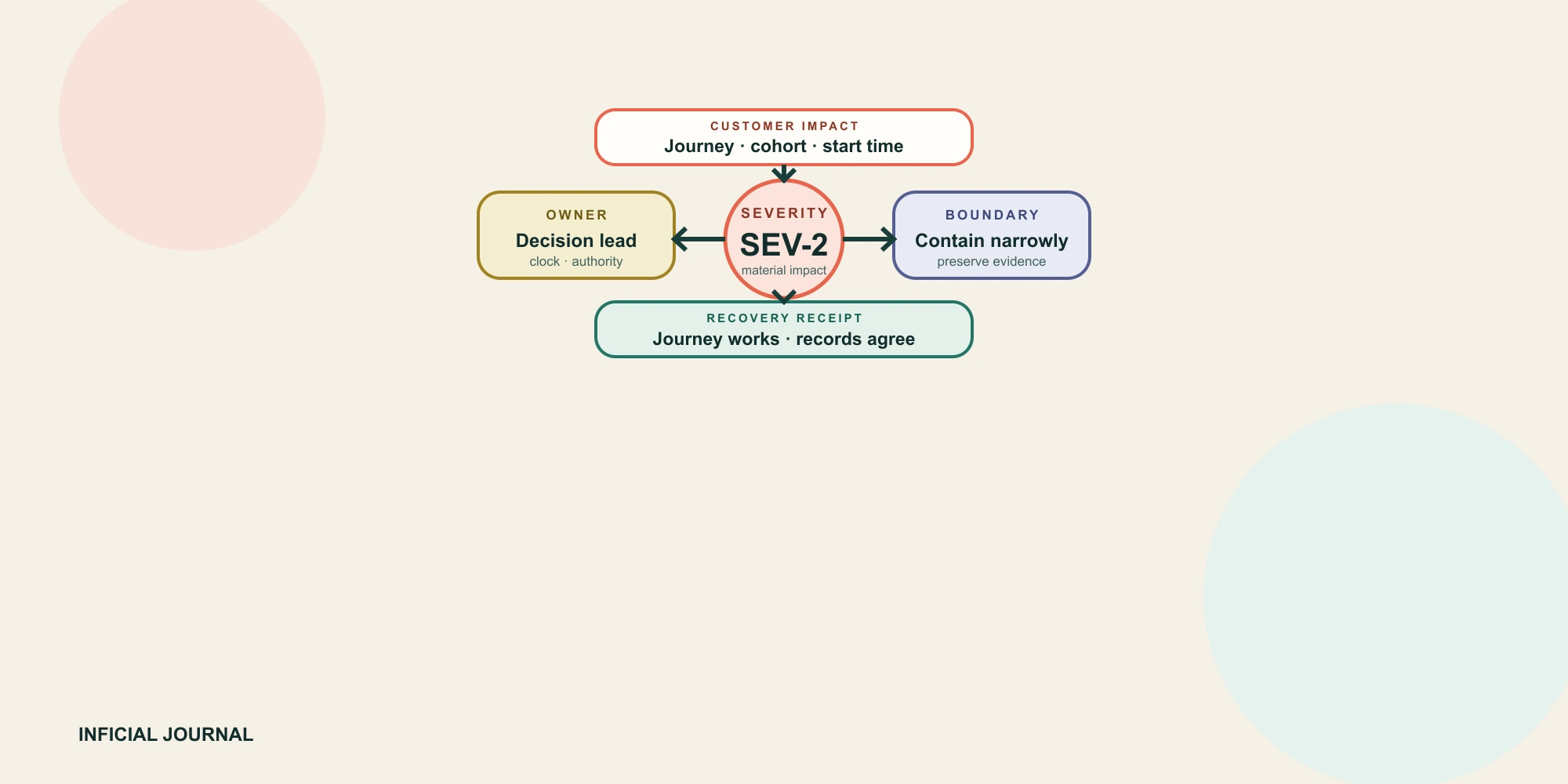
The first incident decision is therefore not how quickly someone can change code. It is whether the team can identify the affected customer journey, establish one incident owner, contain the correct surface, preserve evidence, and prove that commerce records agree after service returns.
Classify the failure and declare severity
A shared symptom does not prove a shared cause. A 500 response on several independent stores is different from a broken product template on one theme. An empty order queue can mean checkout stopped, an integration lost authorization, a webhook consumer is failing, or the warehouse stopped acknowledging records. Classify from observed boundaries before making changes.
| Incident family | Fast discriminator | Primary owner | Containment boundary |
|---|---|---|---|
| Platform or regional service | Independent stores or regions show the same Shopify surface failing | Incident lead plus Shopify support | Protect traffic and operations without editing a healthy store |
| Theme or configuration | One theme, template, market, or recent change differs from a known-good control | Storefront owner | Revert only the scoped release or publish a tested prior theme |
| App or vendor | Failure follows an extension, proxy, script, function, or vendor endpoint | App owner plus vendor | Disable only the affected surface when a tested fallback exists |
| Integration or queue | Checkout works, but orders, inventory, fulfillment, feeds, or messages stop reconciling | Integration and operations owners | Stop the unsafe writer, retain the queue, and prevent duplicate replay |
| Data or procedure | The platform responds, but catalog state, access, scheduling, or an operational handoff is wrong | Data or commerce operations owner | Hold the affected cohort and use an approved continuity route |
Shopify's own theme troubleshooting guidance uses a similar isolation principle: test whether the issue exists on one theme or every theme, then examine recent apps or theme changes.[1] The method is more valuable than the specific tool. Establish a control that should not share the suspected dependency, compare the same customer task, and record the difference.
Do not call a platform incident merely because Shopify Status is green, red, or delayed. Status is one signal. Your incident contract needs store-specific checks across the exact surfaces that earn or fulfill revenue. Community and merchant reports are useful for scope discovery, but they are not proof that your order, payment, inventory, or integration state is safe.
Set severity from customer and operational consequences, not ticket count. Shopify describes checkout, payment processing, order creation, and fulfillment as critical journeys.[2] Add the post-checkout journeys that keep promises: inventory commitment, routing, notifications, refunds, returns, and warehouse handoff.
| Severity | Decision threshold | Response expectation | Exit from severity |
|---|---|---|---|
| SEV-1 | Widespread inability to browse a core storefront, complete checkout, create trustworthy orders, or protect payment and inventory state; no safe workaround | Open incident command immediately, freeze unrelated change, activate business continuity, and set a timed update cadence | Critical journeys work and reconciliation shows no unexplained commerce loss or duplication |
| SEV-2 | Material cohort, market, payment, product, app, or fulfillment path is impaired; a controlled workaround exists | Name an incident lead, contain the cohort, notify affected owners, and review escalation at each response clock | Affected cohort passes functional and record-level recovery checks |
| SEV-3 | Contained degradation, intermittent error, or operational delay with low immediate customer harm | Assign an owner and timebox diagnosis; escalate if scope, duration, or uncertainty grows | The defect is resolved or accepted into planned work with evidence |
| SEV-4 | Cosmetic or low-risk defect with no broken promise and no expanding uncertainty | Use normal backlog and release controls | Normal acceptance criteria pass |
These are Inficial operating recommendations, not Shopify service levels. Set clocks for acknowledgement, classification, updates, escalation, and recovery proof. Each expiry must trigger a decision. An unclassified checkout symptom that survives one verification window should escalate even when traffic is low.
Let the incident lead change severity as evidence changes and record why. A visible storefront error can become SEV-2 when checkout and orders remain safe. A quiet integration lag can become SEV-1 when duplicate fulfillment or inventory writes become possible.
Run one incident command loop
Reader question: How do we stop five teams from diagnosing and changing the store at once?

Shopify has described an incident-command structure in which the incident lead coordinates progress and escalation, communications has a separate owner, and component experts fix the service.[3] Use the same separation at merchant scale. The incident lead should not be buried in diagnosis while the founder, support team, warehouse, and agency receive conflicting updates.
- Detect, classify, and declare: capture the affected journey, start time, cohort, known-good control, current severity, and uncertainty.
- Assign: name incident command, technical lead, communications owner, continuity owner, and decision authority.
- Contain: stop the smallest unsafe input, release, writer, campaign, app surface, or operational path without destroying evidence.
- Diagnose: test hypotheses against controls, preserve identifiers, and reject changes without a falsifiable reason.
- Recover: restore the customer journey in a controlled order, keeping unsafe writers or queues isolated until they can reconcile.
- Reconcile, close, and review: compare commerce records across the incident window, then record residual risk, action owners, and the next rehearsal date.
Use one decision log. Every consequential action needs a timestamp, owner, hypothesis, expected result, observed result, and reversal path. Chat can coordinate, but the final timeline should not depend on reconstructing several channels after the event.
Preserve evidence, then contain the smallest unsafe surface
- Incident start and detection times in one timezone, plus the observer and monitoring source.
- Affected and unaffected journeys, products, markets, customer states, devices, and user roles.
- Exact URLs and relevant commerce, fulfillment, request, source-event, and webhook identifiers.
- Recent theme, configuration, app, catalog, permission, domain, campaign, and integration changes.
- Time-stamped screenshots, raw errors, queue positions, attempts, responses, and destination state.
- Every containment or rollback action, its owner, expected effect, and observed result.
- The first known-good state and the first known-bad state for each critical journey.
Capture platform evidence early. Shopify's activity log is view-only, limited to 250 results, and cannot be exported.[4] Webhook deliveries can repeat after timeouts or retries, so responders must preserve webhook IDs and prove replay is idempotent before clearing a queue.[5]
Rollback and isolation can destroy evidence. Shopify's file-level theme Timeline replaces a whole file, does not restore an entire theme, cannot recover deleted files, and has finite history.[6] Prefer a tested release artifact. Do not uninstall an app as an exploratory first move; use a duplicate theme, disabled block, controlled route, or vendor-supported switch when possible.
| Candidate action | Use when | Hold when | Recovery evidence |
|---|---|---|---|
| Freeze unrelated releases | Severity is uncertain or a critical journey is unstable | A separate emergency fix passed its release path | Change queue and exception are recorded |
| Pause or redirect paid traffic | The destination or checkout is reproducibly unavailable while spend continues | The symptom is brief, regional, or restart cost is high | Two healthy windows pass and the campaign owner approves restart |
| Republish a prior theme | The defect is isolated to the current theme and the prior theme passes | The issue spans all themes or the prior theme lacks current configuration | Journey, tracking, market, and cart checks pass |
| Disable an app surface | The defect follows the extension and a supported fallback exists | The app owns data continuity the fallback cannot preserve | Fallback works and app-owned queues reconcile |
| Stop an integration writer | Continued writes can duplicate, corrupt, or overwrite authoritative state | Stopping loses events or no durable replay exists | Input is durable and replay safety is proven |
There is no universal rule to pause every campaign during every outage. Use a pre-agreed threshold combining confirmed destination failure, expected duration, spend rate, restart cost, and campaign-owner authority. Any manual continuity route must preserve identity, payment authorization, stock authority, customer communication, and later reconciliation.
Issue a recovery receipt before closure
Reader question: What proves that service is restored rather than merely loading again?

A green status page and a successful homepage request prove only part of recovery. Each receipt line needs the incident window, affected cohort, expected and observed state, evidence, owner, and decision.
| Receipt line | Minimum proof | Block closure when |
|---|---|---|
| Storefront and cart | Representative products, markets, variants, discounts, and returned cart lines agree | An affected cohort remains untested or intermittent |
| Checkout, payment, and orders | Approved evidence shows correct payment state, order count, and unique identifiers | Authorization, capture, missing, partial, or duplicate status is unexplained |
| Inventory | Affected SKU-location balances and commitments explain every incident movement | A total matches only because locations or states offset |
| Fulfillment and returns | Open work, acknowledgements, tracking, refunds, and restock decisions reconcile | Manual and automated paths can act twice |
| Apps and integrations | Queues drain idempotently and destination records match source events | Unknown outcomes or dead letters remain ownerless |
| Marketing and support | Destinations, feeds, lifecycle triggers, and customer cases match current operational truth | Spend or messaging resumes into an unverified path |
Shopify order exports include order and captured-payment history but omit authorization data from the transaction-history export.[7] Treat them as one input, not a universal ledger; payment, fulfillment, tax, app, and support systems may hold distinct evidence.
Keep two closure states. Service restored means the journey is safe for controlled use. Incident closed means reconciliation, backlog processing, communication, residual-risk ownership, and follow-up are complete. Do not collapse that gap at the first successful test.
Write the support contract around incident classes
A useful support contract names systems, decisions, access, coverage, and evidence. An unlimited-hours label says nothing about whether the responder can diagnose a paid theme, contact a third-party app vendor, stop an integration writer, approve campaign changes, or reconcile the warehouse backlog.
| Contract field | Required answer | Warning sign |
|---|---|---|
| Coverage and classes | Which hours, peak events, and storefront, app, integration, data, or operational failures are covered? | Always available and everything Shopify without a rota or inventory |
| Authority | Who may declare severity, republish, disable, pause, replay, communicate, and close? | Production access exists but decisions remain informal |
| Access | Which least-privilege accounts, logs, vendors, repositories, monitoring tools, and runbooks are ready? | Access is first requested during SEV-1 |
| Response clocks | What decision follows each expired acknowledgement, classification, update, or recovery clock? | A promised resolution time for dependencies outside the responder's control |
| Evidence and exclusions | Which receipts are delivered, and which security, legal, vendor, finance, or physical operations need another owner? | Resolved means the page loaded once, with no boundary map |
| Exit | How are credentials, runbooks, source, monitoring, contacts, and open actions transferred? | Support knowledge lives in one person's memory |
Shopify directs merchants to third-party developers for most third-party app support and limits support for custom code by plan and role.[8] Maintain a component map with owner, support route, business dependency, response expectation, and fallback. Shopify support channels are not an assumed incident SLA; the merchant team still owns continuity and reconciliation outside Shopify's control.
Rehearse the model with one safe tabletop
Shopify reports using fault injection and critical-journey game days before peak trading.[2] Merchant teams can rehearse the same decisions without touching production.
- ✓Use one scenario: checkout works and orders appear, but warehouse acknowledgement stopped 20 minutes ago.
- ✓Inject incomplete and conflicting signals, then require severity, roles, and the next update time.
- ✓Name which actions are authorized, reversible, and evidence-preserving.
- ✓Walk one customer, order, payment, inventory, fulfillment, and queue identity through recovery.
- ✓Measure time to classify, owner, safe containment, and complete recovery evidence.
- ✓Record failed assumptions, repair the runbook, and set the next rehearsal date.
Run the exercise for 45 minutes without changing the store, integrations, campaigns, or warehouse system. Success is one documented path with no missing owner, credential, identifier, or unsafe replay assumption.
Review within one week, repair missing controls, and repeat the scenario. Exit when a second responder can find the owner, dependency, threshold, action, and evidence from the runbook without private coaching.
Inficial can help map a Shopify store's critical journeys, define incident severity and ownership, build evidence-preserving runbooks, rehearse failure, and connect recovery to a dependable long-term support model.
Frequently asked questions
What should I do first when my Shopify store is down?
Should I pause ads during a Shopify outage?
How can I tell whether Shopify or my theme caused the problem?
What is included in Shopify maintenance services?
When is a Shopify incident resolved?
How often should a Shopify incident runbook be tested?
Sources
- Shopify Help Center: Troubleshooting your online store theme, accessed September 1, 2026
- Shopify Engineering: How we prepare Shopify for BFCM 2025, accessed September 1, 2026
- Shopify Engineering: Implementing ChatOps into our incident management procedure, accessed September 1, 2026
- Shopify Help Center: Activity logs in the Shopify admin, accessed September 1, 2026
- Shopify developer documentation: Verify webhook deliveries, accessed September 1, 2026
- Shopify Help Center: Editing theme code, accessed September 1, 2026
- Shopify Help Center: Exporting orders, accessed September 1, 2026
- Shopify Help Center: How to contact Shopify Support, accessed September 1, 2026
- Shopify developer documentation: Hydrogen production checklist, accessed September 1, 2026

