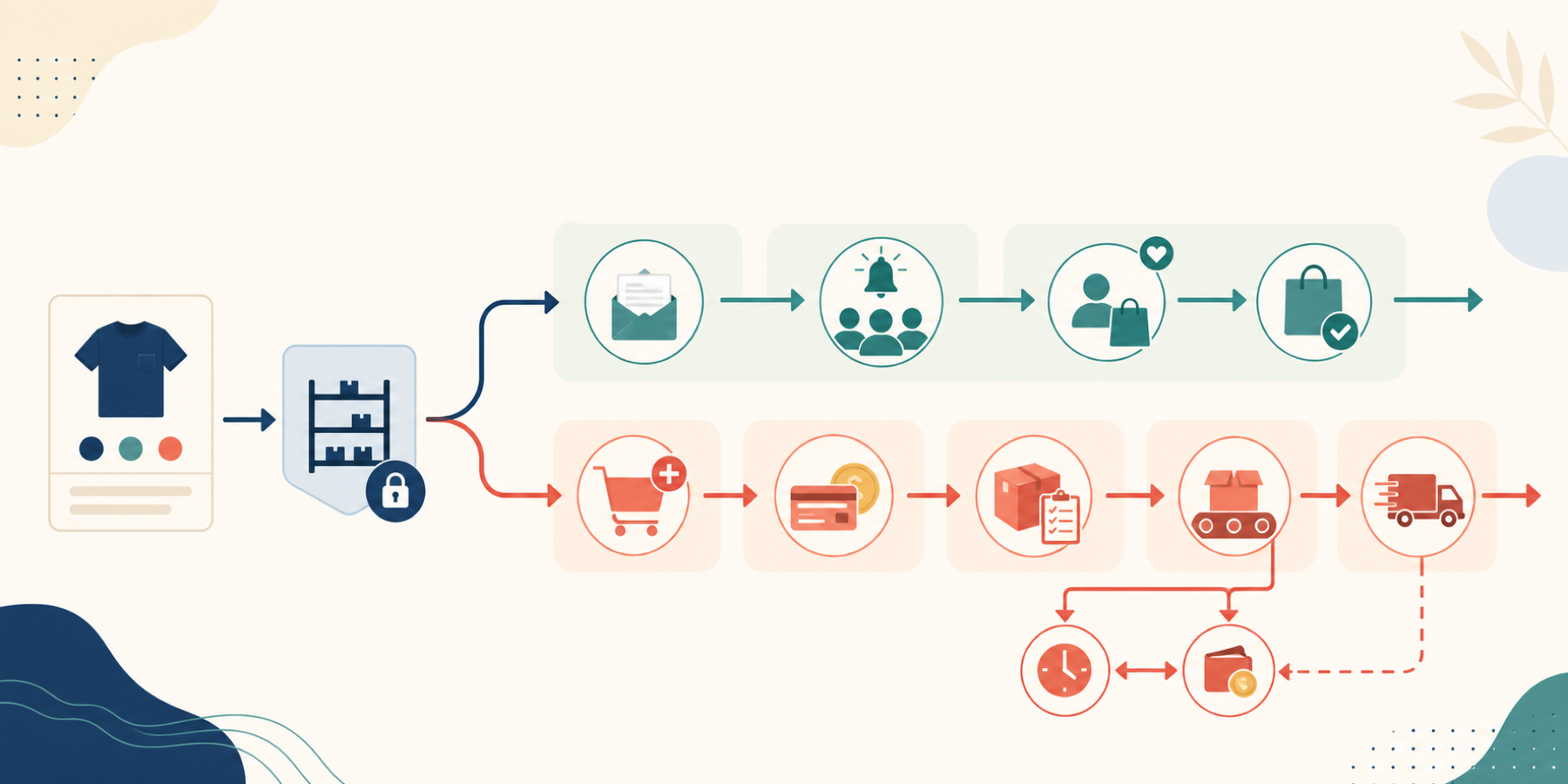

An out-of-stock product creates two different decisions. A merchant can record interest and notify the customer later, or accept an order now and promise fulfilment later. Many Shopify apps offer both buttons, but the operational consequences are not interchangeable.
A waitlist is a demand signal. A pre-order is an order, payment decision, inventory commitment, shipping representation, and customer-service obligation. Choose the promise before choosing the app.
Decide what the customer is being promised
Reader question: Is the store collecting intent or accepting an obligation?
A back-in-stock signup records a contact, variant, market, channel, consent state, and notification status.[6] It creates no order and takes no payment. Shopify documents several marketing-automation templates, but not a variant-specific restock alert, so verify the native gap before adding an app.[5]
A pre-order creates an order before the product is ready to ship. Shopify supports full, partial, or no payment at order time through pre-order apps.[1] The operation must cap or reserve quantity, handle failed balances, monitor promised dates, and give delayed customers a cancellation and refund path.
For US orders, the FTC says sellers need a reasonable basis for the stated shipping time. If no time is stated, the default is 30 days. A missed promise requires notice, a revised date or explanation, and a choice to accept the delay or cancel for a prompt refund.[11] This is operational guidance, not legal advice.
Shopify can continue selling after stock reaches zero, but that setting is only an oversell control.[4] Shopify's documented pre-order workflow requires an app that exposes the purchase option on the product page and checkout.[1][2]
Current Shopify restrictions matter: pre-orders are limited to Online Store and Custom Storefront; do not support Shop Pay, Apple Pay, Google Pay, several local payment methods, customized checkouts, Shop Promise, or Buy X get Y discounts; and cannot combine different purchase options on the same product.[2]
Choose the smallest operating model
Reader question: Which system matches the real uncertainty and obligation?
| Model | Use it when | Critical control | Main failure |
|---|---|---|---|
| Shopify oversell | Few known units, one firm date, full payment now | Manual cap and daily exception review | Ordinary order looks immediately available |
| Waitlist app | Timing or quantity is uncertain | Variant, market, consent, release quantity, send throttle | False alert or more recipients than units |
| Pre-order app | Allocation and ship window are defensible | Purchase terms, cap, reservation, payment, delay workflow | Oversell, failed balance, missed promise |
| Combined app | Products genuinely need both states | Separate rules, labels, owners, and reports | Two promises collapse into one funnel |
| Custom integration | ERP, B2B, allocation, or made-to-order logic exceeds apps | Product ownership, protected API access, monitoring | The merchant becomes the software vendor |
A seasonal product with a moving supplier date belongs on a waitlist. A limited drop with a confirmed inbound allocation may justify capped pre-orders. A made-to-order product constrained by production hours needs a capacity model, not an inventory-zero trigger.
Shopify purchase-option apps extend checkout, admin, storefront, and customer-account surfaces. They require protected capabilities that an admin-created custom app cannot use.[7] Build custom only when the operating requirement justifies owning security, data integrity, releases, and support.
Model the promise state, not only stock
Reader question: What should trigger a button, order, or alert?
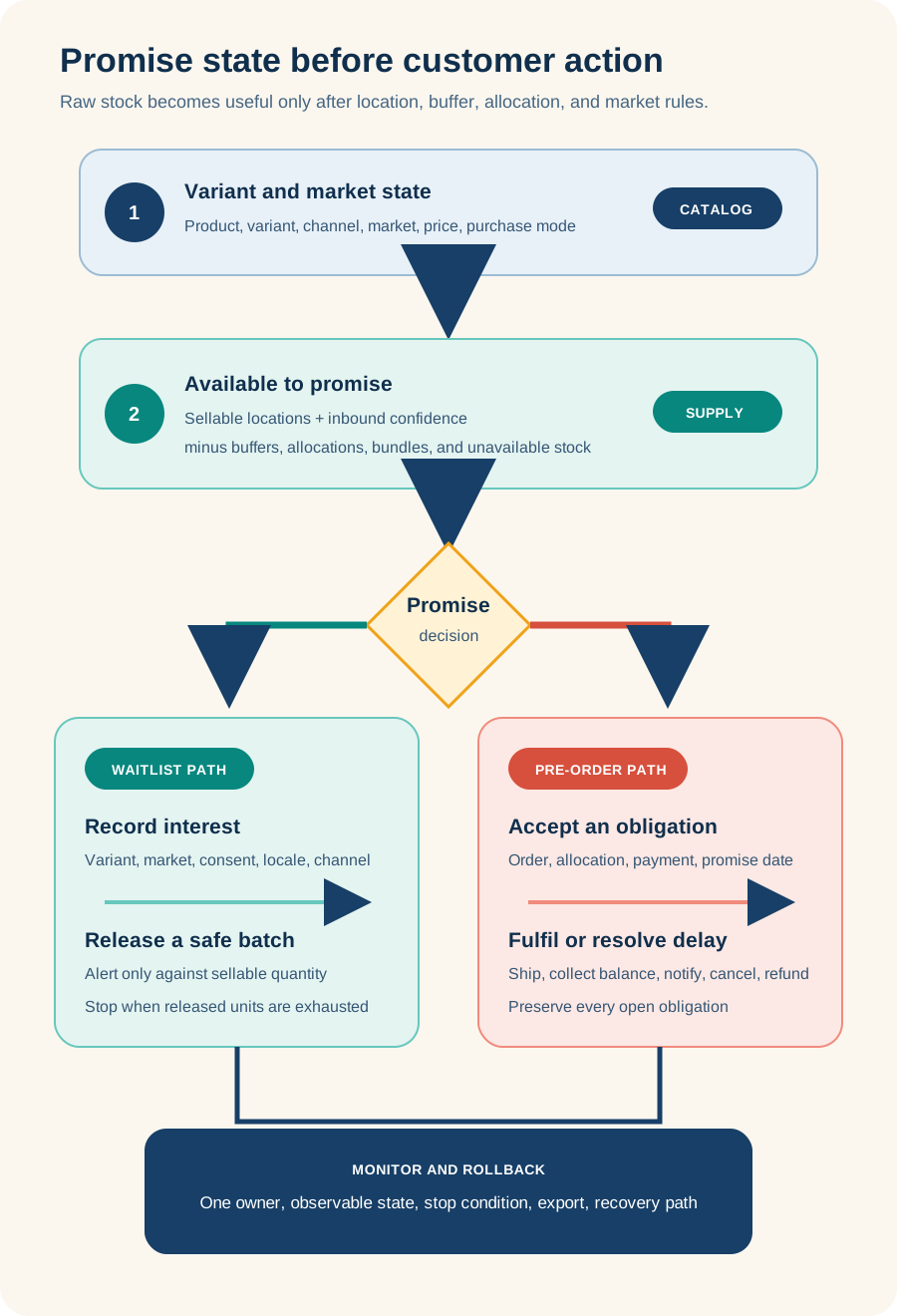
The useful trigger is available-to-promise quantity, not every unit reported as available. A returned unit may be quarantined. A transfer may reach a location that does not fulfil online orders. A bundle, wholesale allocation, damaged-stock hold, safety buffer, or ERP correction can make positive inventory unsafe to sell.
For a waitlist, calculate a release quantity before selecting the audience. If 20 units are safe and 600 customers are waiting, an all-at-once alert recreates the sold-out experience. Control batch size, market eligibility, suppression, cooldown, and stop conditions.
For a pre-order, define whether inventory is committed at sale or fulfilment. Shopify says some apps expose this choice.[3] Also define the cap, inbound allocation, current and revised ship dates, amount due now, amount due later, payment retries, fulfilment hold, cancellation, refund, and customer-message history.
Write the field and event contract
Reader question: What must the app export and reconcile?
A vendor demo passes only when the operator can locate each record, identify its command system, and test failure recovery.
| Record | Minimum fields | Failure test |
|---|---|---|
| Offer | Variant, market, mode, cap, promise date, rule version | Variant or market changes after launch |
| Sellable supply | Location, on hand, committed, unavailable, buffer, allocation, source time | Return, transfer, bundle, stale ERP update |
| Waitlist and alert | Contact, variant, consent, status, batch, suppression, send, purchase | Duplicate event, wrong market, sends exceed units |
| Pre-order and payment | Order line, selling plan, allocation, due amounts, attempt, refund, hold | Mixed cart, failed authentication, partial cancellation |
| Customer notice and exit | Promise version, revised date, response, export status, unresolved work | Notice fails or export omits open obligations |
Keep the funnels separate. Waitlist conversion is notification-to-purchase. Pre-order performance includes on-time shipment, cancellation, failed balance collection, refund time, support contacts, and ageing obligations.
Test compatibility, access, and cost
Reader question: What access and storefront change does the feature justify?
Test the exact production theme, not a product-page screenshot:
- product page, quick add, collection card, search result, recommendation, and cart drawer;
- variant change, sold-out transition, market, language, currency, and slow JavaScript;
- keyboard, screen reader, consent state, and app-disabled fallback;
- checkout, supported payments, mixed cart, subscription, bundle, POS, custom storefront, and Shop channel.
Review the live install screen. A combined app can require customer, product, order, inventory, analytics, theme, Markets, payment-term, purchase-option, translation, and selling-plan access.[8] App blocks and embeds can also place functionality on multiple theme surfaces.[14] Map every permission to an enabled feature, role, export, retention rule, and removal step.
Pricing was verified August 22, 2026 and can change. STOQ currently lists a free tier, then $10, $29, and $69 monthly plans with different pre-order and alert allowances; some tiers add order overages and SMS charges.[8][9] Stok lists free, $10, $20, and $49.99 monthly tiers with different message, pre-order, channel, and overage limits.[10]
Model peak volume, not the average month. Include delivered-message cost, lifecycle tools, discounts, payment fees, refunds, chargebacks, support, split shipping, failed balance collection, and parallel-app cost during cutover.
Run the twelve-scenario pilot
Reader question: Can the promise survive production exceptions before launch?
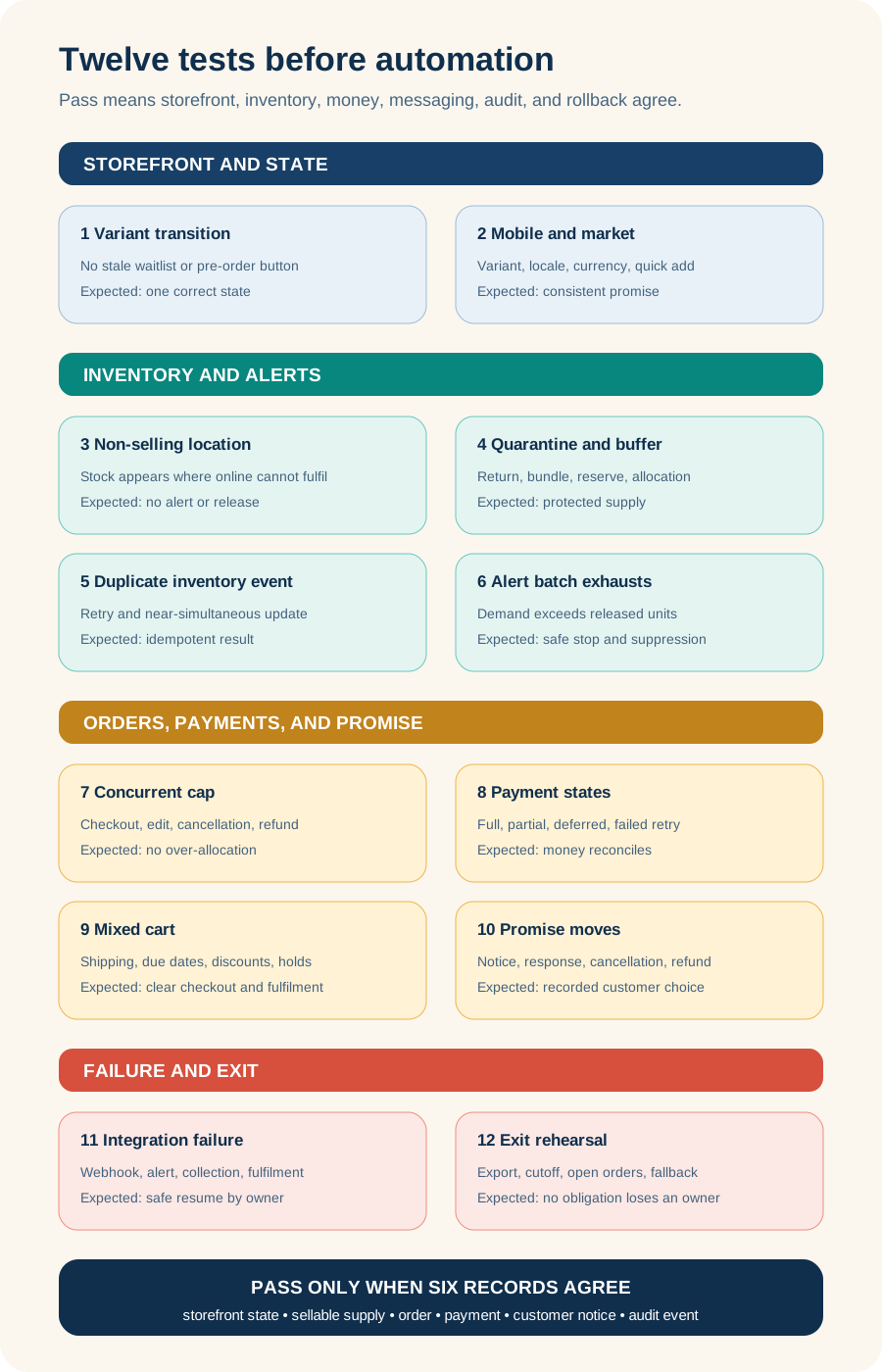
Use test products and controlled orders. Do not enable automatic balance collection or bulk alerts until these pass:
- Variant moves from in stock to waitlist or pre-order and back without a stale button.
- Stock at a non-selling location does not trigger the promise.
- A quarantined return stays unavailable.
- A bundle, buffer, or wholesale allocation reduces sellable units.
- Duplicate inventory events create one state change.
- Alert batches stop when released units are exhausted.
- Concurrent checkouts, edits, cancellations, and refunds respect the cap.
- Full, partial, deferred, failed, retried, and refunded payments reconcile.
- Mixed carts calculate shipping, due dates, discounts, holds, and copy correctly.
- A missed ship date creates a notice, customer choice, response, and refund record.
- Mobile, variants, quick add, market, translation, and supported payments show the correct state.
- Export, disable, finish open work, restore the theme, and verify billing.
If a scenario passes only after a vendor manually edits production data, record that as an ongoing support dependency.
Monitor the obligation
Reader question: Who notices when the promise drifts?
Assign merchandising to eligibility and promises; supply planning to allocation and available-to-promise logic; operations to rules and exceptions; finance to balances and refunds; fulfilment to release and shipment; lifecycle marketing to consent and alert batching; support to delays; engineering to theme, events, monitoring, exports, and rollback.
Monitor two queues. The waitlist queue needs ageing entries, duplicate signups, sends without sellable units, delivery failures, batch progress, and purchase by variant and market. The pre-order queue needs orders near the promise date, delayed orders without a recorded response, failed balances, holds, refunds, and negative or over-cap allocation.
Pause alerts when inventory reconciliation is stale. Close pre-orders when allocation, inbound confidence, or on-time probability crosses the agreed stop condition. The storefront promise should be rolled back before it becomes the exception queue.
Know when neither path is safe
Reader question: Which conditions should stop the project?
Do not launch a waitlist when variant identity changes during imports, sellable locations are unreliable, consent cannot be classified, duplicate sends cannot be prevented, or nobody can explain the release quantity. Do not launch pre-orders when supply has no defensible allocation or date, product specifications can still change, refunds are not operationally owned, or fulfilment cannot separate pre-order and in-stock lines.
Also hold when the app fails the active theme, payment, discount, subscription, bundle, POS, custom storefront, market, language, ERP, OMS, WMS, or lifecycle requirement; when the required feature exists only on an unapproved tier; when permissions exceed the approved data boundary; or when the export omits open orders, consent state, or event history. A scheduled in-stock release or clearly labelled coming-soon page may be safer than either app path.
Plan rollback and exit before launch
Reader question: What must remain operable when the app is removed?
Shopify says app workflows stop after uninstall, theme code can remain, external billing can continue, and app data might be unrecoverable.[12] Shopify also says app-created pre-order data, excluding payment information, is deleted after 48 hours unless the app provides recovery.[1][13]
Require a representative export before installation. Preserve contact, consent, variant, market, notification, suppression, order line, selling plan, allocation, payment terms, promise dates, notices, cancellation, refund, and audit history.
Use this cutover order:
- Stop new offers in the old app.
- Finish open pre-orders under the system that created them.
- Export waitlist state and consent before redirecting signups.
- Disable blocks and embeds in a theme preview.
- Reconcile orders, alerts, payments, billing, integrations, and theme residue.
- Uninstall only after an owner approves the export and 48-hour risk.
Take one safe action this week
Reader question: What can the team do without installing an app?
Choose five recently out-of-stock variants. Record market, selling location, on-hand quantity, unavailable quantity, buffer, inbound quantity and confidence, available-to-promise quantity, customer promise, owner, stop condition, and rollback.
Then choose waitlist, pre-order, scheduled in-stock release, or neither. If the team cannot fill the row from systems it trusts, the immediate task is inventory and ownership repair, not app selection.
No commercial relationship, sponsorship, affiliate arrangement, or endorsement involving Shopify, STOQ, Stok, or another pre-order or waitlist provider is known or implied.
Sources
- Shopify Help Center: Pre-orders, accessed August 22, 2026
- Shopify Help Center: Setting up pre-orders, accessed August 22, 2026
- Shopify Help Center: Managing pre-orders, accessed August 22, 2026
- Shopify Help Center: Selling out-of-stock products, accessed August 22, 2026
- Shopify Help Center: Shopify Messaging automations, accessed August 22, 2026
- Shopify Help Center: Collecting customer contact information, accessed August 22, 2026
- Shopify developer documentation: Custom purchase options, accessed August 22, 2026
- Shopify App Store: Preorder, Back In Stock, STOQ, accessed August 22, 2026
- STOQ pricing, accessed August 22, 2026
- Shopify App Store: Stok: Back in Stock Preorders, accessed August 22, 2026
- Federal Trade Commission: Mail, Internet, or Telephone Order Merchandise Rule guide, accessed August 22, 2026
- Shopify Help Center: Uninstalling apps, accessed August 22, 2026
- Shopify developer documentation: SellingPlanCategory, accessed August 22, 2026
- Shopify Help Center: Extend your theme with apps, accessed August 22, 2026