

Established Shopify stores rarely have a shortage of possible improvements. The harder problem is deciding which changes are ready to reach customers, who can approve them, and what the team will do if the live result differs from the preview.
A new section, app update, tracking change, discount rule, checkout configuration, or theme fix can touch more of the customer journey than its ticket suggests. Treating every item as an isolated task makes releases feel unpredictable. A release-readiness practice connects the change to its dependencies, evidence, owner, timing, and recovery path before anyone presses Publish.
This article offers a practical framework for US ecommerce teams running an active Shopify roadmap. It is not a promise that releases will never fail. It is a way to make risk visible, proportionate, and owned.
Release risk is wider than theme code
The visible storefront is only one part of a Shopify release. A product-template change can affect merchandising, variant selection, subscriptions, analytics, and accessibility. A new app can introduce storefront assets, permissions, recurring cost, data flows, and a new support dependency. A checkout setting can change taxes, payment behavior, customer accounts, or order handling.
That is why ticket size is a weak proxy for risk. A two-line fix to a shared Liquid snippet may reach every product page. A large new landing page may be relatively contained if it has no navigation link, no checkout dependency, and a simple removal path.
Start by asking four questions:
- Which customer journeys can this change alter?
- Which operational teams or systems depend on the affected data?
- How quickly would the business notice a bad result?
- How quickly could the team stop or reverse it?
The answers determine the controls. They also reveal when a request needs more discovery before development begins.
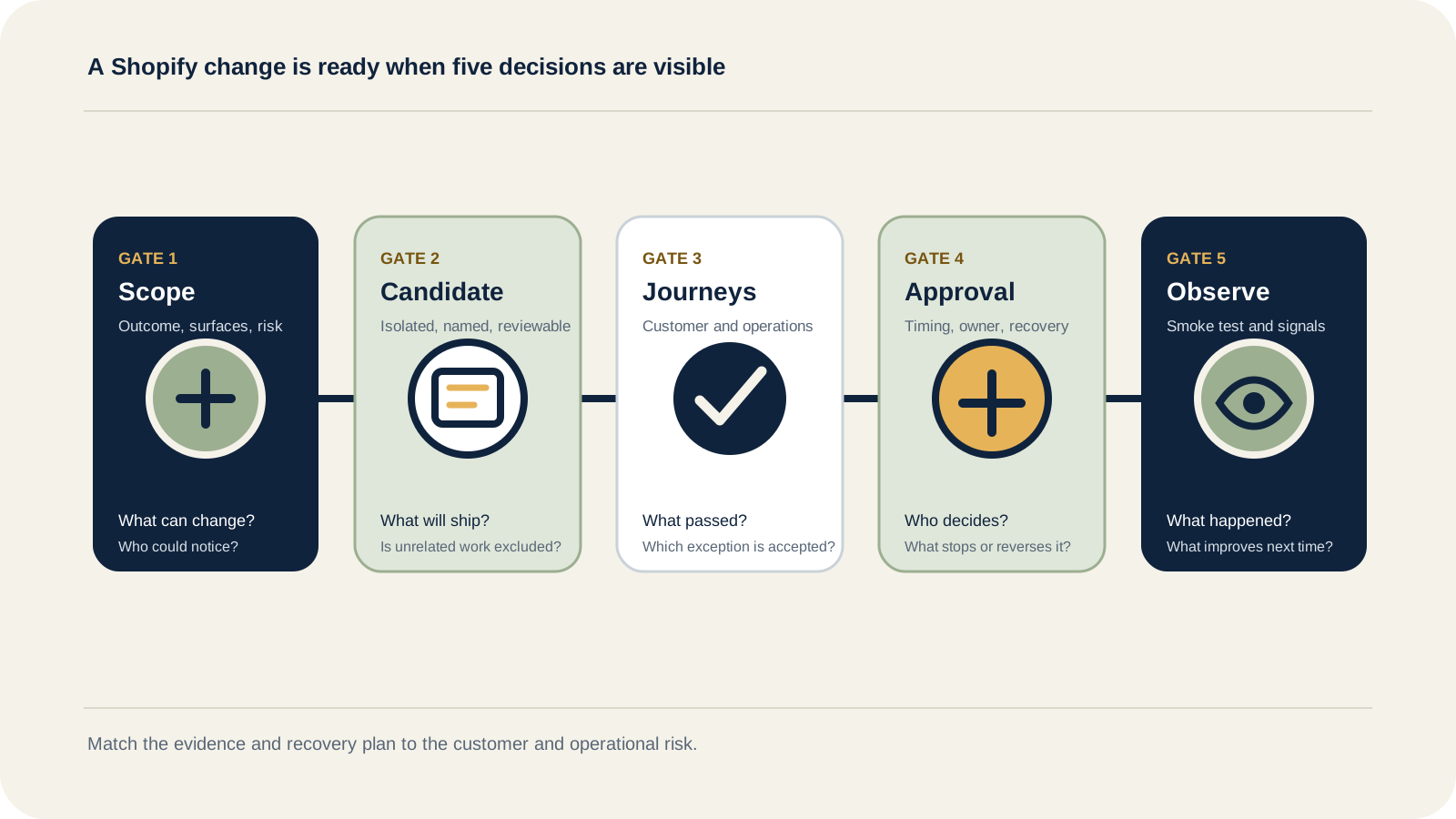
Use five gates before a Shopify change goes live
The five gates below are an Inficial decision framework, not a Shopify product feature. The framework uses Shopify's available controls, including draft themes, previews, permissions, activity records, test orders, and versioned development workflows, then adds the business ownership needed around them.
Gate 1: define the change and its risk
Write a short release statement that describes the intended customer or operational outcome. "Update product template" is too vague. "Make size guidance visible before variant selection on US apparel products without changing subscription or add-to-cart behavior" gives the team something testable.
Then map the affected surfaces. Typical surfaces include:
- Theme templates, sections, app blocks, and theme settings
- Products, collections, markets, and content
- Cart, discounts, customer accounts, and checkout
- Search, subscriptions, reviews, loyalty, and lifecycle messaging
- Analytics, consent, pixels, feeds, ERP, 3PL, and customer support
Classify the change as routine, coordinated, or high risk. The label is less important than the agreed response. A routine content correction might need a preview and one reviewer. A checkout, pricing, subscription, integration, or sitewide theme release deserves broader journey testing, a named decision owner, and an explicit recovery plan.
Gate 2: create a controlled release candidate
Avoid building directly on the published theme when a draft or version-controlled workflow can isolate the change. Shopify supports multiple themes in the theme library, lets teams preview unpublished themes, and keeps the previous theme available after a different one is published.
For stores with active development, connect the theme workflow to version control. Shopify's GitHub integration can synchronize connected branches with themes and record theme editor or code editor changes as commits. Shopify also documents conflict behavior that teams need to understand, especially when admin edits and repository changes happen at the same time.
A release candidate should have a clear identifier, the intended set of changes, and no unrelated work. If five tickets enter one theme without a shared reason, the team may be unable to tell which change caused a regression or which part can be safely removed.
Gate 3: test complete customer and operational journeys
A page that looks correct is not necessarily ready. Test the journey that the change was meant to improve and the adjacent journeys it could disturb.
For a product-page release, that may mean:
- View representative products with different option, inventory, selling-plan, and media states.
- Test mobile and desktop behavior at realistic widths.
- Add variants to cart, change quantities, apply relevant discounts, and continue to checkout.
- Check market, language, currency, tax, and shipping cases that matter to the store.
- Confirm analytics, consent, feeds, subscriptions, fulfillment, and notifications where they are in scope.
- Review loading, error, empty, and unavailable states, not only the clean path.
Shopify recommends test orders when setting up a store or changing payment settings because they help verify checkout, order processing, inventory, shipping, email notifications, and taxes. For an established store, the test plan should match the actual release. A visual copy change does not need the same evidence as a new payment method, but a checkout-affecting release should not stop at a screenshot.
Record the result in plain language. The reviewer needs to know what was tested, with which product or market, what passed, what remains open, and whether an exception has been accepted.
Gate 4: approve timing, ownership, and recovery
Approval is a decision, not a comment that says "looks good." Name the person who accepts the customer and business outcome. For a high-risk release, that person should be different from the person who built it.
Before launch, confirm:
- The release candidate and approved scope
- The launch window and any campaign, merchandising, or operations conflicts
- The person publishing the change
- The person monitoring customer and operational signals
- The threshold for intervention
- The recovery action and the person authorized to take it
Recovery should match the change. It might mean republishing the previous theme, disabling an app block, reverting a commit, restoring a setting, pausing a campaign, or routing a broken integration into a controlled manual process. "We can roll back" is not a plan until the team knows which action, which artifact, and which owner.
Gate 5: observe the live result
Preview evidence reduces uncertainty, but it cannot reproduce every live condition. After launch, run a short smoke test on the live storefront and watch the signals most closely connected to the change.
Useful signals may include checkout errors, payment failures, order creation, inventory updates, support contacts, browser errors, site speed, analytics events, search behavior, or a specific funnel step. Choose them before launch. Otherwise the team may open a broad dashboard and search for any movement that appears meaningful.
Shopify's store activity log can help identify recent actions taken by users, apps, or channels, but Shopify notes that it is view-only, limited to 250 results, and does not always identify an individual actor for theme activity. Treat it as one diagnostic input, not a complete release record.
Close the release with a brief note: outcome, incidents, accepted follow-up, and anything the next release should do differently.
Scale the controls to the change
Release governance should remove ambiguity without turning every edit into a ceremony.
| Change level | Typical examples | Minimum evidence | Recovery expectation |
|---|---|---|---|
| Routine | Copy correction, contained image change, low-risk content update | Preview, focused review, live check | Restore prior content or setting |
| Coordinated | New section, navigation change, app-block update, tracking change | Representative journeys, named approver, launch window, monitoring | Known theme, configuration, or code reversal |
| High risk | Checkout, payments, discounts, subscriptions, pricing, customer accounts, major app or integration change | Cross-functional journey testing, decision record, owner, intervention threshold | Tested recovery action and active post-launch observation |
The level can change during discovery. A "simple banner" becomes coordinated if its visibility depends on market, customer state, discount eligibility, and analytics. A sizeable content build can remain routine if it is isolated and easy to remove.
Make access part of release governance
The release process is only credible if access supports it. Shopify roles can combine granular permissions, while store permissions distinguish actions such as managing themes, editing theme code, changing checkout settings, installing apps, approving app charges, and managing payments.
Review access around real responsibilities:
- Who can publish a theme?
- Who can edit code through the admin or CLI?
- Who can install or remove apps and approve charges?
- Who can change checkout, payment, tax, shipping, domain, or pixel settings?
- Which collaborator accounts are still needed?
Do not give every contributor every release capability simply to avoid a permissions conversation. Equally, do not design a process that depends on an unavailable store owner at the final minute. The right people need the right access before the launch window.
For custom apps and integrations, add API maintenance to the roadmap. Shopify releases stable API versions quarterly and supports each stable version for at least 12 months. Requests to inaccessible versions can fall forward to the oldest supported stable version, which is a warning signal, not a maintenance strategy. Record the API version, owner, dependency, and next review date for every business-critical custom integration.
Turn maintenance into a visible operating rhythm
Long-term support becomes more valuable when releases are part of one ranked roadmap rather than a queue of disconnected tickets.
A practical rhythm might include:
- Weekly triage of defects, requests, dependencies, and platform changes.
- A planned release window for routine and coordinated work.
- A separate path for genuinely urgent trading incidents.
- A monthly review of app changes, access, technical debt, and upcoming API or platform work.
- A short release record that improves estimates, tests, and recovery plans over time.
This structure does not prevent urgent work. It makes the cost of urgency visible. If an unplanned item displaces a tested release, the decision owner can see what moves and why.
Use this release-readiness checklist
- ✓The intended customer or operational outcome is clear.
- ✓The affected theme, app, checkout, data, analytics, and integration surfaces are mapped.
- ✓The change has an agreed risk level.
- ✓The release candidate contains no unrelated unfinished work.
- ✓Representative customer and operational journeys have passed.
- ✓Known exceptions have an owner and explicit decision.
- ✓The publisher, approver, monitor, and recovery owner are named.
- ✓The launch window avoids known campaign or operations conflicts.
- ✓The recovery action and intervention threshold are documented.
- ✓The required permissions are available and proportionate.
- ✓Live smoke tests and monitoring signals are defined.
- ✓The result and follow-up will be recorded after launch.
Inficial can help turn a growing Shopify backlog into a ranked roadmap, a dependable release rhythm, and clearer ownership across storefront, apps, analytics, integrations, and platform care.
Sources
- Shopify Help Center: Managing themes
- Shopify Help Center: Adding, previewing, and buying themes
- Shopify.dev: Shopify GitHub integration for themes
- Shopify Help Center: Placing a test order
- Shopify Help Center: Activity logs in the Shopify admin
- Shopify Help Center: Store permissions
- Shopify.dev: About Shopify API versioning

