
A returns portal can look finished while the operation behind it is wrong. The customer sees an approved return, the carrier has a label, the warehouse has received a parcel, Shopify shows inventory available, and finance has issued a refund. Those facts can occur in the wrong order, in different systems, or more than once.
That is the consequential Shopify returns-app decision. Do not buy a portal first. Decide which system controls eligibility, money, inventory, exchange orders, and customer status at each step, then prove that every handoff reconciles.
Start with the control boundary
Choose one high-value failure mode before choosing a vendor. Examples include selling an uninspected return as available stock, refunding twice, losing exchange inventory, routing a hazmat item to the wrong facility, deducting a fee that the policy did not disclose, or sending a customer contradictory status emails.
Then define the control boundary. For each action, name the system allowed to initiate it and the system that records the result. A return can be visible in two systems without being safely operable in both.
Loop's current Shopify Returns API documentation illustrates this distinction. Loop returns can appear and change status in Shopify, but closing a return in Shopify does not issue the outcome, restock the item, or process an exchange. Loop tells merchants to keep advanced processing in Loop.[11] That is a product-specific documented fact. The broader recommendation to assign one command system per consequential action is Inficial analysis based on that boundary.
Use Shopify native returns as the baseline
Shopify can manage returns and exchanges from the order, activate self-serve return requests, apply return windows and fees, define final-sale products or collections, record inspection, restock inventory, issue refunds to the original payment method or store credit, and add exchange items.[1][2][3][4]
The native baseline has important edges:
- A return can be created only for fulfilled items that have not already been refunded.
- Exchange inventory is not reserved until the return is processed.
- Custom items cannot be exchange items, and orders with duties cannot receive exchange items in the documented native flow.
- Return fees display in the workflow but are not automatically deducted from a refund.
- Rule changes apply to future orders, not previous orders.
- Return rules apply to B2B orders too, and Shopify says separate rules cannot currently be assigned by order type.[2][3]
For a US store with one warehouse, modest volume, straightforward refunds, and a team comfortable working from Shopify orders, native returns may be enough. The safe decision is not "native forever." It is "native until a measured operating requirement justifies another control plane."
Choose the operating model before the app
| Operating model | Best fit | Main control burden | Switching cost |
|---|---|---|---|
| Shopify native | One or few locations, standard rules, manageable volume | Staff consistency, label process, inspection, manual exceptions | Low when all cases remain in Shopify |
| Lightweight portal | Branded self-service, simple labels, basic rules | Portal configuration, notifications, plan limits | Medium because open requests and portal links move |
| Returns platform | Several warehouses, exchanges, routing, carriers, POS, automation | Split authority, integrations, finance and inventory reconciliation | High because open RMAs, labels, credits, events, and workflows move |
| Custom orchestration | Distinct routing, ERP, WMS, or marketplace requirements | Product ownership, APIs, security, monitoring, support | High, but the data contract can be designed for portability |
Buy the smallest model that can handle the production exception, not the clean demo. A footwear brand may justify a platform because variant exchanges and minimum inventory need automated control. A low-volume made-to-order store may be safer with manual approval because condition review determines every outcome.
Map the return as a state flow
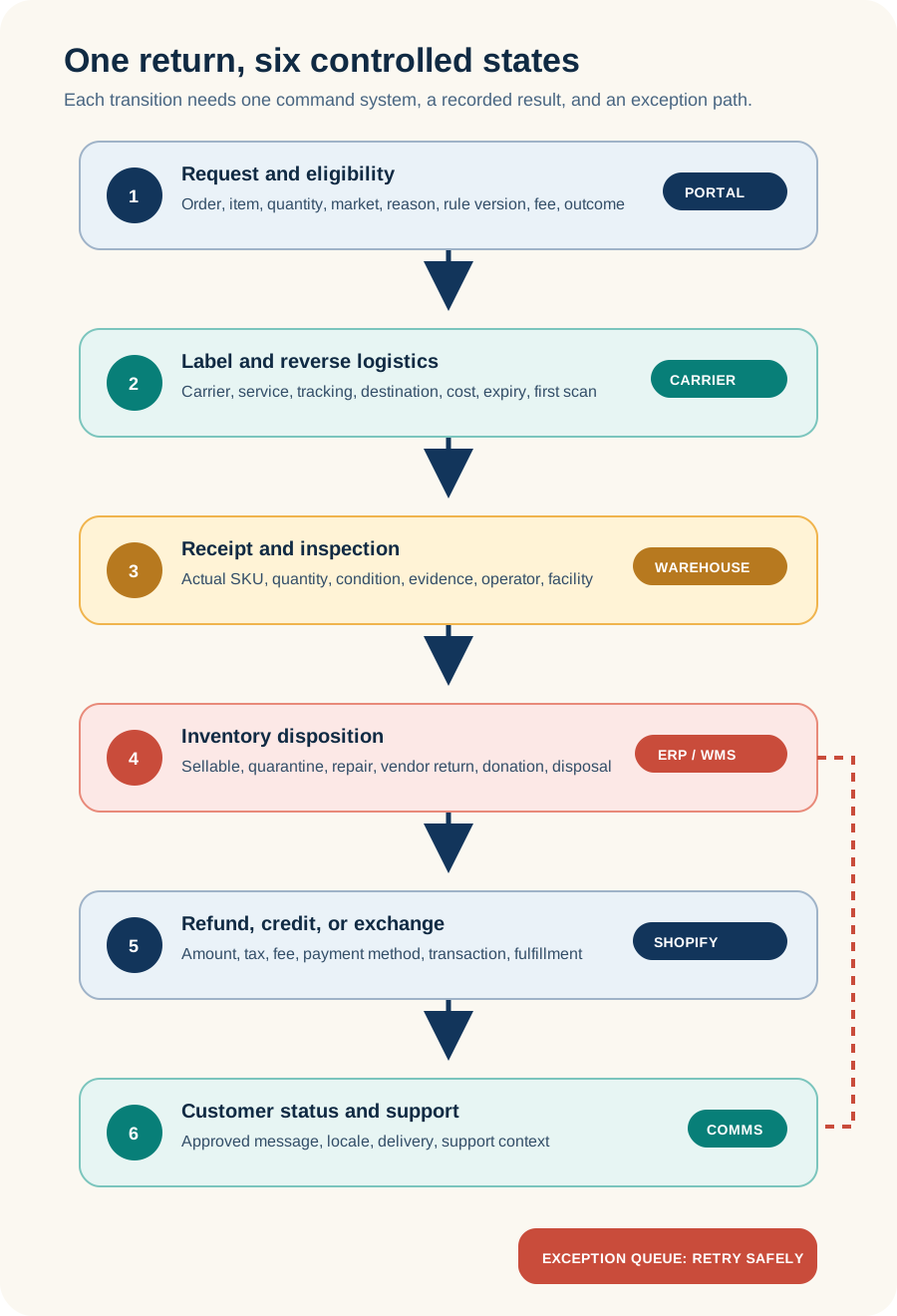
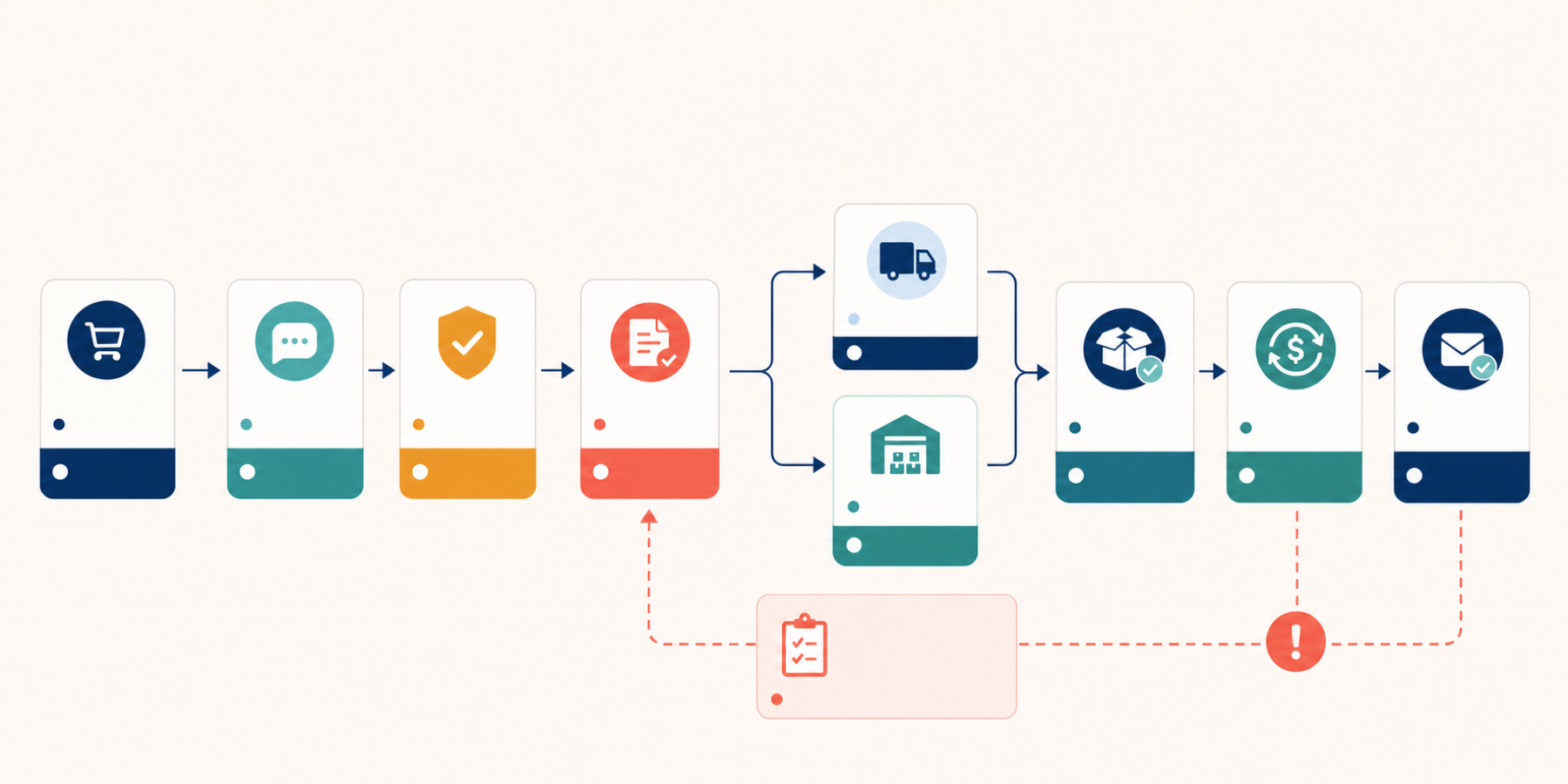
The portal collects identity, order, item, reason, and requested outcome. Eligibility rules decide whether the request is allowed. A carrier or drop-off partner moves the parcel. The warehouse inspects actual quantity and condition. Inventory then moves to sellable, quarantine, repair, vendor return, donation, or disposal. Finance issues a refund, store credit, or balance collection. An exchange creates or edits fulfillment demand. Support and lifecycle systems communicate the result.
These are not one transaction. A label can exist without a shipped parcel. A parcel can arrive with fewer items than requested. An inspection can reject restocking while the refund remains valid. An exchange can be due before the original item is received. An app should expose those intermediate states rather than compressing them into "returned."
Write the return event contract
Use this working field map with ecommerce operations, warehouse, finance, support, and the technical owner.
| Event | Command system | Required record | Failure test | Owner |
|---|---|---|---|---|
| Request submitted | Portal or Shopify | Order ID, line ID, quantity, reason, market, requested outcome, timestamp | Duplicate request, guest lookup, old order | Support operations |
| Eligibility decided | Rules engine | Rule version, decision, fee, exception reason | Final sale, bundle, discount, B2B, market mismatch | Ecommerce operations |
| Label created | App or carrier | Carrier, service, cost, tracking, destination, expiry | Unsupported address, hazmat, carrier outage | Logistics |
| Parcel received | WMS or returns app | RMA, SKU, quantity, facility, received time | Partial parcel, unknown item, duplicate scan | Warehouse |
| Inspection completed | WMS or returns app | Condition, disposition, evidence, operator | Damaged, used, missing component | Warehouse lead |
| Inventory changed | Shopify, ERP, or WMS | SKU, quantity, location, inventory state, source event | Wrong location, duplicate restock, quarantine sold | Inventory owner |
| Refund or credit issued | Shopify or payment system | Amount, tax, fee, method, transaction ID | Partial refund, mixed tender, failed payment, duplicate action | Finance |
| Exchange released | Shopify or OMS | New line or order, price delta, tax, reservation, fulfillment | Out of stock, duties, discount allocation | Ecommerce operations |
| Customer notified | Shopify, app, help desk, or ESP | Template, locale, trigger, delivery status | Contradictory or premature message | Support and lifecycle |
Add two technical rules. First, every consequential event needs an immutable source ID so retries do not refund or restock twice. Second, every automation needs an explicit exception state. "Webhook delivered" is not evidence that inventory, money, or customer communication completed.
Price the production workflow
Pricing was verified on August 21, 2026 from official Shopify App Store listings. These examples show different cost shapes, not a ranking or endorsement.
| App | Current listed plans | Decision question |
|---|---|---|
| AfterShip Returns | Return Care free with shopper-funded returns and revenue share; Essentials $19 monthly with 20 returns and $0.50 per extra return; Premium $119 monthly with 100 returns and $1 per extra return | Does the required carrier, automation, warehouse, warranty, fraud, POS, exchange, and integration workflow exist on the priced tier? |
| Loop Returns | Checkout+ free; Essential $155 monthly; Advanced $340 monthly | Which plan includes the production routing, exchanges, carrier shopping, fraud controls, and destinations, and are there usage or service charges beyond the base price? |
The base subscription is rarely the full returns cost. Model label cost, carrier adjustments, return volume, peak volume, shopper-funded or merchant-funded shipping, per-return charges, implementation, integrations, warehouse handling, support training, finance reconciliation, and the cost of keeping the old platform active during cutover.
AfterShip's current listing says recurring and usage-based charges are billed every 30 days.[9] Loop's listing also notes recurring and usage-based charges, while its migration guidance recommends leaving a previous returns system active for 30 to 60 days where possible.[8][13] Reverify prices and contract terms immediately before purchase.
Review permissions, data, and storefront impact
A returns platform may need customer contact data, all relevant order history, products, inventory, locations, fulfillments, returns, discounts, gift cards or store credit, Markets settings, analytics, and theme or customer-account surfaces. Loop's current App Store disclosure includes sensitive customer and device data plus edit access across customers, products, orders, discounts, gift cards, store credit, analytics, theme, locations, Markets, and price rules.[8]
That scope is not evidence of misuse. It is a review checklist. Map each permission to an enabled feature. Decline or postpone features whose data need is not justified. Document retention, deletion, sub-processors, role access, audit history, and customer-data-request handling.
Storefront impact is usually smaller than a page builder but still real. Test the return link, customer-account extension, embedded portal, support widget, analytics, and consent behavior on mobile, keyboard, slow network, every active language, and every market. Confirm which components survive a theme change and what must be removed during uninstall.
Shopify warns that some app code is not removed automatically, app-dependent workflows stop, and app-held data might not be recoverable after uninstall.[7] Shopify also says uninstalling triggers a customer-data erasure request to the developer after 48 hours, but the merchant should verify deletion with the developer.[10]
Run a ten-scenario pilot
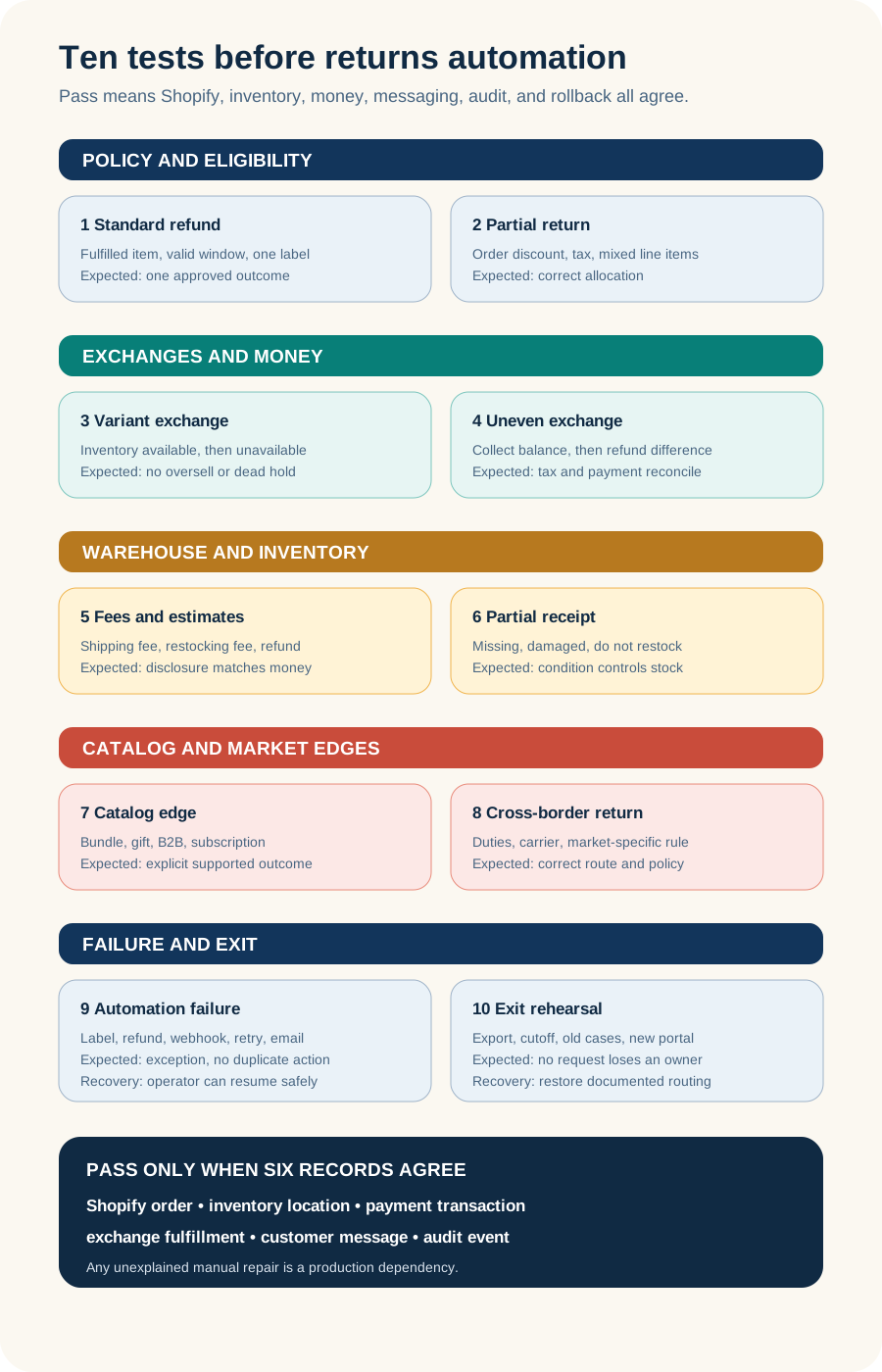
Run the pilot in a preview or tightly limited cohort. Use test orders or controlled internal orders. Do not turn on automatic refunds or restocking until their exception paths pass.
- Standard refund with one fulfilled item and one successful label.
- Partial return from a multi-item order with an order-level discount and tax.
- Variant exchange when inventory is available, then when it becomes unavailable before processing.
- Higher-value exchange that requires collecting a balance, and lower-value exchange that requires a refund.
- Return fee and restocking fee, including manual deduction and customer-facing estimate.
- Partial warehouse receipt, missing item, damaged item, and do-not-restock disposition.
- Bundle, final-sale item, gift, B2B order, or subscription item relevant to the catalog.
- International return with duties, unsupported carrier service, and market-specific policy.
- Carrier label failure, refund failure, duplicate webhook, delayed event, and notification retry.
- Export open and completed cases, disable the portal, route new requests elsewhere, and complete old cases.
Loop's own test guidance calls out labels, gift-card-based store credit, and Stripe flows for some exchange or fee use cases.[15] AfterShip documents that its platform can create a Shopify exchange order and can restock inventory, while its exchange guidance also describes different accounting behavior depending on whether the integration adds items to the original order or creates separate value instruments.[5][6] Treat those as vendor-specific mechanics to test, not assumptions for the category.
Set pass criteria before the demo. Every scenario must reconcile order status, return status, inventory location and state, payment transaction, exchange fulfillment, return fee, tax, notification, event timestamp, and operator. A pilot that needs unexplained manual repair has found a production dependency.
Assign owners and monitor exceptions
- Ecommerce operations owns policy versions, eligibility, exchange rules, fees, plan configuration, and change control.
- Logistics owns carriers, labels, destinations, routing, cross-border restrictions, and delivery exceptions.
- Warehouse operations owns receipt, inspection, disposition, evidence, and inventory-state accuracy.
- Finance owns refund authority, tax and fee treatment, store credit, mixed tender, reconciliation, and loss limits.
- Support owns customer exceptions, manual approvals, status communication, fraud escalation, and service recovery.
- Engineering or the integration owner owns authentication, webhooks, retries, idempotency, monitoring, theme and account surfaces, and rollback.
- Privacy or legal owns notices, contracts, retention, deletion, and market-specific consumer requirements.
Review an exception queue daily during launch and at least weekly after stabilization: label failures, aging unshipped returns, received-but-uninspected parcels, inspected-but-unresolved returns, refund failures, negative balances, duplicate inventory changes, unfulfilled exchanges, contradictory notifications, and cases with different status in Shopify and the app.
Track cycle times between states, not only total return rate. Request-to-label, label-to-first-scan, delivery-to-inspection, inspection-to-refund, and exchange-release-to-fulfillment show where the workflow actually stalls.
Know when not to add an app
Hold the app decision when native Shopify handles the requirement, the return policy is still changing weekly, SKU and location data are unreliable, the warehouse cannot record disposition, finance cannot reconcile partial outcomes, or no one owns the exception queue.
Also hold when the app cannot represent bundles, duties, mixed tender, gift returns, B2B, POS, subscriptions, several markets, or the required warehouse states; when the necessary feature exists only on an unapproved tier; when the team cannot justify the requested customer and order data; or when a sample export omits open-case events and transaction identifiers.
For merchants selling into Europe, policy and interface requirements need market-specific legal review. Shopify's current guidance says its market-specific return rules are in early access and points merchants to the electronic withdrawal requirements applying from June 19, 2026.[3][16] A global default copied from a US workflow is not a compliance plan.
Plan the exit as an open-case migration
Do not uninstall an active returns app and then discover what it owned. Export the return master, item-level events, labels, tracking, warehouse destination, inspection result, disposition, refund or credit transaction, exchange order, customer messages, operator actions, rule version, and exception status.
AfterShip documents CSV exports at SKU level, including RMA state, outcome, customer and order identifiers, shipment details, financial fields, restocked quantity, timestamps, and exceptions, but its standard all-returns export covers the last 365 days.[14] Loop documents exporting analytics and reports, while its migration guidance recommends exporting historical data and running the prior system for 30 to 60 days where possible.[12][13]
Use a dated cutover. New orders go to the new workflow after the cutoff. Old open returns stay in the old system until closed unless the vendor proves safe open-case import. Keep the old portal route clear for eligible pre-cutoff orders, preserve customer communication, reconcile both systems, remove theme and account surfaces in a preview first, cancel external billing, and verify deletion obligations.
Take one safe action this week
Choose one recent partial return. Draw its actual path from customer request to refund, including the order ID, line item, rule applied, label, carrier scan, warehouse receipt, inspection, inventory location, refund transaction, and customer messages. Mark every handoff that lacks one owner, one timestamp, or one source ID.
If the path cannot be reconstructed from current records, that is the first requirement for any returns app. Do not install one yet.
Inficial helps Shopify teams design app and integration workflows that connect storefront experience with orders, inventory, fulfillment, finance, support, and safe operational ownership.
Sources
- Shopify Help Center: Returns and exchanges, accessed August 21, 2026
- Shopify Help Center: Creating and processing returns and exchanges, accessed August 21, 2026
- Shopify Help Center: Setting up return and cancellation rules, accessed August 21, 2026
- Shopify Help Center: Refunding orders, accessed August 21, 2026
- AfterShip Help Center: Manage returns in AfterShip Returns, accessed August 21, 2026
- AfterShip Help Center: Understanding returns and exchanges in Shopify, accessed August 21, 2026
- Shopify Help Center: Uninstalling apps, accessed August 21, 2026
- Loop Returns & Exchanges, Shopify App Store, accessed August 21, 2026
- AfterShip Returns & Exchanges, Shopify App Store, accessed August 21, 2026
- Shopify Help Center: Finding and choosing apps, accessed August 21, 2026
- Loop Help Center: Shopify Returns API, accessed August 21, 2026
- Loop Help Center: Analytics 2.0 exports, alerts and filters, accessed August 21, 2026
- Loop Help Center: Launching Loop and migrating from a previous returns process, accessed August 21, 2026
- AfterShip Help Center: Guide to export returns data, accessed August 21, 2026
- Loop Help Center: Testing your Loop instance, accessed August 21, 2026
- Directive (EU) 2023/2673, EUR-Lex, accessed August 21, 2026