
Connecting Shopify and Klaviyo takes minutes. Building a reliable customer-data and lifecycle-messaging system takes more thought.
The integration can connect customer profiles, products, browsing behavior, carts, checkouts, orders, consent, and marketing activity. That creates useful options for segmentation and automation. It also creates several ways to send the wrong message, duplicate profiles, misread consent, or pay for contacts the team does not intend to email.
The goal is not to switch on every possible sync. It is to create the smallest reliable connection that supports the messages your store is ready to operate.
The practical decision
Before installation, answer five questions.
- Which system owns each customer field and consent status?
- Which Shopify events are needed for the first lifecycle messages?
- How will the team test each event and exclusion rule?
- Who owns deliverability, flow content, integration health, and billing?
- How will the store export data and remove the connection later?
Klaviyo can be a strong fit when a store needs event-driven email or mobile messaging, useful segmentation, and the operating capacity to maintain it. It is not a substitute for consent policy, clean data, message strategy, or regular QA.
Check Shopify's native tools first
Shopify Messaging can create email and SMS campaigns, send to Shopify customer segments, and run native templates for welcome, abandoned browse, abandoned cart, abandoned checkout, post-purchase, win-back, birthday, and VIP journeys.
For email, Shopify currently includes 10,000 sends per calendar month on Basic, Grow, Advanced, and Plus plans. Additional sends begin at $1 USD per 1,000 up to 300,000, with lower rates at larger volumes. Abandoned-checkout automation emails do not count toward the monthly limit.
That native model may be enough when the team needs standard journeys, wants to work inside Shopify, and values a simpler bill and fewer systems to reconcile.
Klaviyo becomes more relevant when a named lifecycle owner needs deeper event-triggered branches, cross-channel coordination, reusable profile properties, more advanced segmentation, or data from subscriptions, support, advertising, reviews, or other connected systems. Choose it for a documented operating need, not because its feature list is longer.
| Decision area | Shopify Messaging first | Klaviyo integration first |
|---|---|---|
| Team | A small team owns standard campaigns inside Shopify | A lifecycle owner maintains profiles, segments, flows, deliverability, and connections |
| Journeys | Native welcome, abandonment, post-purchase, and retention templates cover the need | Journeys require several event conditions, branches, channels, or external tools |
| Data | Shopify customer, product, order, form, and segment data are sufficient | Decisions combine Shopify data with other customer or operational systems |
| Cost | Included email volume and send-based overages fit the program | Profile-based pricing and added operating effort are justified by required capability |
| Exit | The team wants the lightest reconciliation and switching burden | The team accepts a more involved export, rebuild, cleanup, and sender transition |
Map the connection before building flows
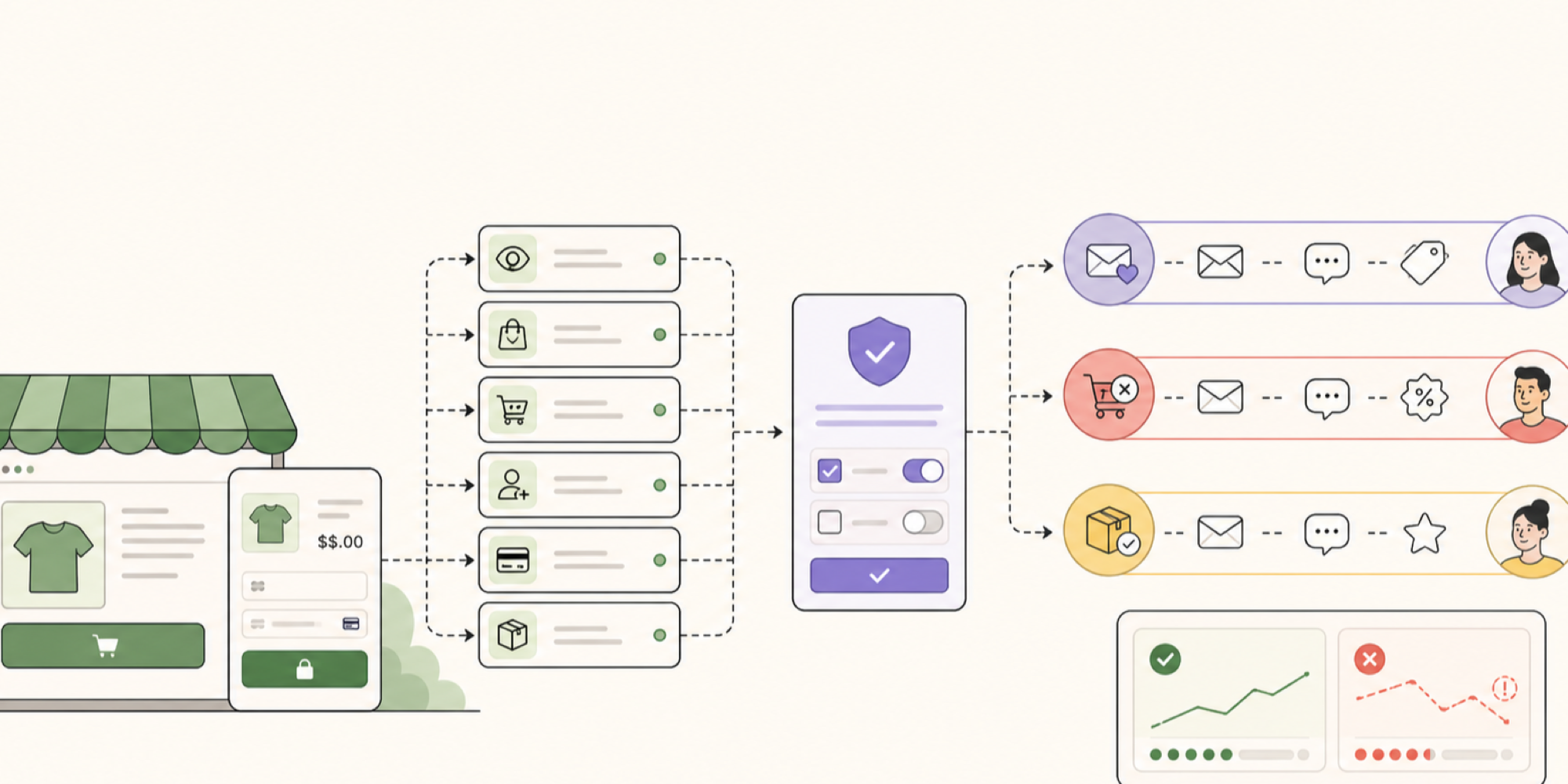
Shopify generates store activity. Klaviyo associates selected activity with customer profiles, then uses those profiles, events, and properties to create segments or trigger messages.
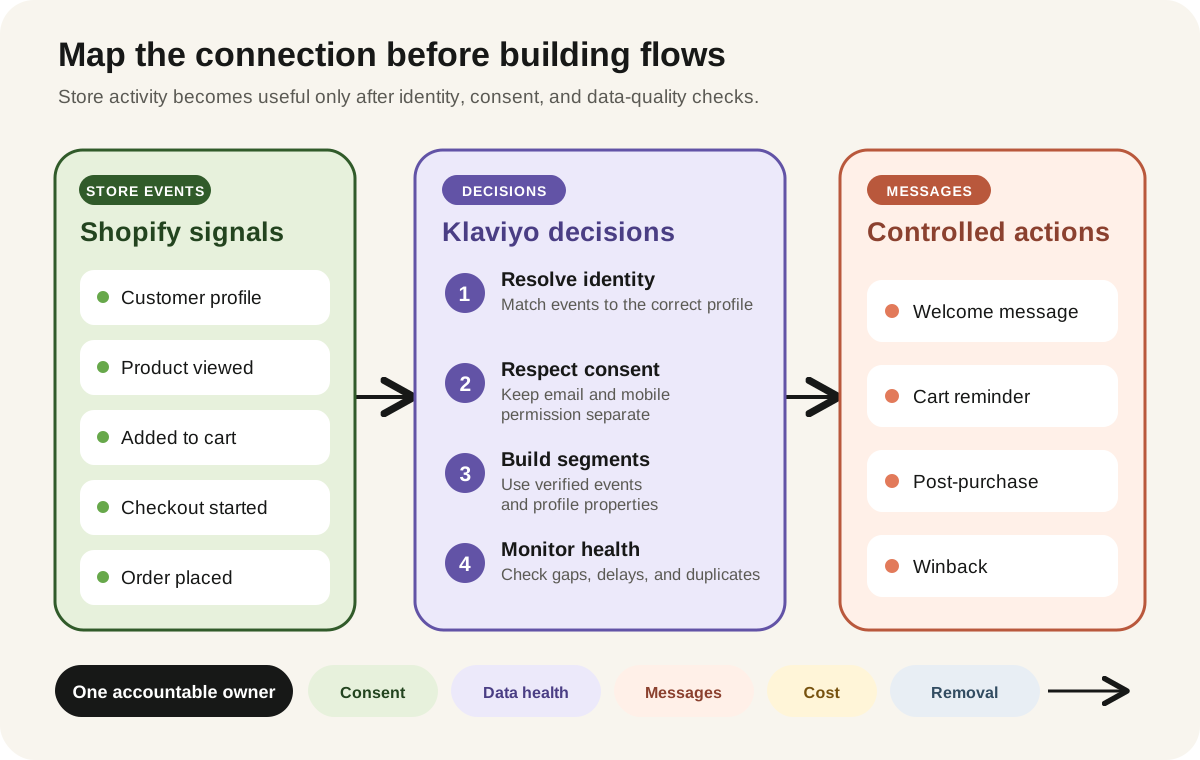
Klaviyo's current Shopify setup can sync customer and order data, enable onsite behavioral tracking, connect Shopify subscriber status to selected Klaviyo lists, and optionally sync profile data back to Shopify. The direction matters. Choosing to sync all Klaviyo profiles back can create Shopify customer records for profiles imported from other sources, even when those people have not interacted with the store.
| Data | Primary owner | Allowed direction | Review question |
|---|---|---|---|
| Customer details | Shopify or documented CRM | One way unless required | Which system wins after a correction? |
| Email consent | Documented consent system | Explicitly configured | Does an unsubscribe update every required system? |
| Mobile consent | Channel-specific record | Explicitly configured | Is promotional consent separate from order updates? |
| Product and catalog | Shopify | Shopify to Klaviyo | Are market, currency, and product URLs correct? |
| Order events | Shopify | Shopify to Klaviyo | Are cancellations, refunds, tags, and later edits represented correctly? |
| Engagement events | Klaviyo | Selected fields only | Does the business need this data inside Shopify? |
Do not choose bidirectional sync because it sounds more complete. Choose it only when a named workflow needs it and the conflict rule is understood.
Review setup, permissions, and storefront impact
The basic connection requires a Klaviyo account, sufficient Shopify access, app installation, an installation-permission review, and configuration inside both systems.
The merchant should expect to assess access connected with customer profiles, contact details, marketing consent, orders, products, catalog data, discounts, and storefront behavior. Ask which access is required for the first pilot and which optional features can stay off.
Klaviyo's Shopify app embed supports onsite tracking and forms. It also adds a client-side storefront dependency. Enable it on a duplicated theme first, then record script and network behavior before and after activation. Test product, search, cart, customer-account, and checkout journeys in the markets the store serves.
Shopify one-page checkout is listed as compatible in Klaviyo's current data reference. Custom checkout behavior, headless storefronts, consent apps, and unusual account implementations still need representative testing. Recheck the embed after a theme, checkout, privacy, or integration change.
Treat consent as data, not a checkbox
Email consent, SMS marketing consent, and transactional order-update consent are different records. Keep them separate in the implementation and in the team's language.
Klaviyo's setup can add Shopify customers who accept email marketing to a selected list. SMS consent requires its own configuration and collection rules. Klaviyo recommends separate lists for email and SMS when both are collected at checkout.
- Klaviyo suppression status does not sync to Shopify as Shopify consent status.
- Deleting a profile in one platform does not automatically delete it in the other.
- Onsite behavioral tracking may be limited for visitors in the EU, EEA, UK, and Switzerland unless consent has been provided, depending on Shopify Customer Privacy settings.
- A phone number used for order updates does not automatically equal promotional SMS consent.
These points do not replace legal review. They show why the team needs a written consent map and regional test cases before sending.
Test events before activating messages
Klaviyo currently documents Shopify metrics and profile properties as syncing in real time, generally appearing within seconds. That does not mean every later Shopify change rewrites the original event. For example, order tags added after an order is processed do not update the already-synced metric.
- ✓Anonymous product view, then identified product view
- ✓Added to cart from the product page and any quick-add interface
- ✓Checkout started but not completed
- ✓Successful order with multiple variants
- ✓Cancelled and refunded order
- ✓Discounted order
- ✓Subscription or bundle order, if applicable
- ✓Customer who accepts email but not mobile marketing
- ✓Customer who unsubscribes
- ✓Customer shopping in another market, language, or currency
Klaviyo's current Shopify behavioral tracking uses a Shopify server pixel for Added to Cart when behavioral event tracking is enabled. The app embed and tracking settings still need to be checked after theme or storefront changes.
Record the expected profile, event, property, segment, exclusion, and message result for every test. A green installation screen is not proof that the business logic is correct.
Launch one lifecycle path at a time
Do not activate welcome, cart, checkout, post-purchase, winback, review, and cross-sell messages on the same day.
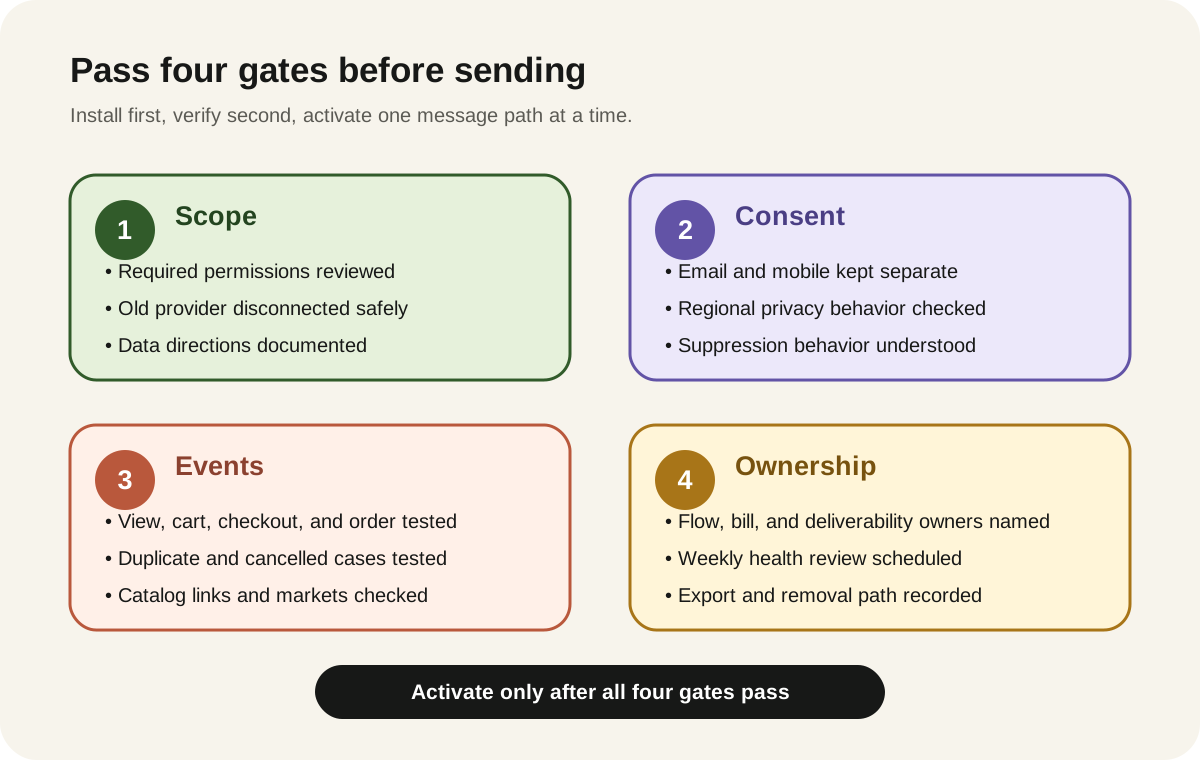
Start with one path that has clear inputs and exclusions. A welcome series may be appropriate when consent collection is already reliable. A post-purchase message can be easier to verify than browse abandonment because the order event is explicit. The first choice depends on the store's data quality and customer need.
- Name the trigger and entry rule.
- Add exclusions for purchasers, unsubscribed profiles, recent recipients, and other relevant cases.
- Test every message on mobile and desktop.
- Confirm product links, prices, currencies, discount rules, and sender identity.
- Send internally or to a controlled test segment.
- Activate with a small eligible audience where practical.
- Review event volume, skipped messages, complaints, bounces, and unexpected entries.
Price the operating model
Pricing was verified on August 15, 2026 and can change.
Klaviyo's current free marketing plan supports up to 250 active profiles and 500 email sends per month. The Shopify App Store currently lists email at $20 USD per month for 251 to 500 contacts and SMS at $15 USD per month for up to 1,250 SMS or MMS credits. The listing notes that external charges can be billed by Klaviyo separately from the Shopify invoice.
Paid email billing depends on active profiles and email volume. Mobile messaging is purchased separately and rates vary by channel, country, and, in the US and Canada, number type.
Do not budget from the install button alone. Forecast:
- Active profiles after list import and profile creation
- Monthly campaigns plus automated sends
- Mobile-message regions and channel mix
- Time for copy, design, approvals, testing, and reporting
- Deliverability monitoring and list hygiene
- Integration maintenance after theme, checkout, catalog, market, or app changes
- Migration and export effort if the platform changes
Review the exact current quote inside Klaviyo before activation. Pricing and plan rules can change.
Decide whether Klaviyo is necessary
Klaviyo may be unnecessary when a store has a very small list, no clear lifecycle plan, weak consent records, or nobody to own weekly operations. Shopify's native tools or a simpler email platform may be enough for basic newsletters and a small number of automations.
It may be a better fit when the business needs Shopify event data for segmentation, several maintained lifecycle paths, coordinated email and mobile messaging, or integrations that the team can actively govern.
Choose based on operating need, not on the number of templates, integrations, or AI features in a product page.
Plan maintenance and the exit path
Klaviyo needs a monthly owner, not only a launch checklist.
Review active-profile growth, suppressions, flow changes, consent behavior, event volume, broken connections, theme updates, form collisions, message overlap, sender health, and billing thresholds. Re-test at least one core journey after a theme, checkout, privacy, subscription, catalog, market, or integration change.
Before committing, confirm that the exit package can preserve:
- Profiles, consent states, suppressions, lists, segments, and custom properties
- Flow diagrams, triggers, filters, delays, branches, templates, and test evidence
- Sending domains, authentication records, branded links, and sender ownership
- Forms, app embeds, pixels, scripts, and theme-removal instructions
- Connections to support, subscriptions, reviews, advertising, and analytics tools
- Essential messages rebuilt in Shopify or another provider before disconnection
Switching cost is not only a CSV export. Dynamic segments, event definitions, workflow logic, reporting history, deliverability operations, and team habits often need to be rebuilt and tested.
Use this connection checklist
- ✓We documented the owner and direction for every synced field.
- ✓We disconnected or safely paused the previous email provider.
- ✓Email, mobile marketing, and order-update consent are treated separately.
- ✓Regional privacy behavior has been tested.
- ✓Product view, cart, checkout, order, cancellation, refund, and unsubscribe cases have been checked where relevant.
- ✓Catalog links, currencies, languages, and markets are correct.
- ✓Only one lifecycle path will be activated first.
- ✓Flow, deliverability, billing, and integration-health owners are named.
- ✓Active-profile and send-volume costs have been forecast.
- ✓Export, deletion, uninstall, and theme cleanup steps are documented.
Take one safe action this week
Create a one-page integration contract without installing or changing anything.
List the first journey, trigger, required Shopify events, consent source, excluded customers, old message to disable, reporting source, pilot audience, monthly cost threshold, stop condition, and rollback owner.
If the team cannot complete that page, it is not ready to connect the platforms. If it can, the page becomes a practical brief for implementation and approval.
Inficial can help decide whether Shopify Messaging is sufficient, map the Shopify and Klaviyo connection, review consent and event behavior, test the storefront implementation, and plan a staged lifecycle rollout without unnecessary data movement.
No commercial relationship, sponsorship, or affiliate arrangement with Klaviyo is known or implied.
Sources
- Getting started with Shopify, Klaviyo Help Center, accessed August 15, 2026
- How to sync data from Klaviyo to Shopify, Klaviyo Help Center, accessed August 15, 2026
- Shopify data reference, Klaviyo Help Center, accessed August 15, 2026
- Troubleshooting added to cart tracking, Klaviyo Help Center, accessed August 15, 2026
- How to collect SMS marketing consent at checkout on Shopify, Klaviyo Help Center, accessed August 15, 2026
- How to send order updates via SMS for Shopify, Klaviyo Help Center, accessed August 15, 2026
- Klaviyo pricing, accessed August 15, 2026
- How Klaviyo billing works, Klaviyo Help Center, accessed August 15, 2026
- Klaviyo: Email Marketing & SMS, Shopify App Store, accessed August 15, 2026
- Shopify Messaging email pricing, Shopify Help Center, accessed August 15, 2026
- Creating and managing marketing automations in Shopify Messaging, Shopify Help Center, accessed August 15, 2026