

A product review app can look like a small storefront feature. In practice, it may connect orders, customer contact data, email timing, incentives, theme blocks, product records, Google surfaces, social channels, support tools, and analytics.
That is why choosing by App Store rating or widget appearance is risky. The better question is: which review workflow does your store need, and which app can run it with acceptable cost, access, and operational effort?
This guide compares Judge.me, Loox, and Yotpo as examples of three current approaches. It is not a ranking or endorsement. Capabilities and prices were verified on August 14, 2026, but should be checked again before installation.
Start with the review workflow
The app sits in the middle of a sequence. An order event starts a timing rule. A request reaches the customer. The customer submits text, a rating, and sometimes a photo or video. The merchant moderates the submission. Approved content appears on the storefront and may be distributed to other surfaces.
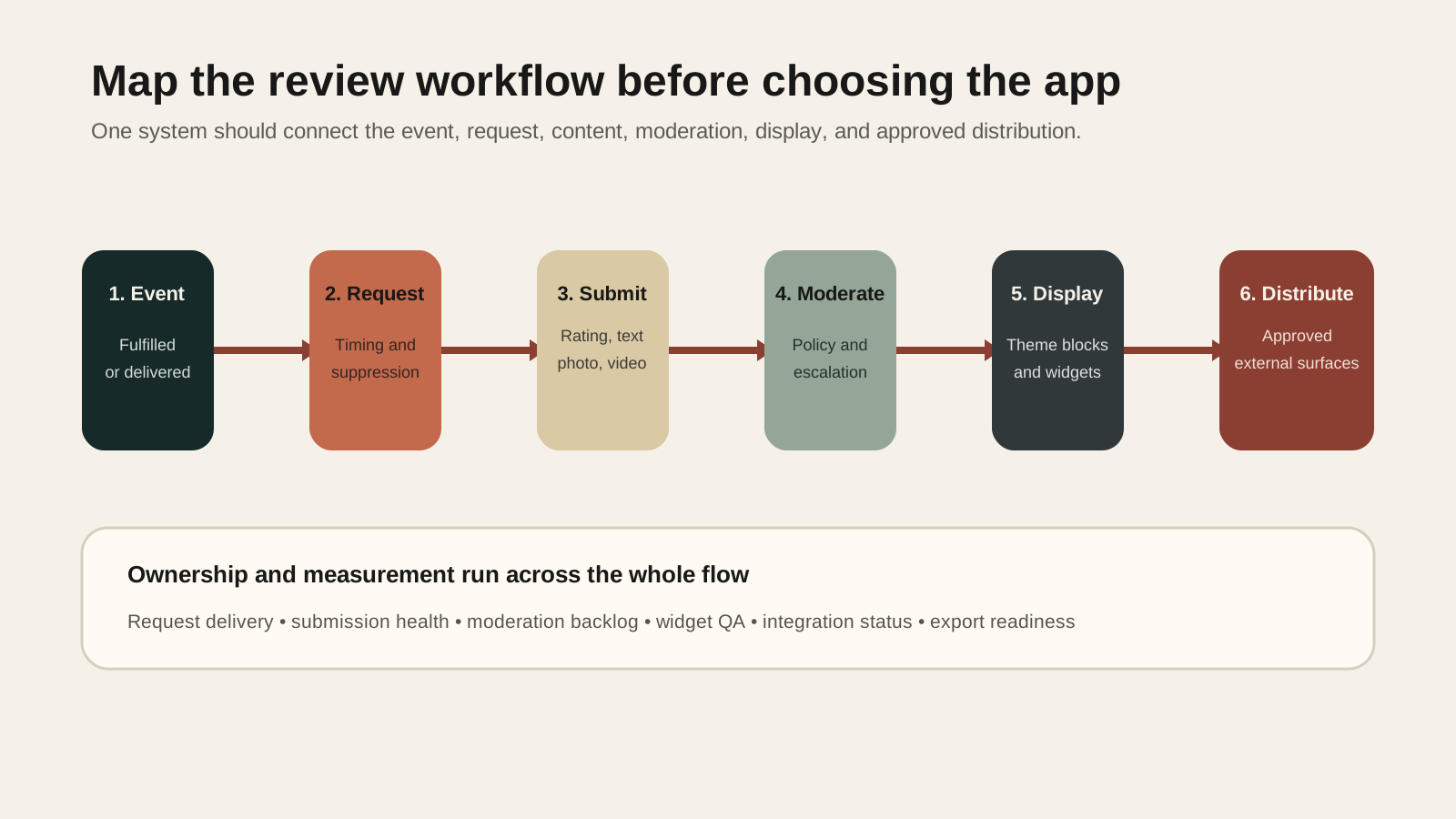
Write one sentence for each stage:
- Trigger: fulfillment, delivery, or another confirmed event
- Timing: the delay and reminder rules by product or market
- Collection: email, SMS, QR code, or onsite form
- Content: rating, text, photo, video, site review, or product question
- Moderation: who checks submissions and how disputes are handled
- Display: product page, collection card, homepage, or dedicated reviews page
- Distribution: Shop, Google, Meta, TikTok, or another approved destination
- Measurement: request delivery, submission rate, moderation backlog, and display health
If the team cannot name the owner of each stage, installing a more capable app will not solve the operating problem.
Choose the collection model
Start with the content customers can realistically provide.
Text and star ratings are usually the simplest model. Photo or video collection can be more useful for products where fit, scale, finish, or real-world appearance changes the buying decision. It also creates more moderation work and makes rights, consent, and reuse rules more important.
Incentives need similar care. A coupon for submitting a review can increase participation, but the policy should not reward positive sentiment. The team also needs rules for repeat submissions, returns, cancellations, and customers who do not want marketing messages.
The request channel matters too. Email might be sufficient if the store already has reliable transactional delivery. SMS adds consent, cost, and regional messaging considerations. QR codes can help with retail or packaging-led journeys, but attribution and product matching need testing.
Choose the lightest collection model that answers a real customer question.
Compare fit, not feature count
The three example apps overlap, but their current plans emphasize different operating models.
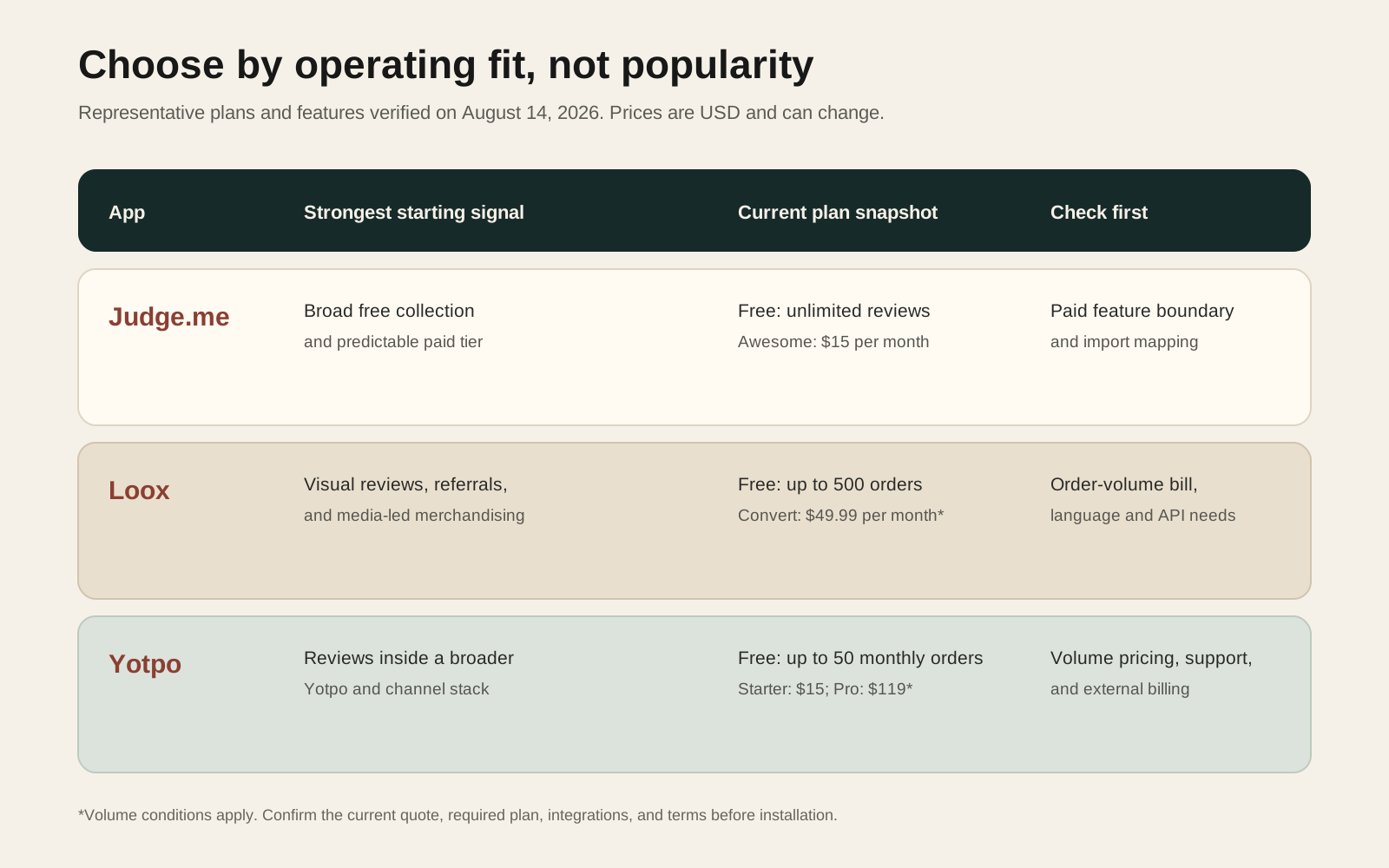
| App | Consider it when | Check carefully |
|---|---|---|
| Judge.me | You want a broad free starting point, unlimited review collection, and a predictable $15 paid tier for advanced collection, integrations, and distribution features | Confirm which integrations and Google or social features require the paid plan; test imported review mapping and widget configuration |
| Loox | Visual reviews, branded media widgets, referrals, and social distribution are central to the merchandising plan | The Convert plan is order-volume based; confirm the expected bill, language needs, video requirements, API access, and additional-order charges |
| Yotpo | Reviews may become part of a wider Yotpo operating stack, or the team needs its listed Google, social, analytics, and loyalty connections | Free usage is capped by monthly orders; paid pricing changes with volume; confirm external billing, support route, and the exact capability included at each tier |
Judge.me currently lists unlimited product, store, photo, and video reviews on its free plan. Its $15 per month Awesome plan lists advanced collection, more than 130 integrations, Google Shopping, social connections, and wider customization.
Loox currently lists a free Beginner plan for up to 500 orders. Its $49.99 per month Convert plan includes 300 orders in the base price, then states an additional $50 per 300 orders. That plan adds video reviews, bundles, referrals, Google, Meta and TikTok syndication, integrations, API access, and webhooks. An Unlimited plan is listed at $299.99 per month.
Yotpo currently lists a free plan for stores with up to 50 monthly orders. Starter begins at $15 per month and Pro at $119 per month, with the listing noting that paid pricing changes with order volume. The listing also warns that external charges may be billed separately from the Shopify invoice.
These are pricing snapshots, not lifetime costs. Add implementation, design, moderation, support, migration, and future switching effort.
Check every connection before installation
A review app should not receive access simply because it is popular. Shopify distinguishes required scopes, which merchants approve during installation, from optional scopes that can be requested later. Optional scopes can be declined or revoked. Shopify also recommends revoking optional access that is no longer needed to reduce data-leak risk.
Ask the vendor or implementation owner to explain:
- Which product, order, customer, fulfillment, and marketing data the app reads
- Which records or theme surfaces it can change
- Which access is required for the selected features
- Which optional access can remain disabled
- Where review content and customer data are stored
- Which subprocessors or external channels receive data
- How exports, deletion requests, and account closure are handled
Then map downstream connections. Judge.me, Loox, and Yotpo currently list combinations of Shopify Flow, Klaviyo, Google, Shop, Meta, TikTok, Gorgias, loyalty tools, page builders, and other services. A listed connection does not prove that it supports your exact event, field, market, or plan. Test the required workflow with representative data.
Price the operating model
The subscription price is only the visible line item.
| Cost area | Question |
|---|---|
| App plan | What does the store pay at its current and expected order volume? |
| Messaging | Are request emails or SMS included, metered, or routed through another tool? |
| Incentives | What margin is given away through review coupons or referral rewards? |
| Operations | Who moderates, answers, translates, and resolves disputed reviews? |
| Storefront | Who owns widget styling, placement, accessibility, and theme QA? |
| Integrations | Are required connectors, API access, or webhooks restricted to a higher tier? |
| Exit | What will export, remapping, testing, and historical continuity cost? |
Do not pay for syndication, AI summaries, video, referrals, or analytics merely because they appear in a feature grid. Connect each paid feature to a named customer question or team workflow.
Plan ownership and the exit path
Product reviews become durable store content. Treat them as an asset with an owner and an export plan.
Before installation, export a sample from the candidate app or obtain the documented schema. Check whether the export preserves product identifiers, ratings, titles, body text, customer display names, verification status, media references, replies, timestamps, and moderation state.
Also inspect how the app reaches the storefront. Shopify theme app extensions can expose review or rating elements as app blocks or app embeds in compatible themes. This lets merchants configure supported elements in the theme editor without manual Liquid edits and reduces the risk of breaking theme code.
Prefer that extension-based path when the app and theme support it. If legacy snippets or custom scripts are required, document their locations and removal steps.
Give one person responsibility for:
- Request timing and deliverability
- Moderation and customer escalation
- Widget placement and accessibility
- Integrations and channel syndication
- Monthly bill and order-volume thresholds
- Exports, backups, and switching readiness
Run a small review-app pilot
Choose a representative product group rather than every product.
- Test one fulfilled and one cancelled order.
- Check request timing and suppression rules.
- Submit text, photo, and video content where applicable.
- Review mobile and desktop widget behavior.
- Test moderation, replies, and customer correction paths.
- Check product mapping across variants and bundles.
- Run one required integration, such as Klaviyo or Shopify Flow.
- Complete one export and restore exercise.
- Compare page performance before and after activation.
- Remove the app from a duplicated theme to confirm the exit steps.
The pilot is not a conversion experiment. It is a workflow and risk check. Approve wider rollout only when the store can collect, moderate, display, export, and remove the app predictably.
When a review app is unnecessary
Do not install one simply because competitors show star ratings.
A review app may be premature when the store has very few completed orders, nobody can moderate submissions, product feedback belongs in a private research process, or the team cannot maintain another customer-data processor. It may also be unnecessary when an existing platform already collects the required content and can display or syndicate it safely.
Start with the customer question. If buyers mainly need better specifications, sizing, compatibility, photography, or delivery information, improving product content might be the more direct investment.
Use this decision checklist
- ✓We defined the trigger, timing, request channel, content type, moderation, display, distribution, and measurement workflow.
- ✓One system is the review source of truth.
- ✓We compared the plan cost at current and expected order volume.
- ✓Every paid feature maps to a customer or operating need.
- ✓Required and optional data access have been reviewed.
- ✓The selected theme supports the intended app blocks or embeds.
- ✓Product, variant, market, language, and bundle mapping have been tested.
- ✓The team owns moderation, accessibility, integration health, and billing.
- ✓A complete, usable review export has been tested.
- ✓The removal and switching path is documented.
Inficial can help you decide whether an existing Shopify app fits, configure its connections, test the storefront impact, or design a custom integration when the standard workflow does not match.
Sources
- Judge.me Product Reviews App, Shopify App Store, accessed August 14, 2026
- Loox Product Reviews App, Shopify App Store, accessed August 14, 2026
- Yotpo Product Reviews App, Shopify App Store, accessed August 14, 2026
- About theme app extensions, Shopify.dev, accessed August 14, 2026
- Manage access scopes, Shopify.dev, accessed August 14, 2026