
Google Search Console now has a dedicated Generative AI performance report for Search. For ecommerce teams, this is a welcome change: visibility inside AI Overviews and AI Mode no longer has to be discussed entirely through manual searches, screenshots, or third-party estimates.
The report is useful, but its boundary matters. It currently shows impressions and a limited set of dimensions. It does not give you a complete AI rank-to-revenue funnel. Treating every impression as a citation win, every page increase as an optimization success, or every organic conversion as AI-driven would replace one measurement gap with several unsupported conclusions.
The practical goal is narrower: use the report to understand where Google is showing your ecommerce content in supported generative AI features, then connect that evidence carefully to broader Search Console and analytics data.
What the report actually measures
Google announced the report on June 3, 2026 and described a rollout to a subset of websites while testing continued. The Search version covers impressions from AI Overviews and AI Mode. Google says the report can group those impressions by page, country, device, and date.
An impression is not simply proof that your URL was somewhere inside a generated response. In AI Overviews, a linked item must be scrolled or expanded into view to count. AI Mode follows Google's standard impression rules. A follow-up question in AI Mode is treated as a new query for measurement.
The distinction matters for ecommerce. A product guide might receive impressions because Google presents it while someone compares product types. A collection page might appear for a broader shopping task. A product detail page might become visible only after the user explores a follow-up. The report can show that these pages appeared, but it does not reveal the shopper's complete path or decision.
| Question | Useful dimension | Responsible interpretation |
|---|---|---|
| Which page families are visible? | Page | Compare products, collections, guides, policies, and editorial content |
| Where is visibility appearing? | Country | Identify market patterns before localizing or reprioritizing content |
| Which devices dominate? | Device | Check whether visibility and landing-page experience align by device |
| Is visibility changing? | Date | Compare stable periods and annotate releases, migrations, and content changes |
What the report still cannot tell you
The dedicated report is not an AI ranking tracker. Google's current help page documents impressions, pages, countries, dates, and devices. It does not document a query dimension, a universal AI position score, or a report-level split that lets you compare AI Overview performance against AI Mode performance.
It also does not isolate the rest of the commercial funnel. Google continues to include supported AI-feature data inside the overall Web search type. The dedicated view creates a clearer impression layer, but a team should not subtract or join figures casually and label the result "AI clicks" or "AI revenue."
- Do not claim "our AI rank increased." An impression trend is not a stable rank across generated experiences.
- Do not claim "this page generated AI revenue." Page-level visibility plus an organic purchase does not prove that the same session came from a supported AI feature.
- Do not claim "our optimization caused the increase." A before-and-after movement can coincide with demand, rollout, feature availability, competition, indexing, or reporting changes.
Use a three-layer measurement stack
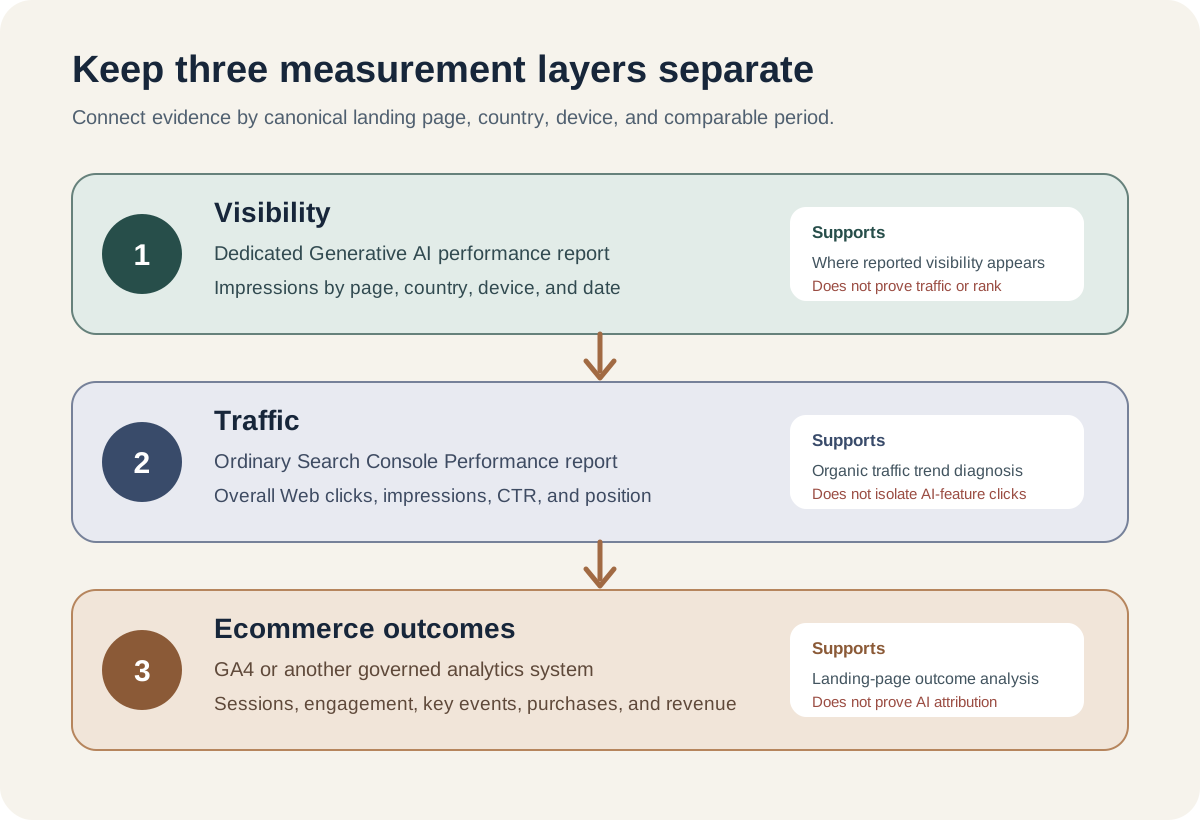
The first layer is visibility. Use the dedicated Generative AI performance report to monitor supported-feature impressions by page, country, device, and date.
The second layer is traffic. Use the ordinary Search Console Performance report for overall Web clicks, impressions, click-through rate, and position. Remember that the Web search type includes AI-feature activity alongside the rest of web search.
The third layer is outcomes. Use GA4 or another governed analytics system to examine landing-page sessions, engagement, key events, purchases, and revenue. Google's Search Console integration can bring search and Analytics metrics together around landing pages, country, and device, but the systems retain different scopes and documented limits.
This stack supports questions such as, "Pages in our buying-guide group gained generative AI impressions, while their overall organic entries and assisted product views also rose." It does not support, "AI Mode caused 14 purchases," unless a separate, validated source provides that attribution.
Build a weekly ecommerce visibility view
Start with page groups that reflect how customers make decisions. A practical set might include:
- Product detail pages
- Collection and category pages
- Buying guides and comparisons
- Product-care and compatibility content
- Shipping, returns, warranty, and policy pages
- Brand and editorial content
Export the report weekly and assign each canonical URL to one group. Canonical matters because Search Console usually credits performance data to the canonical page rather than a duplicate URL.
- Record generative AI impressions for the current and comparison period.
- Calculate each page group's share of reported generative AI impressions.
- Record the leading countries and devices.
- Compare overall Web impressions and clicks for the same page set.
- Review landing-page sessions and agreed ecommerce outcomes.
- Annotate content updates, template releases, redirects, indexing changes, feed changes, campaigns, and seasonality.
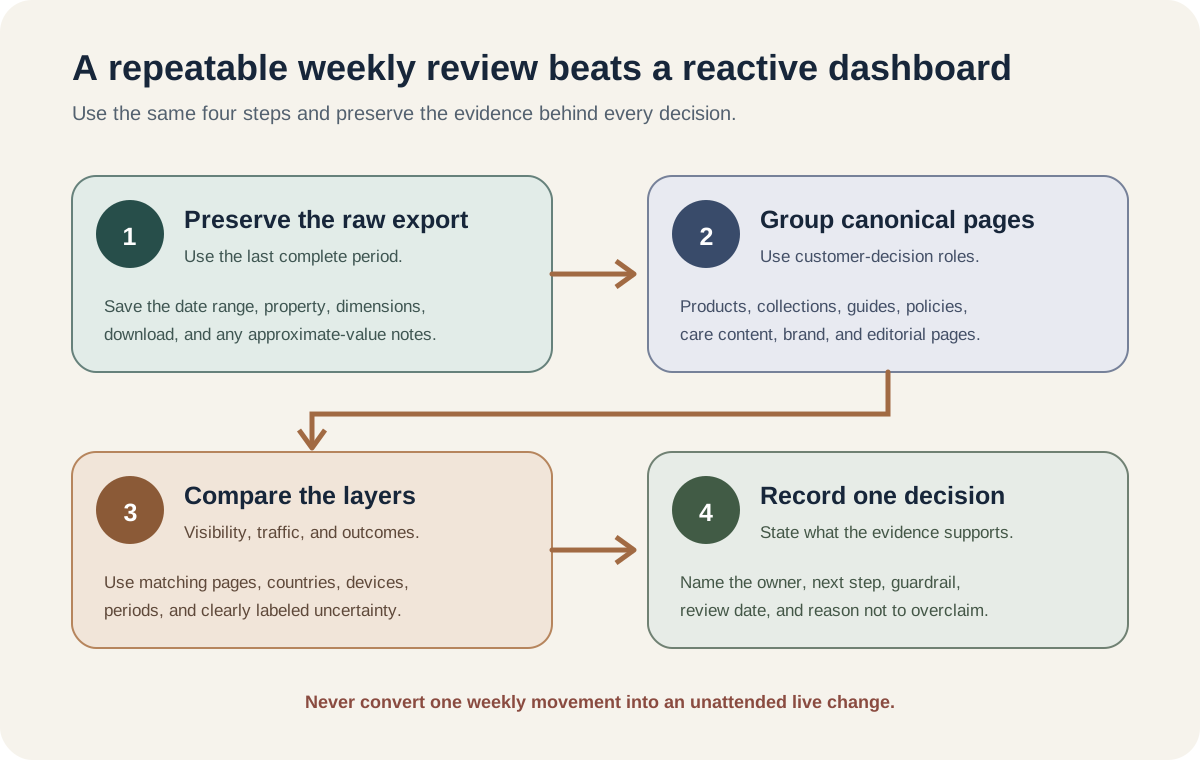
Use weekly or monthly views when daily volume is unstable. The newest Search Console figures can be preliminary, and the report may show different chart and table totals because aggregation changes by dimension.
Interpret movement before taking action
An increase is a prompt to investigate, not an instruction to rewrite every page.
| Pattern | What it may support | What to check next |
|---|---|---|
| AI impressions rise, overall organic clicks remain stable | More supported-feature visibility without confirmed traffic growth | Page groups, countries, devices, demand, and comparison period |
| AI and Web impressions rise together | Broader search visibility or demand may be changing | Queries in the standard report, indexing, seasonality, releases, and market mix |
| One page group gains while another falls | Supported features may be surfacing different content types | Intent coverage, internal linking, canonical selection, content accuracy, and merchant data |
| Visibility rises and GA4 outcomes improve | A useful correlation worth deeper analysis | Comparable periods, channel mix, landing pages, consent, campaigns, and other releases |
| Visibility falls suddenly | Reporting, availability, eligibility, demand, or site changes may be involved | Rollout, controls, data anomalies, indexing, snippets, robots, canonicals, and releases |
Google says normal search foundations still apply. Pages need to be indexed and eligible to appear with a snippet. Helpful content, crawl access, internal links, textual product information, accurate structured data, useful images, and current Merchant Center information remain relevant. Google does not require a special AI file or dedicated AI schema.
That guidance argues for fixing verified content and technical gaps. It does not justify mass-producing speculative question pages or adding markup that does not match the visible page.
If the report is missing, diagnose before reacting
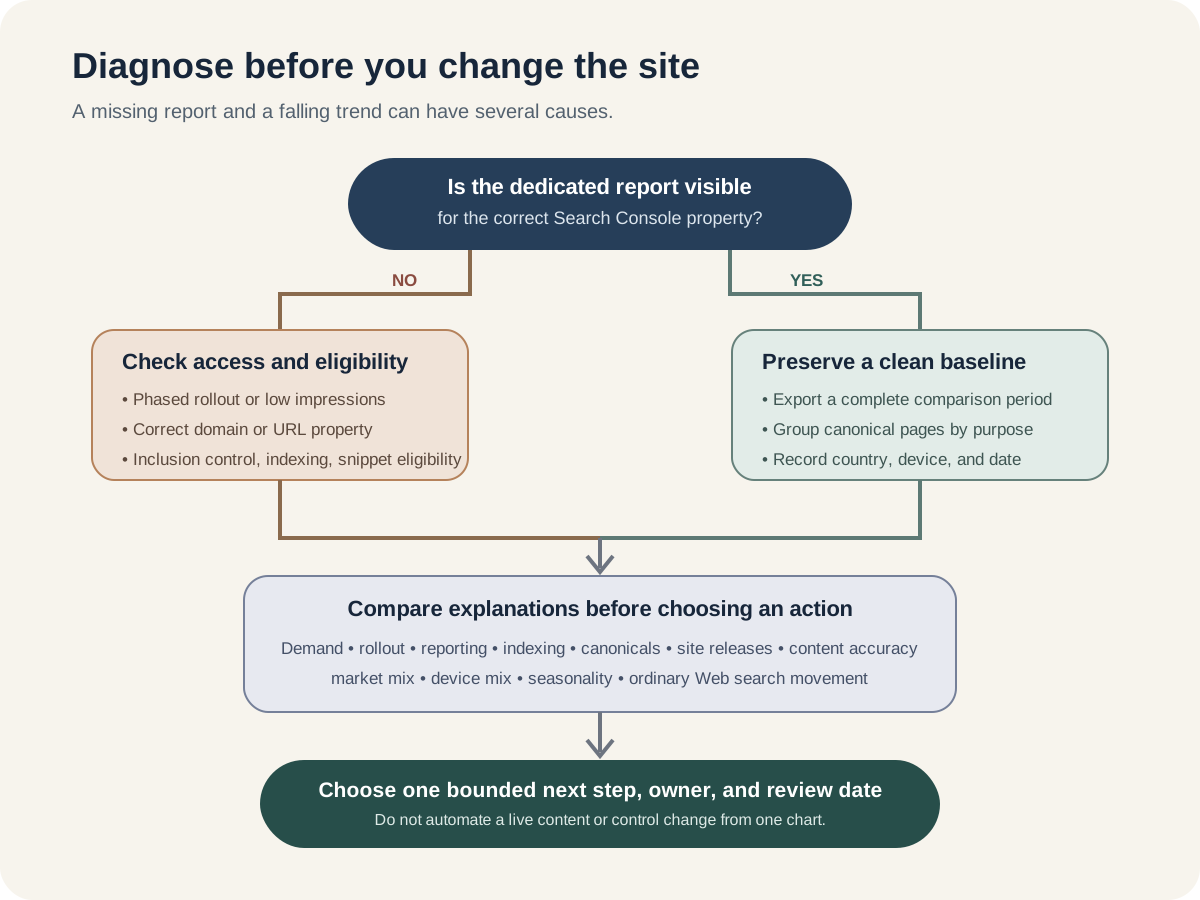
Recent practitioner discussion suggests access has broadened, but reports remain inconsistent across properties. Google's current help page still lists phased access and insufficient impressions as reasons a property may not see the report. The Search generative AI control is also documented as rolling out gradually. Where available, it lets a verified property owner include or exclude content from named Search generative AI features.
Review that control carefully. Excluding a site prevents its links and content from appearing in the listed features, but Google says the setting is not a ranking or inclusion signal for other parts of Search. It is also separate from AI training controls.
Do not change a property-level control simply to test a dashboard hypothesis. The decision affects content eligibility and possible traffic. It needs an accountable owner, a recorded reason, an expected impact, a review date, and a rollback decision.
Important limitations and privacy boundaries
- Rollout is incomplete according to the current official help text, so two properties may not have the same interface or access.
- Search Labs experiments are excluded from the report.
- The table carries ordinary Search Console limits, including a 1,000-row limit, and totals can differ because of aggregation.
- Some ordinary Search Console query rows are omitted for privacy, and tables can be truncated.
- Approximate or unavailable values shown in the interface become zero in the downloaded generative AI report, so exports need careful labeling.
- Search Console and GA4 process different scopes. Consent, tag behavior, time zones, attribution, and property configuration can change comparisons.
- A visibility change does not prove a content change caused it. Record uncertainty rather than forcing a verdict.
A safe action for this week
Create a one-page baseline, even if the report is not available yet.
- ✓List your five most important ecommerce page groups.
- ✓Name the owner for Search Console, GA4, merchandising, and technical SEO.
- ✓Record whether the dedicated report and control are available for the correct property.
- ✓If available, export the last complete four weeks by page, country, and device.
- ✓Annotate major site and campaign changes.
- ✓Choose one weekly review date and preserve the raw export.
- ✓Write down the three claims your dashboard must not make: AI rank, AI revenue, and causation without evidence.
Inficial can help ecommerce teams connect Search Console, analytics, technical SEO, merchant data, and governed AI visibility reporting into a measurement plan that makes uncertainty explicit.
Sources
- Google Search Central: Introducing Search Generative AI performance reports in Search Console, June 3, 2026
- Search Console Help: Generative AI performance report (Search), accessed August 14, 2026
- Search Console Help: What are impressions, position, and clicks?, accessed August 14, 2026
- Google Search Central: AI features and your website, updated December 10, 2025
- Search Console Help: Search generative AI control, accessed August 14, 2026
- Google Analytics Help: Connect Search Console to Google Analytics, accessed August 14, 2026
- Search Console Help: Performance report dimensions and data groupings, accessed August 14, 2026