
Shopify B2B is no longer a Plus-only starting point. That does not make the architecture decision automatic. A merchant can configure a wholesale price successfully in admin and still lose the intended buyer context in the theme, cart, checkout, order, or downstream system.
The useful question is not whether native Shopify, an app, or Plus has more features. It is which system should own company identity and price resolution, and whether that authority survives every state a real buyer can enter.
Start with required buyer states, not plans
Define the smallest set of states the business must support: signed-out retail, one-location wholesale, multi-location wholesale, approved net terms, and an unapproved applicant. Add retail-hidden products, negotiated prices, markets, currencies, tax, discounts, and manual review only when they change the order.
For each state, specify expected products, unit price, quantity rule, payment term, delivery option, storefront message, checkout action, order association, and downstream handoff. Different answers for two approved buyers require an explicit model.
| Required state | Native lower-plan test | Escalation signal |
|---|---|---|
| Grouped wholesale tiers | Represent each approved group with B2B Markets and no more than three active catalog assignments | The approved model needs more distinct catalog groups than the plan supports |
| Negotiated company pricing | Prove that market grouping is commercially valid | A company location needs a directly assigned price list |
| Terms and checkout | Test due-now and approved net-term orders | Deposits, partial payments, or another verified Plus-only payment state is mandatory |
| Storefront variation | Test the shared theme for retail and every B2B state | The required contextual experience exceeds the plan or theme boundary |
| Special workflow | Name the missing operation and its owner | A scoped app can fill the gap without replacing identity or price authority |
Make company location the authority key
Shopify models a business as a company with locations and contacts. A location can carry addresses, tax settings, payment terms, checkout settings, permissions, and pricing context. Contacts spanning several locations choose which location they are buying for.
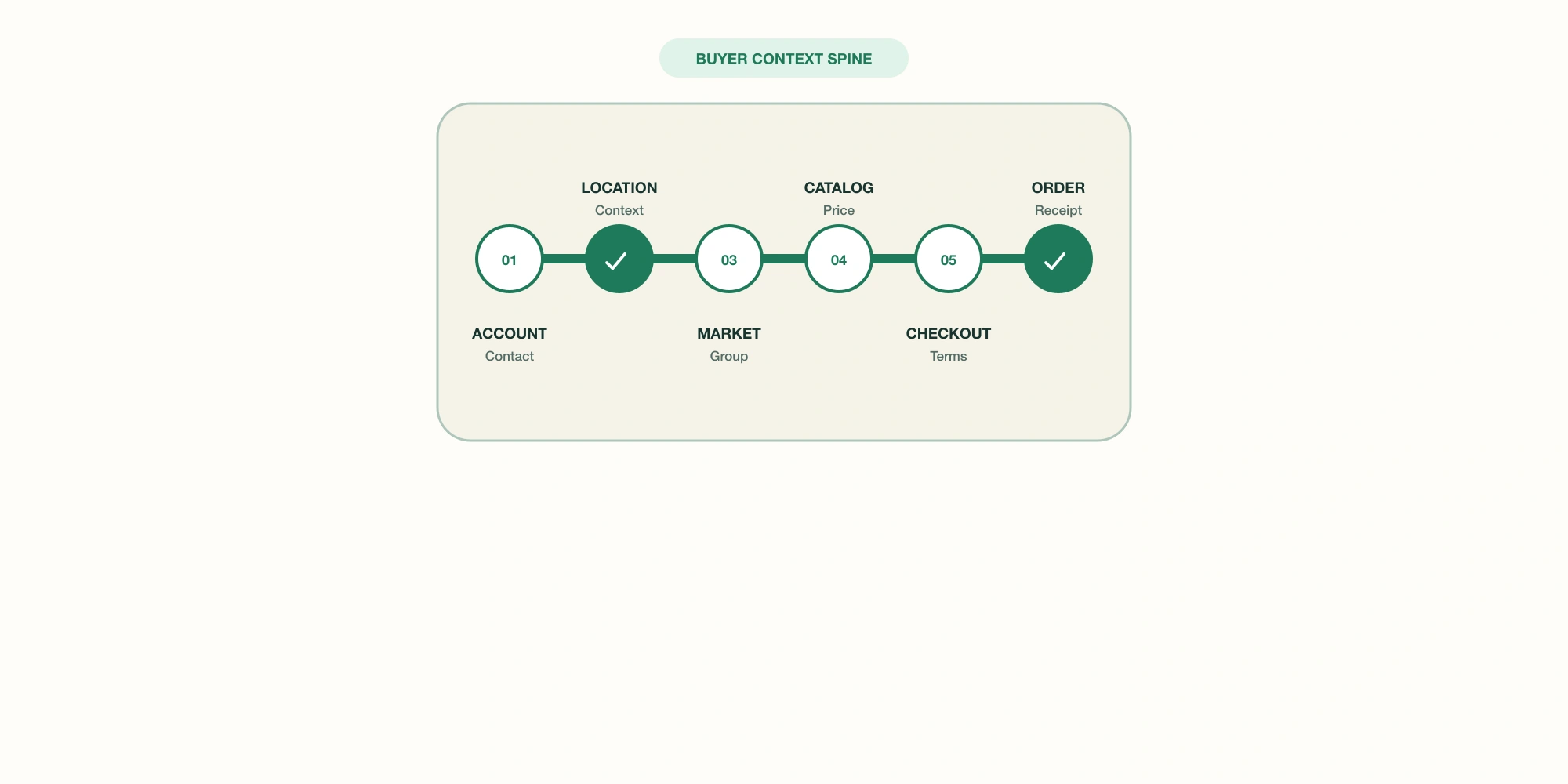
That choice should remain legible through the transaction. Customer accounts establish the buyer. The location determines eligible B2B context. Markets and catalogs resolve products and prices. The theme renders the state. Checkout carries terms and addresses. The order records the purchasing company.
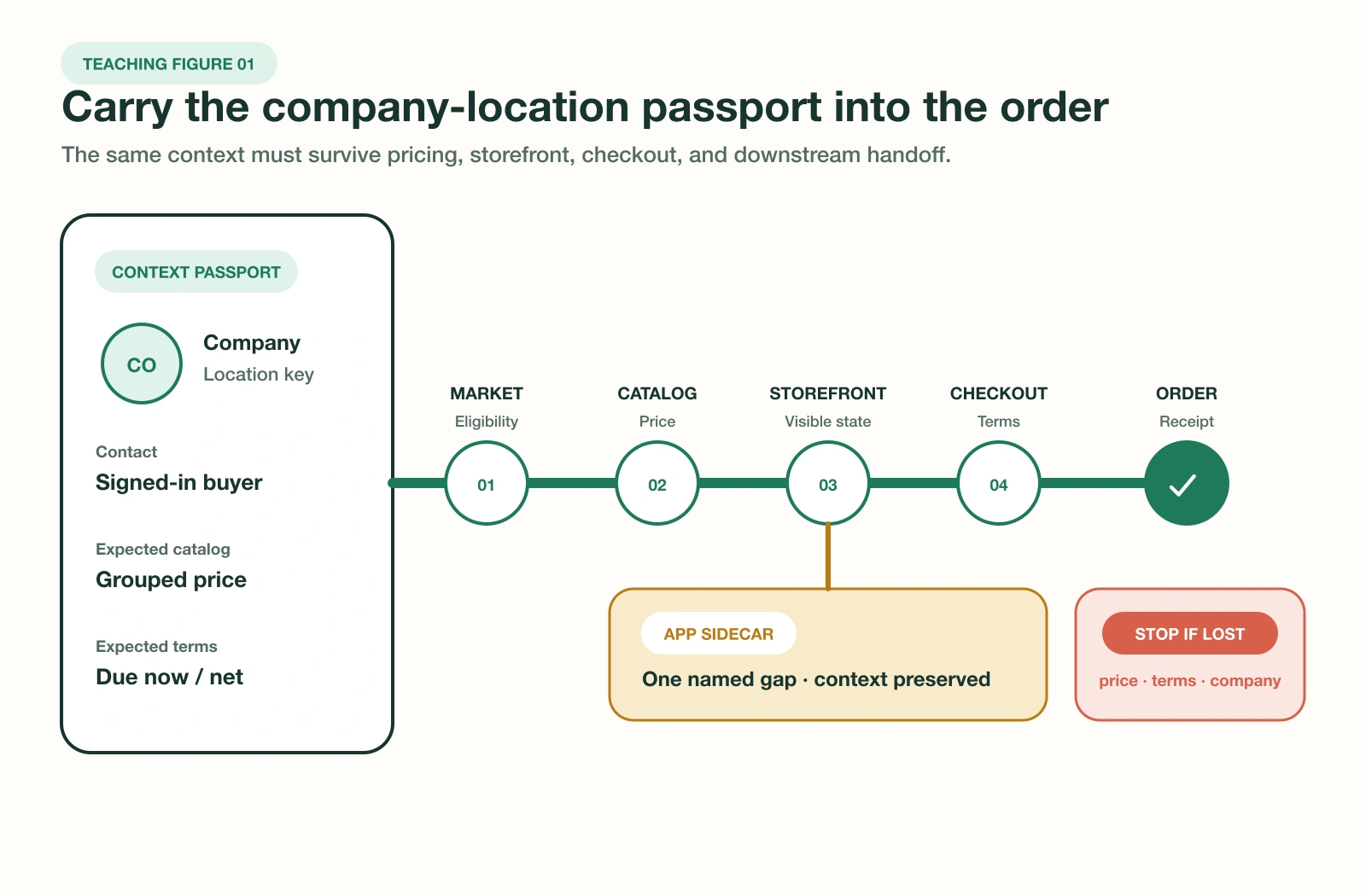
Catalog overlap needs deliberate testing. Shopify prioritizes direct company-location catalogs, company-location Markets, region Markets, then app catalogs. At equal precedence, the lowest eligible price can win. A clean catalog list does not prove which price a buyer will receive.
Decision rule: if the team cannot name the authority for identity, product eligibility, price, terms, and order association, it is not ready to choose a wholesale app or Shopify plan.
Use plan limits as structural thresholds
As of September 2026, Shopify documents companies, company locations, payment terms, volume pricing, quantity rules, and B2B customer accounts across its main plans. Basic, Grow, and Advanced use new Shopify Markets for B2B catalogs and allow up to three active catalog assignments across all B2B Markets.
Plus becomes structurally relevant when the approved model requires unlimited B2B market catalogs, direct catalog assignment to particular companies or locations, deposits, partial payments, or another current Plus-only capability. Advanced can also matter when the required storefront experience depends on contextual theme customization through Markets.
Do not translate those boundaries into a generic revenue cutoff. Compare the annual operating cost of each valid design, including app fees, development, catalog maintenance, support, manual exceptions, reconciliation, incident exposure, and future exit work. Cost matters only after the design can represent the required states.
Let an app fill one proved gap
A lower-plan merchant may still need help with account applications, sales-rep ordering, bulk order entry, ERP synchronization, tax validation, or a pricing model that Markets cannot express. That is an app requirement only after the native pilot exposes the gap.
- ✓Name the exact missing state, operator, approver, and recovery owner.
- ✓Confirm whether the app reads or writes companies, locations, catalogs, discounts, carts, draft orders, or orders.
- ✓Trace the calculated price through product page, cart, checkout, order, refund, and downstream systems.
- ✓Test whether company, location, purchase order, payment term, tax, and delivery context remain attached.
- ✓Document data export, configuration reconstruction, theme residue, billing cancellation, and restore time.
- ✓Reject a second pricing authority unless its conflict and precedence rules are explicit and testable.
Current Shopify developer documentation also lists purchase options such as subscriptions, pre-orders, and try-before-you-buy as unsupported by B2B. If one is commercially mandatory, stop and recheck the current platform and app boundary before promising a combined flow.
Test the state chain before migration
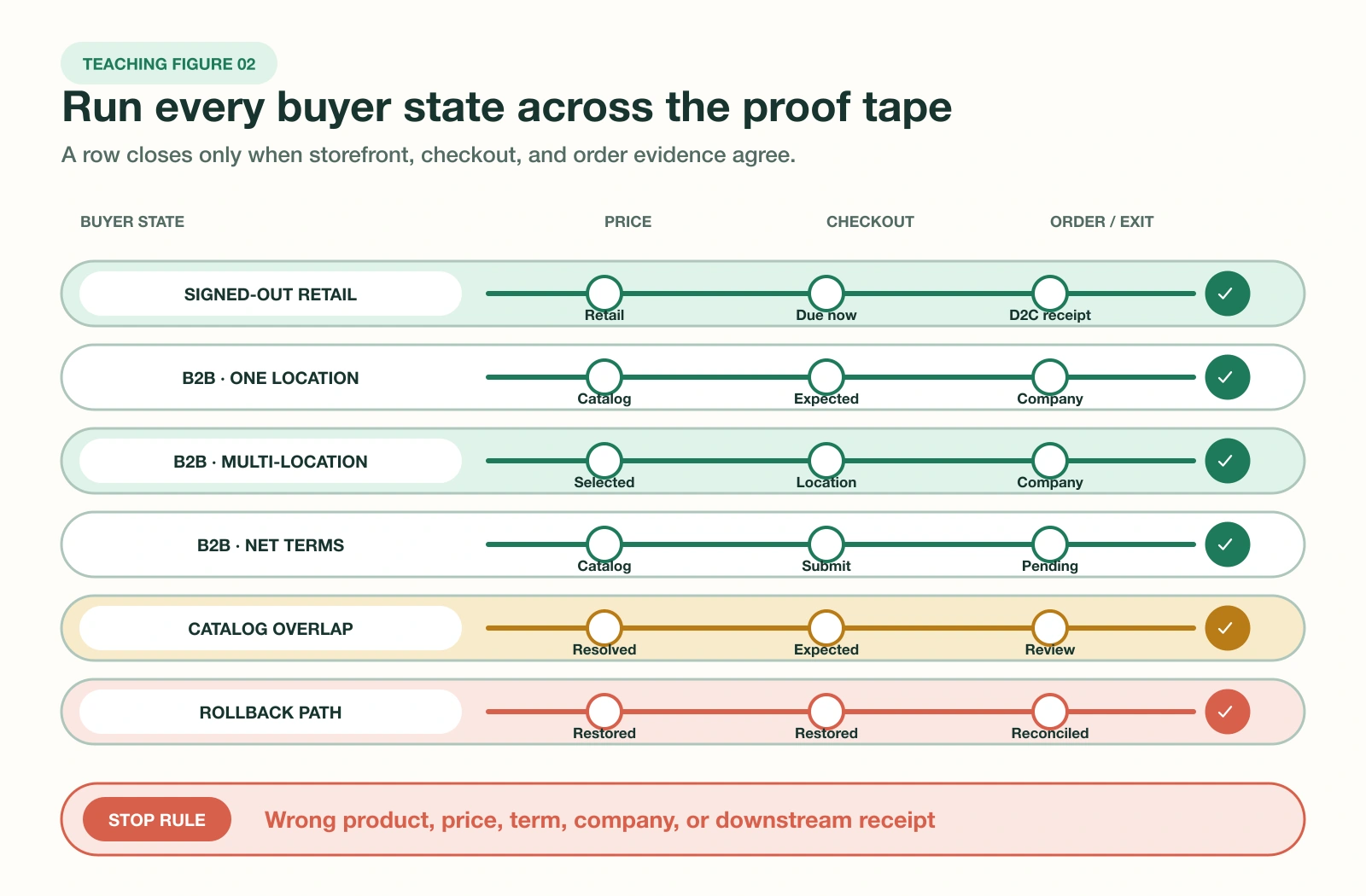
Shopify recommends testing with a company, location, catalog, customer account, and order. Extend that baseline into a fixture grid. Each row should contain setup, expected result, observed result, evidence link, owner, and stop condition. Use safe test products and payment methods appropriate to the store.
- Freeze the current wholesale configuration and export recoverable data.
- Create representative companies, locations, contacts, products, catalogs, terms, and discounts.
- Test signed-out, signed-in, single-location, multi-location, approved, and unapproved paths.
- Record visible products and prices, cart totals, checkout terms, addresses, taxes, delivery, and order association.
- Verify the order, refund, fulfillment, finance, CRM, ERP, analytics, and support views that matter.
- Trigger one rollback and prove that the previous buyer path can be restored without losing an order or price record.
Stop the pilot on any price mismatch, unauthorized product exposure, lost company association, incorrect term, unowned manual workaround, or unreconciled downstream record. Fix the authority map first. Repeating checkout with the same buyer does not cover a different location, market, discount, or approval state.
Close with a decision receipt
Choose native lower-plan B2B when all required states fit the catalog and experience boundaries and Shopify can remain authoritative. Choose native plus one app when a specific gap has a clean extension boundary and tested exit. Choose Plus when a required state is genuinely Plus-only or the lower-plan design becomes more complex to operate than the upgrade path.
The approval record should name the chosen authority, supported buyer states, excluded states, app scopes, catalog model, owner, validation date, known exceptions, review trigger, rollback action, and evidence links. Review it when plans, Markets, pricing, discounts, themes, apps, buyer onboarding, or downstream integrations change.
A useful success signal is not that wholesale orders exist. It is that the pilot's required states produce no unresolved identity, product, price, term, checkout, or downstream mismatch. The next action is small: model five representative buyers and run the state grid before requesting an app demo or Plus proposal.
Frequently asked questions
Is Shopify B2B available without Shopify Plus?
How many B2B catalogs can I use without Plus?
Can non-Plus Shopify give every company a unique price list?
Do I still need a Shopify wholesale app?
Can one Shopify store serve both B2C and B2B customers?
How should I migrate from a wholesale app to native Shopify B2B?
Sources
- Shopify Help Center: Shopify B2B features by plan, accessed 8 September 2026
- Shopify Help Center: Companies and customers in B2B, accessed 8 September 2026
- Shopify Help Center: Sign-in and customer accounts in B2B, accessed 8 September 2026
- Shopify Help Center: B2B and Markets, accessed 8 September 2026
- Shopify Help Center: Creating and managing B2B catalogs with Markets, accessed 8 September 2026
- Shopify Help Center: Setting up B2B discounts, accessed 8 September 2026
- Shopify Help Center: Testing your B2B setup, accessed 8 September 2026
- Shopify developer docs: Support B2B customers in your theme, accessed 8 September 2026
- Shopify developer docs: Apps and B2B, accessed 8 September 2026
- Shopify developer docs: About catalogs in Markets, accessed 8 September 2026