
A Shopify store loses organic clicks. The homepage looks stable, so the team starts rewriting product titles across the catalog. That response may target the wrong pages and the wrong cause.
Search Console reports a property, not an ecommerce operating model. Product pages, collections, guides, policy pages, and localized URLs have different jobs. Inside one total, a shift in one group can look like a sitewide SEO failure.
Classify canonical URLs by template and intent, compare groups on the same reporting boundary, and verify the likely cause before changing the store.
Start with the decision your report must support
A useful report answers a decision, such as whether a theme release affected product pages, whether a collection decline reflects demand or visibility, or whether a localized market moved independently.
- Write the decision at the top of the report.
- Define only the page groups and dimensions needed to answer it.
- Name the evidence that would approve, reject, or defer a change.
Search Console supplies page, query, country, device, and date dimensions. Your team must supply the merchandising model that makes those dimensions decision-useful.
Build a template and intent classification contract
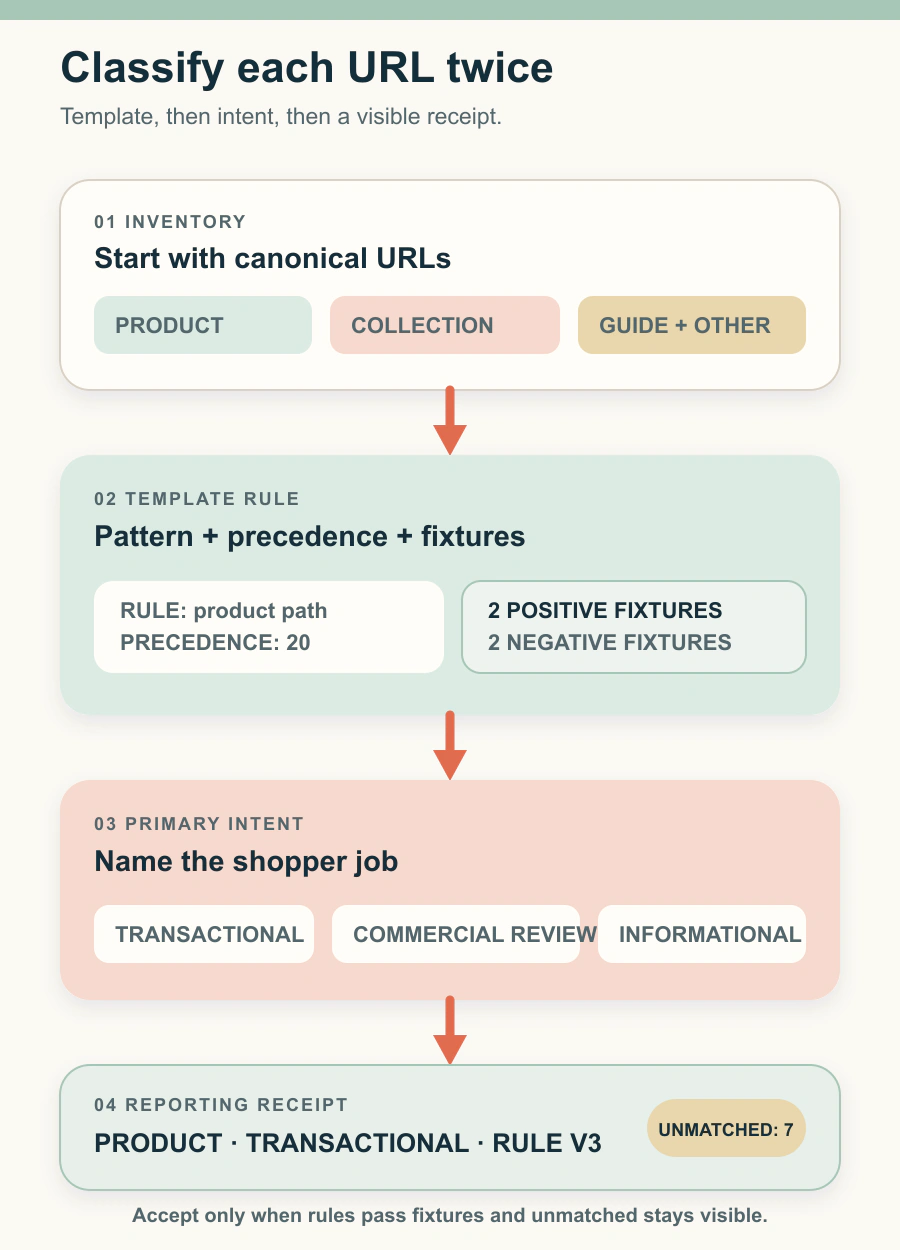
A page template describes how a page is built. Commercial intent describes the shopper job it supports. Both labels matter.
A collection page and a buying guide can both support commercial investigation, but they have different structures, owners, release risks, and content controls. Two product pages can share a template while serving very different query intent.
Define template groups from the actual store
Shopify's generated sitemap separates products, collections, pages, and blog posts. That is a useful starting inventory, not a complete reporting contract.
A store may also have market subfolders, campaign landing pages, app routes, headless routes, filtered collection states, or custom content types. Inspect the URLs that Google credits in Search Console, the canonical URLs in your crawl, and the current sitemap before writing rules.
An illustrative template inventory might include:
| Template group | Reader job | Illustrative matcher | Required fixture |
|---|---|---|---|
| Product | Evaluate one purchasable item | Path contains /products/ | One indexed product canonical |
| Collection | Browse a category or use case | Path contains /collections/ | One primary collection canonical |
| Guide | Learn, compare, or solve a problem | Approved blog or guide routes | One evergreen guide and one comparison |
| Policy and service | Resolve delivery, returns, warranty, or support questions | Approved policy and page routes | One customer-facing policy page |
| Campaign | Continue a paid, email, or seasonal promise | Named campaign route list | One current and one expired campaign page |
| Unmatched | Reveal classification gaps | No rule matched | A sampled list reviewed every cycle |
These matchers are examples, not a universal regex. A rule is acceptable only after it matches known positives, excludes known negatives, and assigns each canonical URL once.
Add an intent label without pretending it is ground truth
Use a maintainable vocabulary: transactional, commercial investigation, informational, and navigational or support. Intent is an analyst-assigned primary label, not Google ground truth. Keep the rule visible and review exceptions because pages and query mixes can serve more than one job.
Editorial callout: If every URL is classified but nobody can explain the rules, the dashboard is not governed. It is only tidy.
Give rules precedence, fixtures, and ownership
For each rule, record:
- Rule name and version.
- Included matcher, exclusions, and precedence.
- Two positive and two negative fixtures.
- Expected template and intent, owner, and review date.
- Unmatched count and sampled unmatched URLs.
Run the fixtures whenever routes, markets, themes, apps, or canonical rules change. If a URL can enter two groups, resolve the precedence before using the totals.
Version the classifier and reject ambiguous assignments
Store the rule version, valid-from date, priority, matcher reference, template, primary intent, fixtures, owner, and status. Evaluate active rules by priority; reject equal-priority overlaps; assign each canonical once or send it to unmatched; and persist the winning rule beside the output.
Fixtures should cover localized folders, canonicalized filters, app routes, redirects, archived products, campaigns, and custom root paths. A visible unmatched URL is safer than a plausible total under the wrong owner.
Enforce reconciliation invariants before analysis
Five invariants turn a collection of regex rules into a reporting contract:
- Uniqueness: Every exported canonical page has one classification record or one unmatched record.
- Exclusivity: No page is accepted by two rules at the winning priority.
- Coverage: Classified rows plus unmatched rows equal the distinct page rows in the same extract.
- Metric conservation: Summed group metrics equal the metrics in that classified extract after using the same filters and aggregation. They are not required to equal the unfiltered property total.
- Reproducibility: The stored rule version, request boundary, and extraction time can recreate the decision input.
Use hard gates for invariants that should never be negotiable: zero accepted overlaps and all release fixtures passing. Set a local unmatched budget for the decision rather than copying a universal percentage. A catalog-wide template change requires tighter coverage than a review of ten known collection pages. If the local budget is exceeded, the output can still diagnose classification drift, but it cannot approve a storefront change.
Create a scorecard that preserves the reporting boundary
The first scorecard can be a spreadsheet. Keep it small enough that a founder, SEO lead, developer, and merchandiser can discuss the same evidence.
| Field | Why it belongs | Boundary to record |
|---|---|---|
| Canonical URL count in group | Shows the current reporting population | Source, extraction date, unmatched count |
| Clicks | Measures visits from supported Google Search results | Search type, country, device, period |
| Impressions | Shows observed search-result visibility | Same filters and comparison period |
| CTR | Helps identify changes between visibility and clicks | Query and result-type mix can change |
| Average position | Adds directional ranking context | Average topmost position, not a stable rank |
| Indexed-page evidence | Checks whether important pages remain eligible | Page indexing summary plus inspected fixtures |
| Query themes | Explains the shopper language behind a group | Query rows are incomplete and privacy-limited |
| Release and demand notes | Adds context for interpretation | Theme, content, catalog, market, feed, and seasonal changes |
Most Search Console performance data is credited to Google's selected canonical URL. Compare that reporting population with the canonicals your store expects. Do not classify every parameter or duplicate URL as a separate performance page.
Keep one unmatched row in the scorecard. A falling unmatched share is useful operational evidence that the rules cover the current store. It is not an SEO outcome.
Aggregate rates and positions without inventing movement
Do not average the CTR values shown on page rows. Recompute group CTR from the additive metrics:
group CTR = sum(clicks) / sum(impressions)
When compatible API rows must be combined, weight position by impressions:
group average position = sum(row average position × row impressions) / sum(row impressions)
Bulk export exposes position sums designed for aggregation. Use the documented formula for the chosen table rather than averaging a precomputed position column. Keep search type, property, country, device, date boundary, aggregation type, and data state identical before combining rows.
Denominator changes deserve their own note. CTR movement on a page group whose impression mix changed sharply may say more about new queries or result types than about title quality. A position change on a group whose URL population changed may reflect a classification or inventory shift. Record both the metric movement and the population movement before assigning a cause.
Before a comparison is decision-eligible, require:
- finalized data, or an explicit provisional label and a scheduled recheck;
- complete and comparable date windows with the same day count;
- identical search type, property, country, device, and appearance boundaries;
- a stable or explained page population;
- a non-zero denominator for every calculated rate;
- annotations for releases, migrations, promotions, market launches, and known data anomalies.
Read metric patterns before choosing a fix
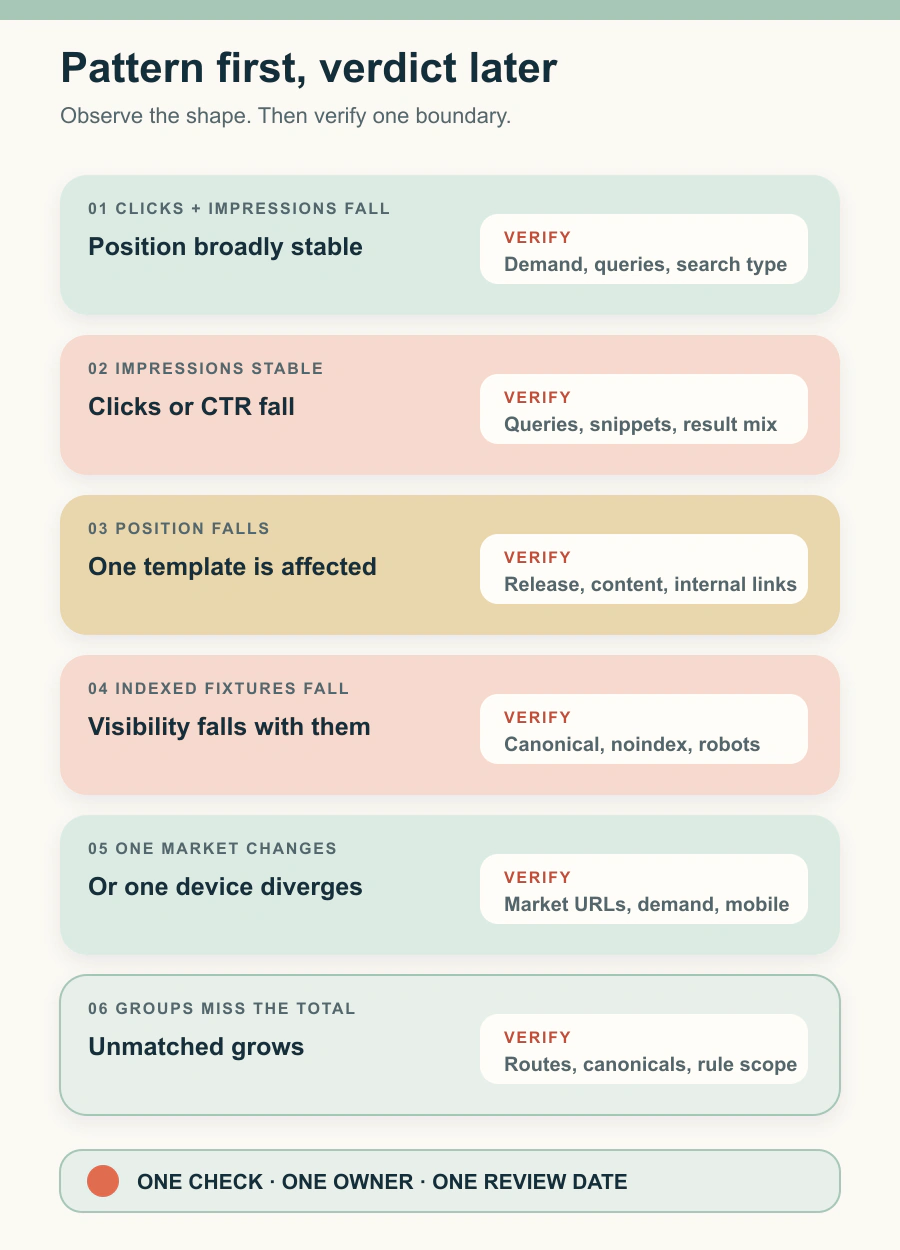
No single Search Console metric identifies a root cause. Read the shape of the change, then run the named verification.
| Observed pattern in one page group | What it may support | Verify before changing the store |
|---|---|---|
| Clicks and impressions fall; position is broadly stable | Demand, seasonality, feature availability, or query mix may have changed | Compare like periods, leading queries, search types, markets, Google Trends, and data anomalies |
| Impressions are stable; clicks or CTR fall | Search-result presentation or query mix may have changed | Inspect important queries, actual result pages, titles, snippets, rich-result eligibility, device, and country |
| Position falls across one template | A content, internal-link, template, or ranking change may affect the group | Check release annotations, query mix, sampled URLs, internal links, manual actions, and competing results |
| Indexed important pages fall with visibility | Eligibility, canonical, crawl, noindex, redirect, or availability issues may be involved | Review Page indexing, URL Inspection fixtures, canonicals, robots rules, sitemaps, and response behavior |
| One market or device changes | Localization, demand, property scope, mobile presentation, or release behavior may differ | Separate country and device; verify market URLs, hreflang, mobile templates, and comparable periods |
| Property total changes but classified groups do not explain it | Rules, new routes, or reporting boundaries may be stale | Review unmatched URLs, canonical changes, new subdomains, search type, and property scope |
Google's own traffic-drop guidance treats chart patterns as investigation paths. It also recommends looking for whether a change affects the whole site, a group of pages, or one important page. The template scorecard makes that group-level check repeatable.
Do not set a universal percentage threshold. A material change depends on the store's normal variability, decision risk, seasonality, group size, and data completeness. Document the review rule locally.
Choose the lightest extraction method that stays trustworthy
The extraction method should match the decision frequency and catalog scale.
Know the operating boundary of each extraction tier
Use the interface for one bounded investigation. Its substring and RE2 regex filters are useful, but partial matching, manual state, and screenshots do not form a durable reporting definition.
Use the Search Analytics API for repeatable page-level scorecards. Save the request, filters, response aggregation, rule version, extraction time, and data state. Pagination does not remove top-row limits: Google documents up to 25,000 rows per request and 50,000 exposed rows per day per search type for this method. Choose the minimum dimensions that answer the decision.
Use BigQuery bulk export for large catalogs and durable history. Classify URL-impression rows, aggregate metrics, filter every query by data_date, monitor ExportLog freshness, treat empty query text as anonymized data, and govern cost, retention, permissions, and schema changes. Do not mix URL- and site-impression boundaries.
Choose the extraction tier with an exit condition
| Tier | Best fit | Primary failure mode | Exit condition |
|---|---|---|---|
| Interface | One bounded question and a small rule set | Manual filters cannot be reproduced | Move to the API when the same view is rebuilt repeatedly or ownership becomes ambiguous |
| Search Analytics API | Scheduled scorecard with controlled dimensions | Top-row limits and excessive granularity hide coverage | Reduce dimensions, split the question, or move the required history and detail to bulk export |
| BigQuery bulk export | Large catalog, durable history, governed joins | Cost, permissions, stale exports, and unconsolidated rows | Pause expansion when the operating owner, cost control, or monitoring cannot be maintained |
The most advanced stack is not automatically the best one. The correct tier is the lightest system that can reproduce the decision and expose its failure state.
Run a weekly review receipt
The receipt records what was observed, what remains uncertain, and what the team will do next.
- Property, search type, countries, devices, and date comparison.
- Classification rule version and unmatched URL count.
- Page groups with material movement under the local review rule.
- Click, impression, CTR, and position pattern for each affected group.
- Query, indexing, release, market, and demand checks completed.
- One named owner for the next verification step.
- Evidence expected before a change is approved.
- Review date and rollback or exit condition.
The rollback condition matters. If a title or internal-link change is approved for a bounded page group, record how to reverse it and what evidence would trigger that reversal. If the investigation remains inconclusive, no change is a valid decision.
Separate evidence, approval, and rollback
The analytics owner controls extraction, reconciliation, and data state; the SEO owner controls the hypothesis and query review; engineering controls release safety; merchandising or market owners supply demand and catalog context. A small team may combine roles, but one person should not silently define the population, infer the cause, and approve the change.
For an approved intervention, freeze representative URL fixtures, name the intended mechanism and exact page group, run canonical, indexability, response, structured-data, and internal-link checks, and record the review window and reversible configuration. Reporting rollback restores a faulty classifier; storefront rollback reverses a faulty release.
Keep the limits and stop conditions visible
- Private queries are omitted, top-row limits apply, and filtering can change aggregation.
- Most performance data is assigned to Google's selected canonical; average position is not a fixed daily rank.
- Search Console clicks and GA4 sessions have different scopes and should not be forced to match.
- A release correlation narrows the investigation but does not prove causation.
Narrow or stop the analysis when property scope is wrong, canonical inventory is unstable, data is stale or provisional, no owner can maintain the rules, or the group is too small or volatile for the local decision rule. More segmentation cannot repair an invalid boundary.
A safe next action for this week
Choose one completed 28-day period and the preceding comparable 28-day period. Do not change the store yet.
- Export the Pages table for Web search from the correct property and record the full boundary.
- Create rule version v1 with priority, owner, positive fixtures, negative fixtures, and an unmatched path.
- Run the uniqueness, exclusivity, coverage, metric-conservation, and reproducibility checks.
- Calculate CTR from summed clicks and impressions; weight position correctly when compatible rows are combined.
- Reject the decision if fixtures fail, overlaps exist, the local unmatched budget is exceeded, or the comparison period is incomplete.
- Pick the one group with the clearest material change under the local review rule.
- Run the demand, query, indexing, release, market, device, and population checks for that pattern.
- Assign one verification action, decision owner, review date, reporting rollback, storefront rollback, and exit condition.
Success is not a green chart. Success is a team that can explain which page group changed, which causes were checked, what evidence is still missing, and why one bounded action is safer than a catalog-wide rewrite.
Frequently asked questions
How do I use Google Search Console for a Shopify store?
What regex should I use to group Shopify product and collection pages?
Why do my filtered Search Console groups not add up to the property total?
Does a fall in Shopify organic clicks mean rankings dropped?
When should I use the Search Console API instead of the interface?
Should Search Console clicks match GA4 organic sessions?
Sources
- Google Search Console Help: Performance report dimensions and data groupings, accessed 31 August 2026
- Google Search Console Help: Advanced filtering and comparison, accessed 31 August 2026
- Google Search Console Help: What are impressions, position, and clicks?, accessed 31 August 2026
- Google Search Central: Debugging drops in Google Search traffic, accessed 31 August 2026
- Google Search Console API: Search Analytics query method, accessed 31 August 2026
- Google Search Console Help: About bulk data export to BigQuery, accessed 31 August 2026
- Google Search Console Help: About Search Console data, accessed 31 August 2026
- Google Search Console Help: Page indexing report, accessed 31 August 2026
- Shopify Help Center: Finding and submitting your sitemap, accessed 31 August 2026
- Shopify Help Center: SEO overview, accessed 31 August 2026
- Google Search Console API: Getting all your performance data, accessed 31 August 2026
- Google Search Console Help: Bulk export query guidelines and sample queries, accessed 31 August 2026
- Google Search Console Help: Bulk export table guidelines and reference, accessed 31 August 2026
- Google Search Console Help: Manage and monitor bulk data exports, accessed 31 August 2026