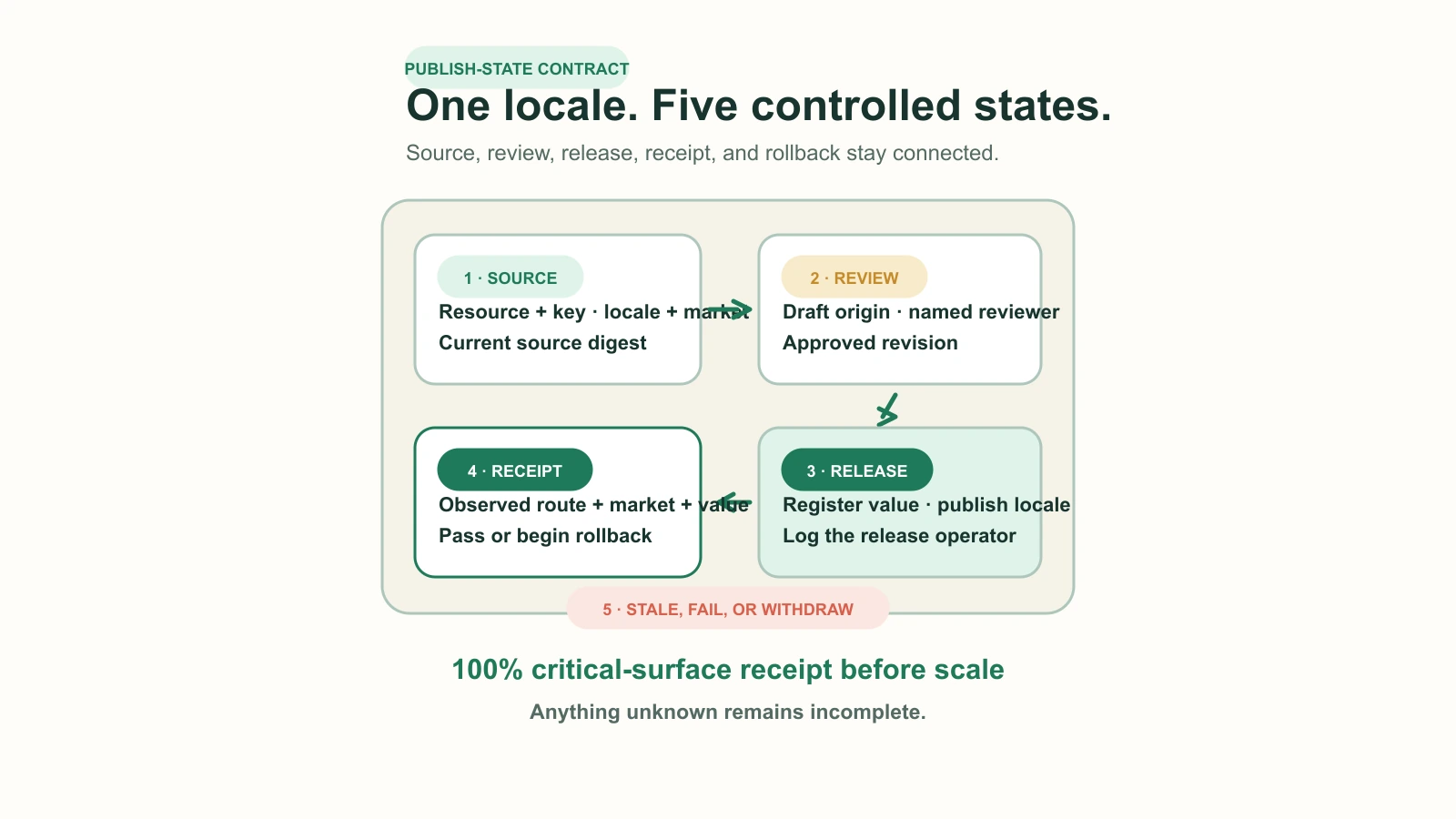

A translation app can report complete while the storefront is still operationally incomplete. A product description is translated, yet an app block remains in the primary language, an unpublished locale falls back silently, a market-specific term is wrong, and nobody can prove which source revision the translation represents. The missing layer is not another language. It is a publish-state contract.
The contract records what is translatable, who owns each surface, which source digest was reviewed, where the result is stored, whether the locale is published, what the shopper actually received, and how the team withdraws or migrates the translation. Use it to choose between Shopify Translate & Adapt, a Translations API-compatible app, a vendor-managed layer, or a custom integration.
Start with surface ownership, not language count
Shopify does not have one universal translation store. Merchant-authored resources can be exposed through Shopify's translation system. Theme storefront strings live in locale files. Theme app extension copy belongs to the extension. Checkout and system messages have different ownership again. Customer account and checkout UI extensions read their own locale resources, not the theme's. An app can therefore translate a large catalog accurately and still leave a mixed-language purchase journey.
| Surface | Typical owner | Translation mechanism | Failure to test |
|---|---|---|---|
| Products, collections, articles, policies, navigation, metaobjects, and eligible metafields | Merchant or catalog team | Shopify translation resources, CSV, Translate & Adapt, compatible app, or Admin API | The field is missing, stale, market-wrong, or falling back |
| Theme storefront labels | Theme team | Storefront locale JSON and Liquid translation filters | A theme switch or new section reintroduces primary-language labels |
| Theme app extension labels | App developer | Extension locale files | Merchant tooling cannot edit the label the team assumed it owned |
| Checkout and Shopify system messages | Shopify plus configured settings | Shopify-owned language settings and supported extension localization | A storefront preview passes while checkout remains inconsistent |
| Checkout or customer account UI extension copy | Extension developer | The extension's locale files and localization API | The extension falls back independently of theme and catalog content |
| External widgets, feeds, reviews, and scripts | Vendor or integration owner | Vendor-specific store, API, export, or runtime layer | Content is absent from Shopify exports or unavailable during vendor failure |
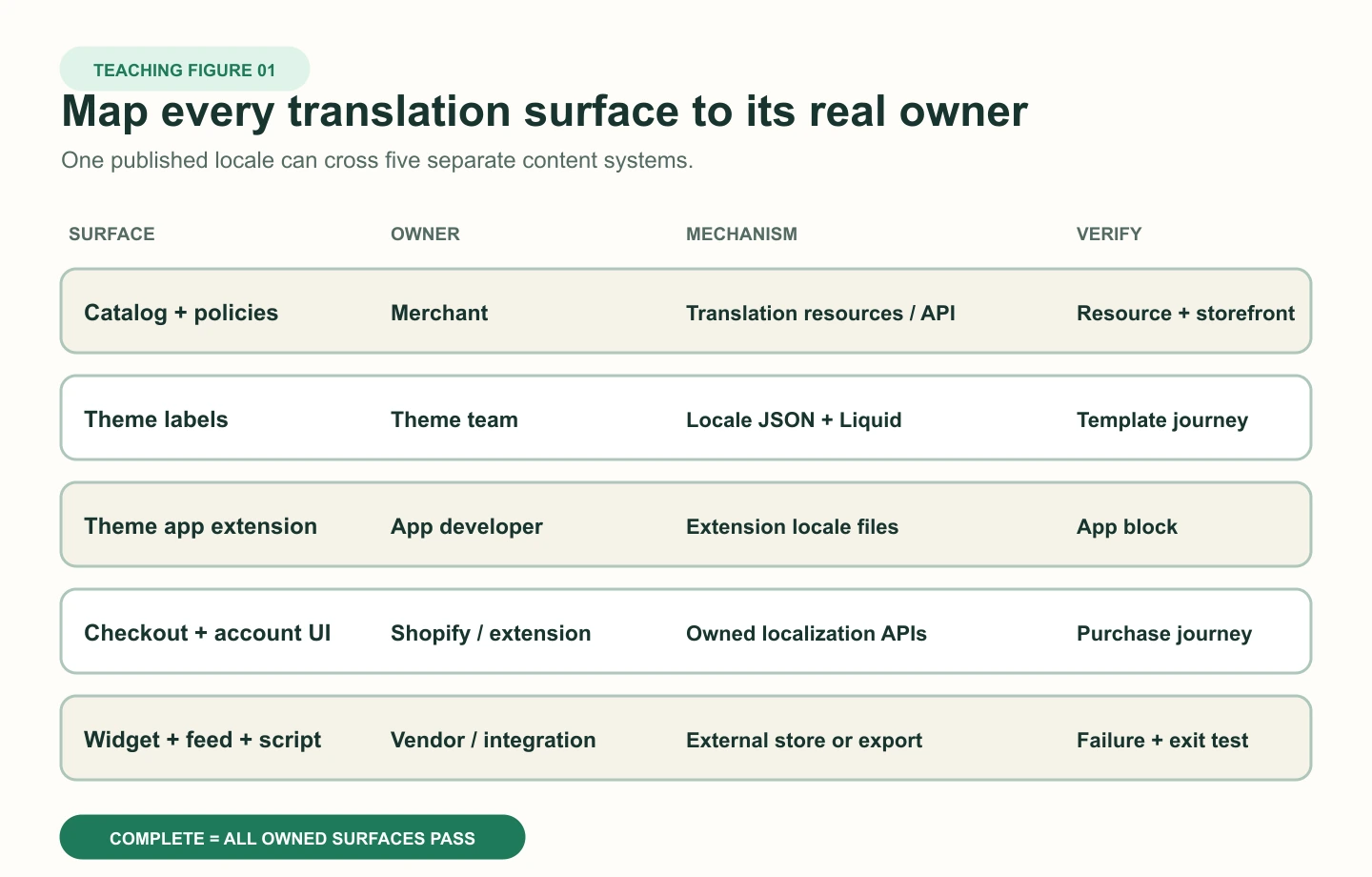
Editorial callout: If a vendor cannot show where each translation is stored, how it is exported, what happens when the app is disabled, and which surfaces it cannot own, the evaluation is not complete. A polished language switcher is not an ownership model.
Define the publish-state contract
Shopify's Translations API makes one control especially valuable: a translation write can include the digest of the source content. When source text changes, Shopify can identify the translation as outdated instead of pretending it is current. That mechanism should become an operating rule even when a human-facing app hides the API details.
| Contract field | Required value | Why it exists |
|---|---|---|
| Resource identity | Resource type, global ID, field key, locale, and optional market | Prevents the same sentence in different resources or markets from being treated as one record |
| Source state | Source value hash or Shopify digest plus captured timestamp | Links the translation to the revision that was actually reviewed |
| Translation state | Draft, reviewed, registered, published, verified, stale, withdrawn, or failed | Separates linguistic work from storefront availability |
| Origin | Manual, machine, vendor memory, imported file, or custom pipeline | Sets the right review and attribution expectations |
| Ownership | Author, reviewer, approver, technical operator, and escalation owner | Stops failures being passed between content, ecommerce, and development teams |
| Verification receipt | URL, market, locale, timestamp, expected value, observed value, and screenshot or response evidence | Proves what a shopper received rather than what the admin reported |
| Exit evidence | Latest export, restore test, disable result, residue list, and deletion rule | Turns portability and rollback into tested facts |
The release invariant is strict: every decision-critical surface in the pilot must have a reviewed translation tied to the current source digest, a published locale, and a passing storefront receipt for the intended market. If any of those fields is unknown, the item is incomplete. A primary-language fallback may be an acceptable temporary policy for low-risk editorial content, but it must never be mistaken for translated coverage.
Choose the architecture by workflow and failure boundary
| Option | Best fit | Require before approval | Main non-fit or exit risk |
|---|---|---|---|
| Shopify Translate & Adapt | One or two machine-translated languages, manual translation beyond that, Shopify-hosted resources, and a small team | Surface inventory, untranslated and outdated queues, market-specific review, CSV backup, and checkout journey test | Unsupported surfaces and external app content still need separate ownership |
| Translations API-compatible app | More collaboration, bulk operations, terminology, review, or third-party workflow while translations remain Shopify resources | Exact resource coverage, read and write scope map, digest behavior, export format, market handling, and uninstall test | App workflow and metadata may not survive even if Shopify translation values do |
| Vendor-managed or runtime layer | Surfaces or workflow that cannot be met with Shopify-hosted translations and a documented operational case | Data-location map, crawler and feed behavior, checkout boundary, latency and failure mode, complete export, disable test, and theme residue check | Dependency, recurring cost, vendor lock-in, and storefront behavior during outage or removal |
| Custom integration | High-volume catalogs, structured source systems, controlled terminology, market variants, approvals, and owned engineering operations | Digest-aware writes, least-privilege scopes, idempotency, rate-limit handling, queue observability, reconciliation, support rotation, and deletion path | Highest implementation and maintenance responsibility |
| No additional app | Existing native translation plus theme and extension locale work already covers the required journey | Coverage receipt and named maintenance owner | Manual work can grow unnoticed if content velocity is not measured |
Current pricing should be treated as an input, not the decision. Translate & Adapt is listed as free and supports two auto-translated languages with manual translation for additional languages. Paid platforms may price by language, translated words, automation, or workflow tier. The durable comparison is cost per maintained, verified surface, including review labour, theme migrations, failed sync investigation, and exit work.
Constrain permissions and data movement
A custom translation integration needs read_translations to retrieve translation state and write_translations to register or remove values. The integration may also need access to the source resources it reads. A listed permission is not proof that every requested object is necessary. Map every scope to a named workflow, data class, retention rule, operator, and revocation test.
- ✓List each Shopify resource type, vendor system, file, and user role the workflow touches.
- ✓Separate read, write, publish, remove, theme, file, and external-service permissions.
- ✓Identify whether product, customer, order, analytics, or personal data leaves Shopify and why.
- ✓Record where translation memory, glossary terms, screenshots, and review comments are stored and deleted.
- ✓Test revoked access, expired credentials, partial API failure, duplicate jobs, and safe replay.
- ✓Require audit records for who changed a translation, which source digest it used, and which market received it.
Do not grant customer or order access merely because the vendor offers personalized translation or analytics. Start from the minimum content workflow. Add a sensitive scope only when a documented feature, owner, retention period, and measurable benefit justify it.
Build the integration as a reconciled queue
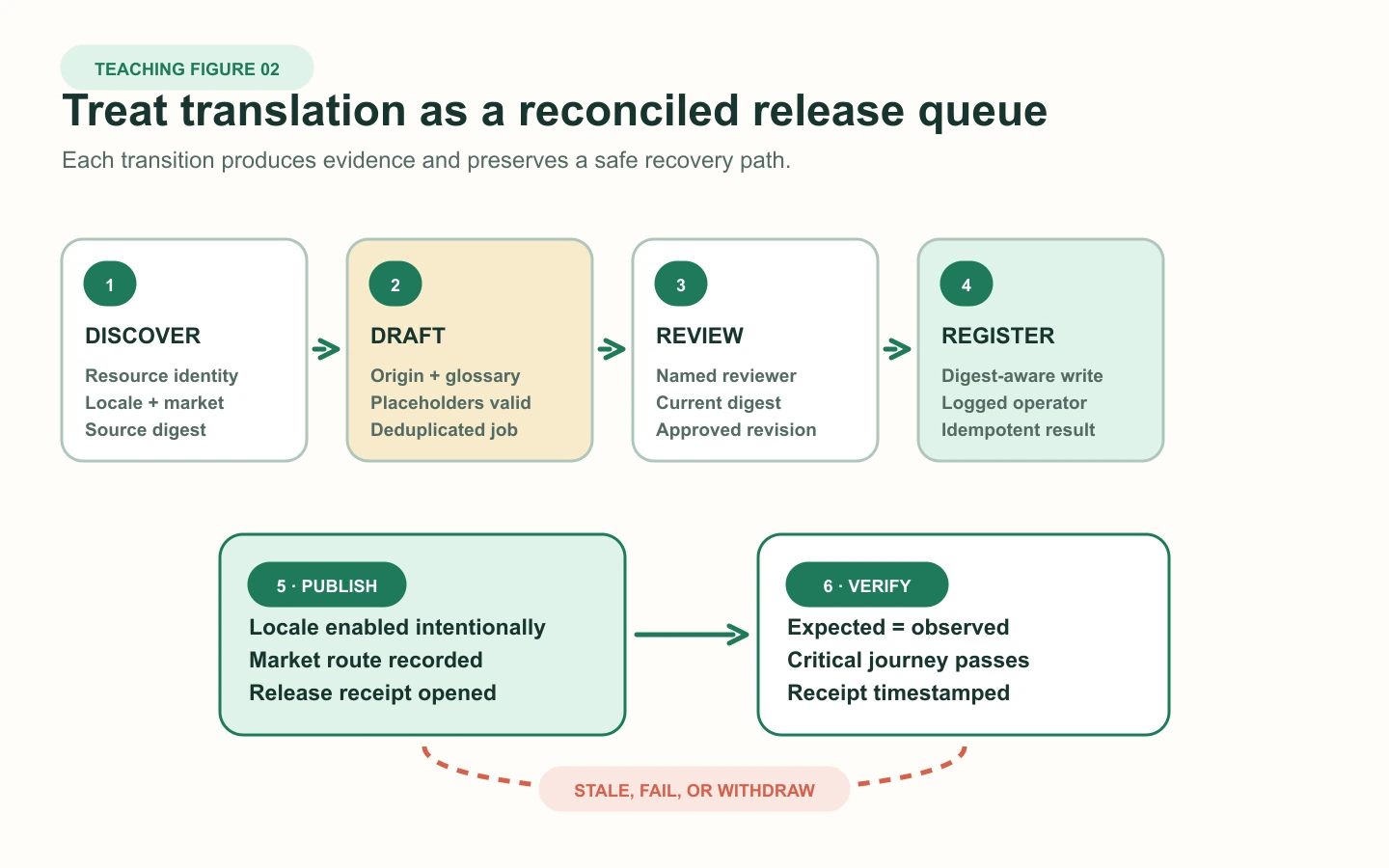
A reliable custom pipeline does not translate and publish in one opaque request. It discovers translatable resources, captures the source digest, creates a job, applies glossary and market context, records a draft, collects review, registers the translation, publishes the locale when authorized, and verifies the storefront. Each step is idempotent and can be retried without inventing a second translation revision.
- Query the eligible translatable resources and store resource identity, field key, locale, optional market, and source digest.
- Deduplicate on resource, field, locale, market, and source digest before sending work to a human or machine service.
- Validate placeholders, HTML structure, links, units, glossary terms, and protected brand strings before review.
- Register only the reviewed value with the digest captured for that source revision.
- Publish the locale through the approved release step, not as a side effect of generating a translation.
- Fetch the real storefront route in the intended market and locale, then compare expected and observed values.
- Reconcile Shopify translation state with the queue daily and route outdated, missing, duplicated, or failed records to owners.
- Remove or withdraw a translation only through a logged rollback that confirms the resulting fallback and URL behavior.
Concurrency matters. If the source digest changes after a reviewer approves the draft but before registration, the job must stop as stale. It must not overwrite the current translation with work based on an older product claim, policy, ingredient list, price explanation, or shipping promise.
Set explicit fallback and failure policies
| Failure | Detection | Immediate response | Recovery evidence |
|---|---|---|---|
| Source changed after review | Digest mismatch or outdated flag | Block registration or withdraw the affected release | New review tied to current digest |
| Locale published with missing critical content | Synthetic journey or coverage receipt fails | Unpublish the locale or remove the affected route from promotion | All critical receipts pass before republish |
| External vendor or script unavailable | Health check, missing widget, timeout, or error rate | Serve owned Shopify content or primary-language fallback under the approved policy | Failure-mode test and restored service receipt |
| Theme release removes or renames locale keys | Pre-release key diff and storefront smoke test | Rollback theme release or restore compatible keys | Desktop and mobile route receipts across representative templates |
| Wrong market-specific term or claim | Reviewer or storefront check identifies market mismatch | Withdraw the market-specific translation without deleting valid global content | Correct market-scoped value and approval |
| App removed but switcher or code remains | Disable and uninstall inspection | Remove documented theme residue and stale entry points | Clean theme diff, no dead request, and stable locale navigation |
Shopify documents that unpublishing a language makes its URLs unavailable and can require redirects, while deleting a language permanently removes its translations. A rollback plan must distinguish translation withdrawal, locale unpublish, language deletion, app disable, and app uninstall. They are not interchangeable actions.
Run a controlled one-locale pilot
Day 0: Freeze the contract
Select one secondary locale, one market, representative products and collections, one article, policies, navigation, theme labels, app blocks, and the full purchase journey. Name owners and rollback authority.
Days 1 to 2: Build the inventory
Capture resources, keys, digests, translation origins, unsupported surfaces, permissions, export format, and baseline primary-language fallbacks.
Days 3 to 4: Translate and review
Apply terminology and market context, review every decision-critical claim, and register only values tied to the current source revision.
Day 5: Publish and verify
Publish the locale intentionally. Test home, collection, product, cart, checkout, customer account, policy, search, app block, emails, feeds, and crawler-visible output where applicable.
Day 6: Exercise failure and exit
Change source content, disable the candidate app, interrupt a job, export translations, restore one record, inspect theme residue, and rehearse withdrawal.
Day 7: Decide
Approve, revise, or reject based on coverage, staleness, error recovery, review effort, performance, support load, and proved exit cost.
| Pilot signal | Release rule | Rollback or stop rule |
|---|---|---|
| Critical surface coverage | 100% reviewed against current source digest and storefront-verified | Any missing, stale, or wrong-market critical surface |
| Fallback accuracy | Every fallback matches the written policy and is visible in the inventory | Silent primary-language fallback on checkout, legal, delivery, product-claim, or account-critical content |
| Operational latency | Review and correction stay within the named service level | Queue age or correction load exceeds available owner capacity for two review cycles |
| Performance and availability | No material regression in representative templates and vendor failure degrades safely | Blocking render, broken navigation, or an unowned vendor outage path |
| Exit | Current export reimports successfully and disable leaves a usable journey | Missing data, unremovable residue, broken locale navigation, or undocumented external dependency |
| Commercial fit | Total cost is acceptable per maintained and verified locale surface | Pricing, review labour, or maintenance grows faster than the value of the locale |
Operate freshness, monitoring, and change
Localization becomes a production system as soon as the catalog, theme, policies, apps, or markets change. The operating cadence should follow content risk rather than a generic monthly translation task. High-risk product claims, legal language, delivery promises, payment copy, and returns policy need tighter source-change alerts and review targets than evergreen editorial copy.
- ✓Daily: reconcile new, failed, and outdated decision-critical records; alert on missing storefront receipts.
- ✓Per content release: capture new source digests and block stale translations from automatic promotion.
- ✓Per theme or app release: diff locale keys, test extension surfaces, and inspect representative desktop and mobile journeys.
- ✓Weekly during rollout: review queue age, correction rate, fallback rate, failed jobs, vendor health, and support contacts by locale.
- ✓Monthly: export owned translation data, sample restore, review permissions, and compare maintained coverage with paid language and word tiers.
- ✓Quarterly: rehearse disable and rollback, remove dead locale keys, review vendor residue, and re-evaluate whether the selected architecture still fits.
Do not use translation count as the main success metric. Track current-digest coverage, verified critical-surface coverage, fallback rate by surface, stale queue age, first-pass review acceptance, correction rate, storefront mismatch, failed-job recovery time, support contacts by locale, and the cost of maintaining one verified surface. These measures expose whether the system is reliable, not merely busy.
Prove switching cost before scale
Shopify says Translate & Adapt translations remain after the app is uninstalled, although removal has its own process. That is helpful but incomplete as an exit plan. A third-party app may keep workflow metadata, glossary logic, translation memory, images, market adaptations, external widgets, or theme switcher code outside the Shopify values that survive. Vendor export formats may also differ from Shopify's native CSV.
- Export all relevant languages, markets, resource identities, field keys, source values, translated values, status, and workflow metadata.
- Import a controlled sample into an isolated test path and compare the storefront receipt, not just the file row count.
- Disable the app before uninstalling it and record storefront, admin, job, feed, checkout, and account behavior.
- Inspect theme files, app blocks, snippets, script requests, switchers, redirects, DNS, and external services for residue.
- Define which translations remain in Shopify, which are deleted, which are legally retained, and who can retrieve the final export.
- Price the exit work before adding more languages, content types, automated jobs, or custom vendor-only fields.
Frequently asked questions
Is Shopify Translate & Adapt enough for a multilingual store?
Does Translate & Adapt overwrite manual translations?
What permissions does a custom Shopify translation app need?
Why does the source digest matter?
What should a Shopify translation app pilot cover?
What happens when a Shopify translation app is removed?
Sources
- Shopify Help Center: Translate & Adapt
- Shopify Help Center: Localization and translation
- Shopify developer docs: Manage translated content
- Shopify Admin GraphQL: translationsRegister
- Shopify Admin GraphQL: translatableResource
- Shopify Admin GraphQL: translationsRemove
- Shopify developer docs: Theme app extension configuration
- Shopify developer docs: Storefront locale files
- Shopify developer docs: Customer account extension localization
- Shopify App Store: Translate & Adapt
- Shopify App Store: langify
- langify support: Export translations
- langify support: Moving theme translations
- Weglot support: Remove remaining Shopify button code
- Shopify Help Center: Uninstalling apps