
Shopify says yesterday's total sales were one number. Google Analytics 4 shows a different revenue total. The tempting response is to call tracking broken and start changing tags.
That can make the problem worse. Shopify and GA4 do not begin with the same data, definitions, timing, or purpose. Shopify records commercial activity in the store. GA4 reports ecommerce events that reached and were processed by an analytics property. A difference is therefore expected. The useful question is whether the gap is explainable and stable.
Start with the metric, not the percentage gap
Shopify defines total sales as gross sales minus discounts and sales reversals, plus taxes, duties, shipping charges, and fees.
GA4's item revenue is narrower: price multiplied by quantity, excluding tax and shipping. GA4 purchase revenue represents revenue received through ecommerce and in-app purchase events, while total revenue can also include subscriptions and advertising revenue, minus reported refunds.
| If you are comparing | First check |
|---|---|
| Shopify total sales vs GA4 item revenue | Tax, shipping, duties, fees, discounts, and reversals are not aligned |
| Shopify online-store sales vs GA4 purchase revenue | The purchase event value, currency, and transaction coverage |
| Shopify total sales vs GA4 total revenue | Whether GA4 includes non-store revenue sources |
| Daily totals | Time zones, processing delay, order edits, and reversal dates |
Do not assume what the Shopify integration sends as the GA4 purchase value. Inspect a real purchase event and document the payload. Google says event-level revenue depends on value and currency, while item revenue depends on item-level price and quantity.
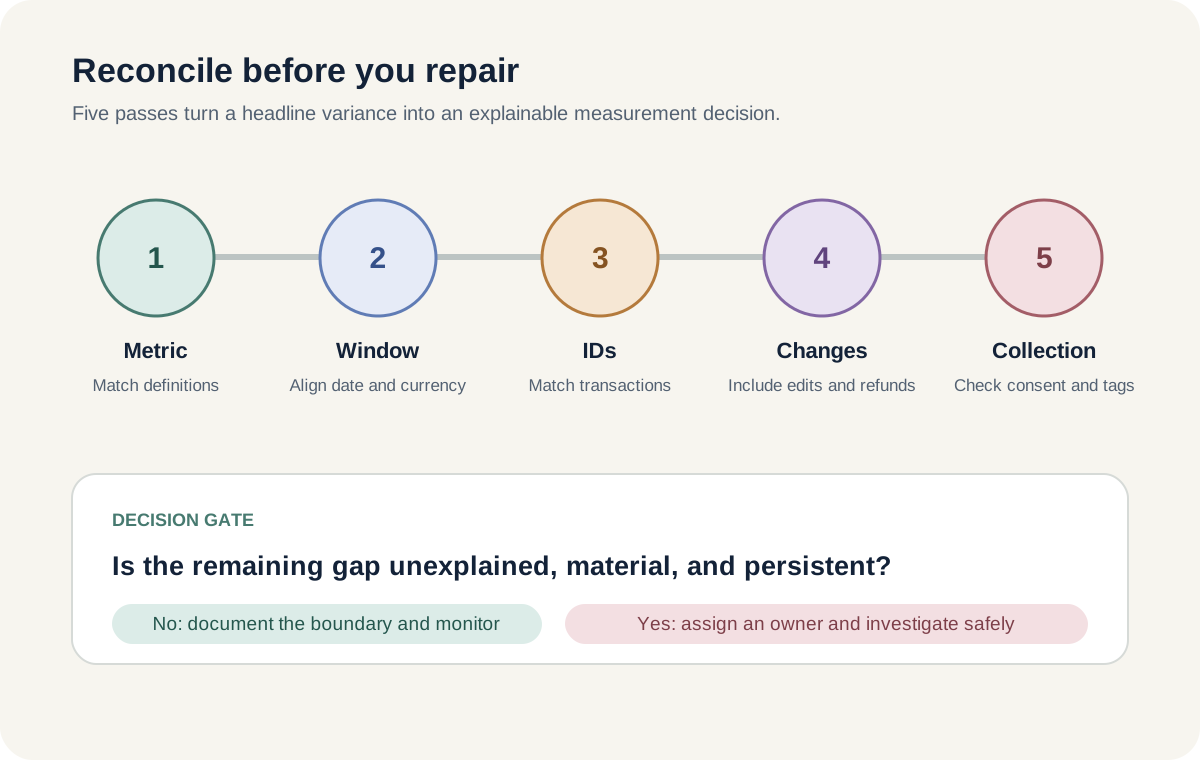
Use a five-pass reconciliation
1. Match the scope
Choose one store, one sales channel, and one revenue definition. If GA4 measures the online store, do not compare it with totals that include point of sale or other channels. Shopify notes that pending, unpaid, and canceled orders can appear in sales reports, while test orders do not.
2. Match the reporting window
Use a completed period rather than today. GA4 processing can take 24 to 48 hours, and values may change during that time. Google records activity according to the property's reporting time zone, not each visitor's local date.
Use the same reporting currency. Shopify can display converted report data using the historical exchange rate for the transaction date. That may not match a value sent or converted elsewhere.
3. Match transaction IDs
Compare Shopify order identifiers with GA4 transaction_id values. Use identifiers and values, not customer names or email addresses.
Google requires a unique transaction ID to deduplicate web purchase events and process refunds correctly. Empty, reused, or inconsistently formatted IDs can create undercounting or duplication risk. Compare four groups: present in both systems, Shopify only, GA4 only, and duplicated in GA4.
4. Account for changes after purchase
Shopify sales reversals include refunds, cancellations, edits, and adjustments. A later order edit can appear separately in a sales-over-time report. GA4 changes only when the relevant events and parameters are sent and processed.
Record the comparison date and rerun the same closed period after processing has settled. This separates timing differences from persistent collection gaps.
5. Check the collection boundary
GA4 can report only events it receives. Shopify's GA4 setup collects events including add_to_cart, begin_checkout, and purchase after setup. Consent choices, tag configuration, browser restrictions, and implementation errors can reduce observable events.
Do not weaken a consent banner to improve the match. Google recommends using a consent management platform that integrates with Shopify's Customer Privacy API, or Shopify's own privacy controls as a starting point. Measurement coverage is not permission to collect more data.
Read the shape of the gap
A consistently lower GA4 total often points toward collection coverage, consent, channel scope, or missing purchase parameters. A higher GA4 total can justify checking duplicate purchase firing, multiple tag implementations, or transaction IDs.
If daily values move between dates but a completed week is closer, examine time zones, processing, and post-order changes first. If the overall total is reasonable but channel revenue changes, inspect attribution separately. GA4's reporting attribution model can redistribute revenue credit when event-scoped traffic dimensions are used without changing the underlying Shopify order.
These patterns are diagnostic leads, not verdicts. Confirm them at transaction level before changing production tracking.
Know when not to change tracking
Do not aim for a permanent 100 percent match. Consent, blocked collection, offline or non-web orders, and different metric definitions make that an unsafe universal target.
Do not send synthetic purchases merely to fill a reporting gap. Do not expose customer details in a reconciliation export. Do not change attribution settings while diagnosing event collection, because that changes how credit is displayed rather than whether a purchase occurred.
Use Shopify or the governed finance system for commercial and accounting totals. Use GA4 to understand observable journeys, landing pages, campaigns, and onsite behavior. The systems become more useful when their roles are explicit.
A safe action for this week
Take one completed seven-day period and create a reconciliation note with five lines:
- ✓Exact Shopify report, filters, sales channel, and revenue metric
- ✓Exact GA4 report, metric, property time zone, and currency
- ✓Shopify order count and unique GA4 transaction ID count
- ✓Known refunds, cancellations, edits, consent boundaries, and processing delay
- ✓Variance amount, variance percentage, likely explanation, owner, and next review date
Do not change tracking yet. First decide whether the remaining difference is unexplained, material for the decision, and persistent across another comparable period.
Inficial can help ecommerce teams audit Shopify and GA4 measurement, document the reconciliation boundary, and build reporting that separates commercial truth from behavioral evidence.
Sources
- Shopify Help Center: Sales reports, accessed August 17, 2026
- Google Analytics Help: Ecommerce purchases report, accessed August 17, 2026
- Google Analytics Help: Monetization overview report, accessed August 17, 2026
- Google Analytics Help: Fix missing revenue data, accessed August 17, 2026
- Google Analytics Help: Data freshness, accessed August 17, 2026
- Google Analytics Help: Set up Analytics for a website or app, accessed August 17, 2026
- Shopify Help Center: Overview of Shopify reports, accessed August 17, 2026
- Google Analytics Help: Minimize duplicate key events with transaction IDs, accessed August 17, 2026
- Shopify Help Center: Setting up Google Analytics 4, accessed August 17, 2026
- Google Analytics Help: Set up Shopify to obtain user consent, accessed August 17, 2026
- Google Analytics Help: Change the reporting attribution model for key events, accessed August 17, 2026