
Removing an unused Shopify app sounds like a quick cost or speed win. The uninstall button is quick. Understanding what the app still controls is not.
An app may add a storefront block, pixel, function, fulfillment location, customer data, automation, or external subscription. Remove it without a short exit test and the saving can become a broken journey, missing record, or invoice that keeps arriving.
Do not use app count as the decision
More apps do not automatically mean a worse store. A well-built app can provide a useful capability with less maintenance than custom code. Shopify's theme app extension model can also reduce direct theme-code changes and load resources only where needed.
The better question is: does this app create enough current value to justify its cost, performance impact, operating work, and exit risk?
For one candidate app, write down:
- The customer or team problem it solves.
- The owner who can confirm it still works.
- Evidence of use or value from the last 90 days.
- The current plan, usage charges, and any external invoice.
- The time spent maintaining rules, content, permissions, and support.
If nobody can name the job or owner, that is a reason to investigate. It is not yet proof that removal is safe.
Run the five-step exit preflight
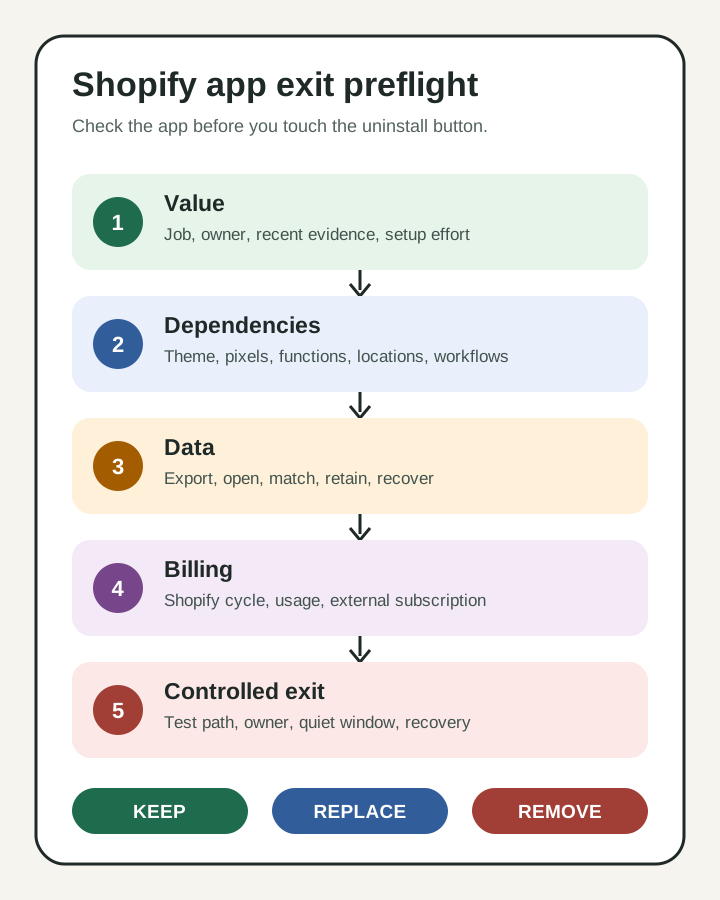
1. Confirm fit and setup effort
Open the app's About page under Settings > Apps. Shopify can show billing and usage charges, permissions, privacy details, extensions, functions, pixel status, compatibility issues, and app history.
Compare that footprint with the app's actual job. Include setup effort that a subscription price misses: staff training, rule reviews, content updates, quality checks, vendor support, and incident recovery.
2. Map every dependency
List where the app appears and what calls it. Check theme app blocks and embeds, checkout or discount functions, pixels, inventory locations, scheduled workflows, lifecycle tools, feeds, reports, and manual team procedures.
Shopify warns that dependent automations, integrations, and store features stop when an app is uninstalled. A theme preview can test a storefront surface, but it cannot prove that a background workflow or external integration will survive.
3. Secure the data you need
Record what the app reads, creates, changes, and stores outside Shopify. Export the records the business needs, then open the export and test whether it is usable. A file that cannot reconnect reviews to products or subscriptions to customers is not a recovery plan.
Shopify notes that some app data may be unrecoverable after uninstall and that reinstalling may not restore previous settings or data. Ask the developer about export coverage, retention, deletion, and reinstallation behavior before removal.
4. Separate billing paths
For Shopify-billed apps, uninstalling stops future recurring billing cycles, but a charge already generated for the current cycle can still appear. Usage charges also follow their own timing.
External subscriptions are different. Removing the Shopify app does not cancel a payment handled directly by the vendor. Save the renewal date, billing owner, cancellation path, and final expected charge.
There is no useful universal price comparison here. Use the actual billing section and vendor invoice because plans, volumes, add-ons, and currencies vary by store.
5. Choose a controlled exit
Do not start with a revenue-critical app. Pick a quiet window, define what will be checked, and name the person who can recover the capability.
| Decision | Use it when | Minimum proof |
|---|---|---|
| Keep | The capability is valuable and the operating burden is acceptable | Owner, value evidence, current cost, maintenance plan |
| Replace | The capability is needed but the current fit is poor | Tested replacement, data mapping, overlap and cutoff plan |
| Remove | The capability is unused, duplicated, or no longer worth its burden | Dependency map, usable export, billing closure, recovery window |
After any approved removal, test the relevant home, product, collection, cart, checkout, account, and operational paths. Shopify's web-performance reports can help show changes over time, but performance alone should not decide whether a customer or operational capability stays.
A 30-minute founder test for this week
Choose one low-risk app. Do not uninstall it yet.
- Write its job, owner, current cost, and one piece of recent value evidence.
- List every visible surface, data set, workflow, and connected system it touches.
- Confirm what can be exported and open one sample file.
- Record Shopify billing, external billing, renewal date, and cancellation owner.
- Select keep, replace, or remove, plus the evidence still missing.
The output is a one-page app exit record. If the decision is remove, schedule the actual change only after the owner approves the test and recovery plan.
Map the dependency before removing the app
This small test prevents two common mistakes: keeping every app because removal feels risky, and deleting an app because its value is not immediately visible.
- Use the broader Shopify migration scope framework
- Explore Shopify Apps & Integrations
- Review Long-Term Shopify Support
Inficial can help map app data, storefront extensions, automations, billing, and a controlled exit without treating app count as the goal.
Sources
- Storefront performance, Shopify developer documentation, accessed August 18, 2026
- Managing apps, Shopify Help Center, accessed August 18, 2026
- Uninstalling apps, Shopify Help Center, accessed August 18, 2026
- App charges on your Shopify bills, Shopify Help Center, accessed August 18, 2026
- Improving your online store performance, Shopify Help Center, accessed August 18, 2026