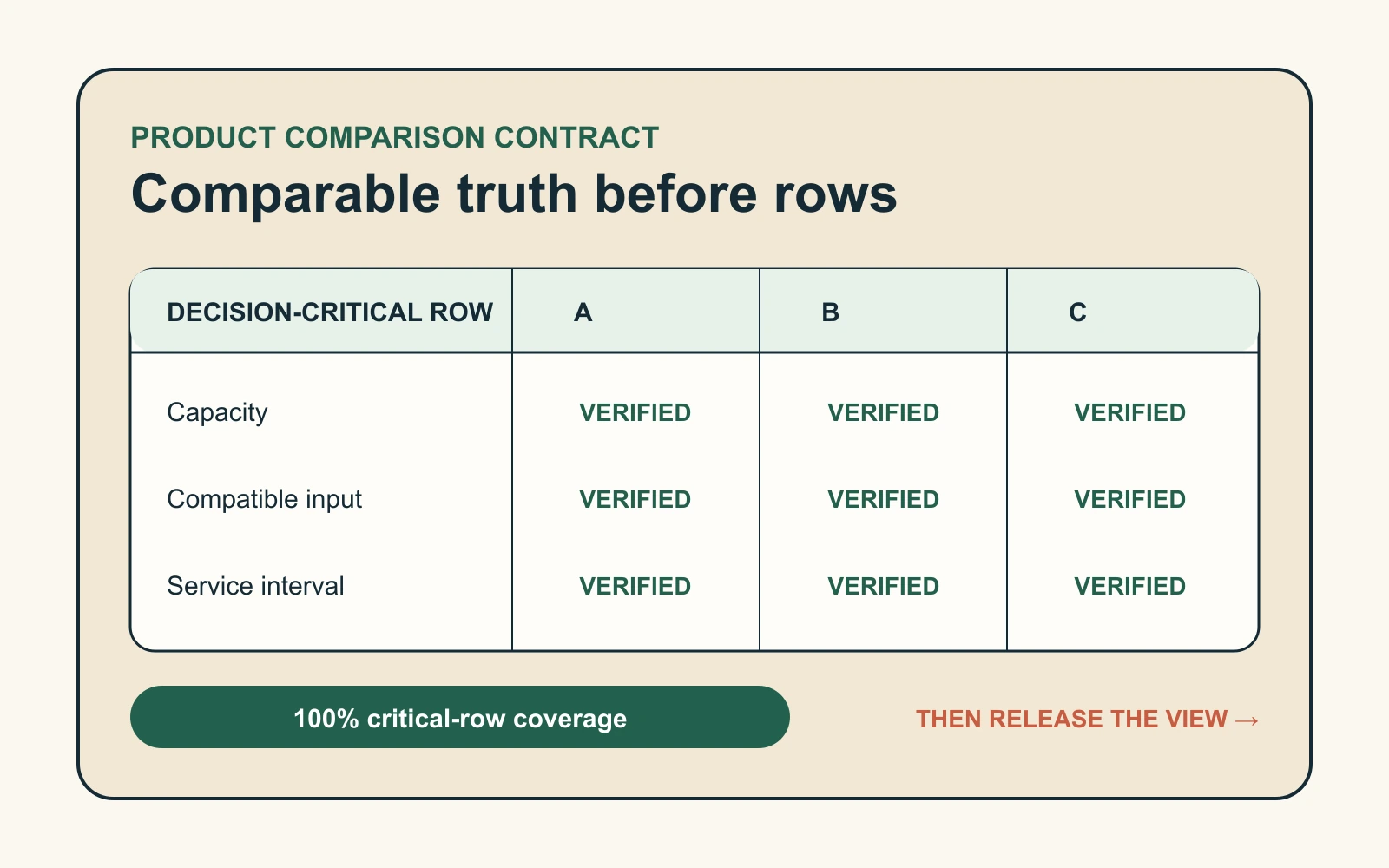

Campaign landing pages often begin as one useful test and end as a maintenance problem. The ad changes, the bundle changes, a variant sells out, one market has different eligibility, and the page still repeats the original promise.
An offer-state router solves that problem. A short campaign key selects a controlled offer definition, validates it against current store context, and exposes the same state to the page, CTA, cart, and analytics.
Define the offer contract before designing the page
Create one record for each campaign. It should contain only fields the store can govern.
| Field | Example | Why it exists |
|---|---|---|
| Campaign key | weekend-kit | Stable link between the ad and controlled offer |
| Promise | Build a weekend kit and save 15% | Message match |
| Eligible products | Trail Pack plus pouch | Prevent unrelated variants entering the offer |
| Market rule | US and UK | Stop unsupported regional promises |
| Active window | Start and end timestamps | Provide an expiry path |
| Proof set | Capacity, fit, and material records | Match evidence to the active offer |
| Fallback | Standard product page | Preserve a useful path when validation fails |
Do not let price, discount, or arbitrary headline parameters become page truth. Accept a known key such as offer=weekend-kit, resolve it against a controlled record, and ignore unknown parameters.
Render one decision workspace, not a promotional skin
The resolved state should control four visible areas.
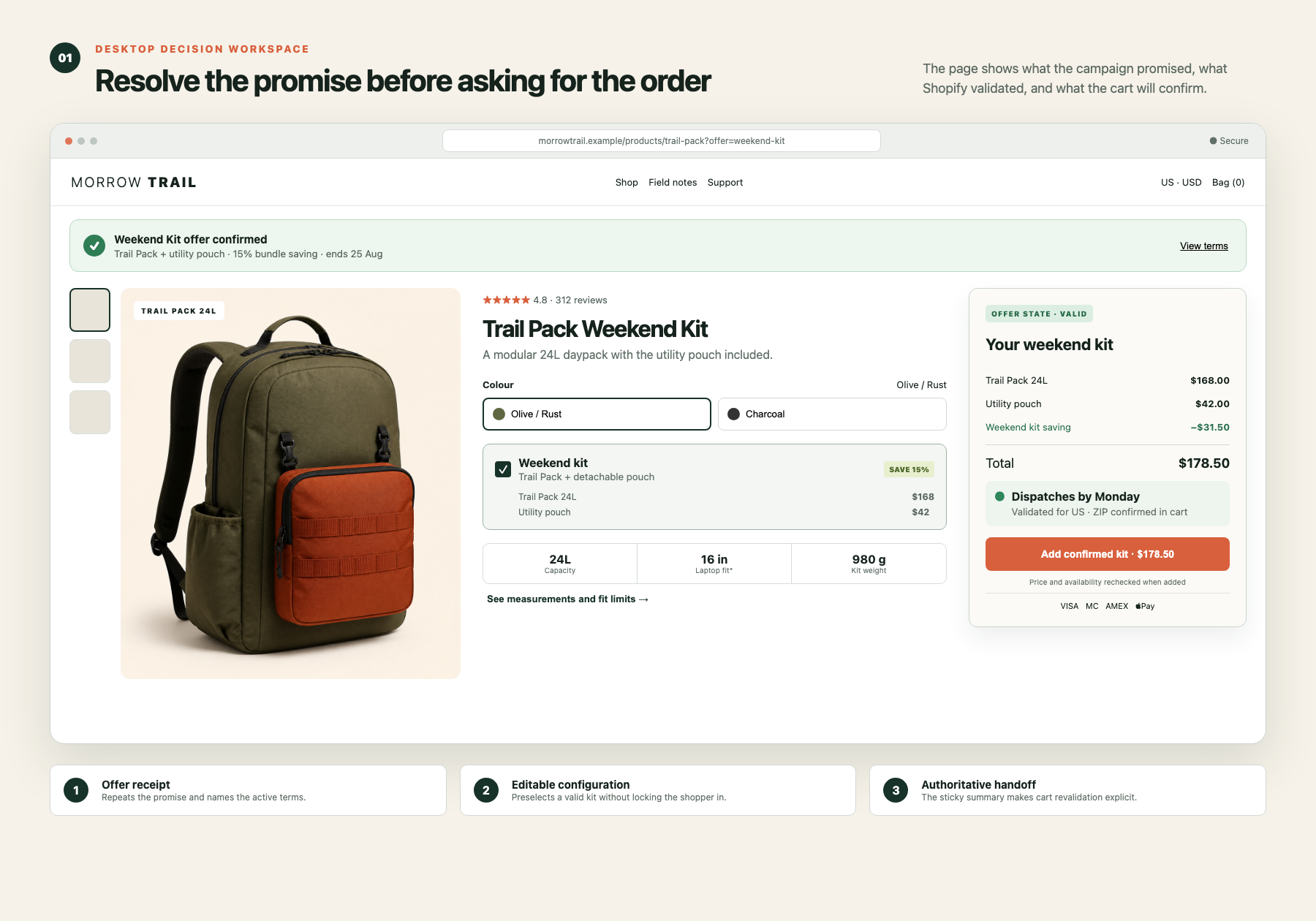
- Offer receipt: repeat the exact campaign promise and concise eligibility terms.
- Buying unit: preselect only valid products and variants, while keeping choices editable.
- Evidence module: show proof related to the promise, not a generic review wall.
- Order summary: keep price, discount condition, fulfilment context, and CTA together.
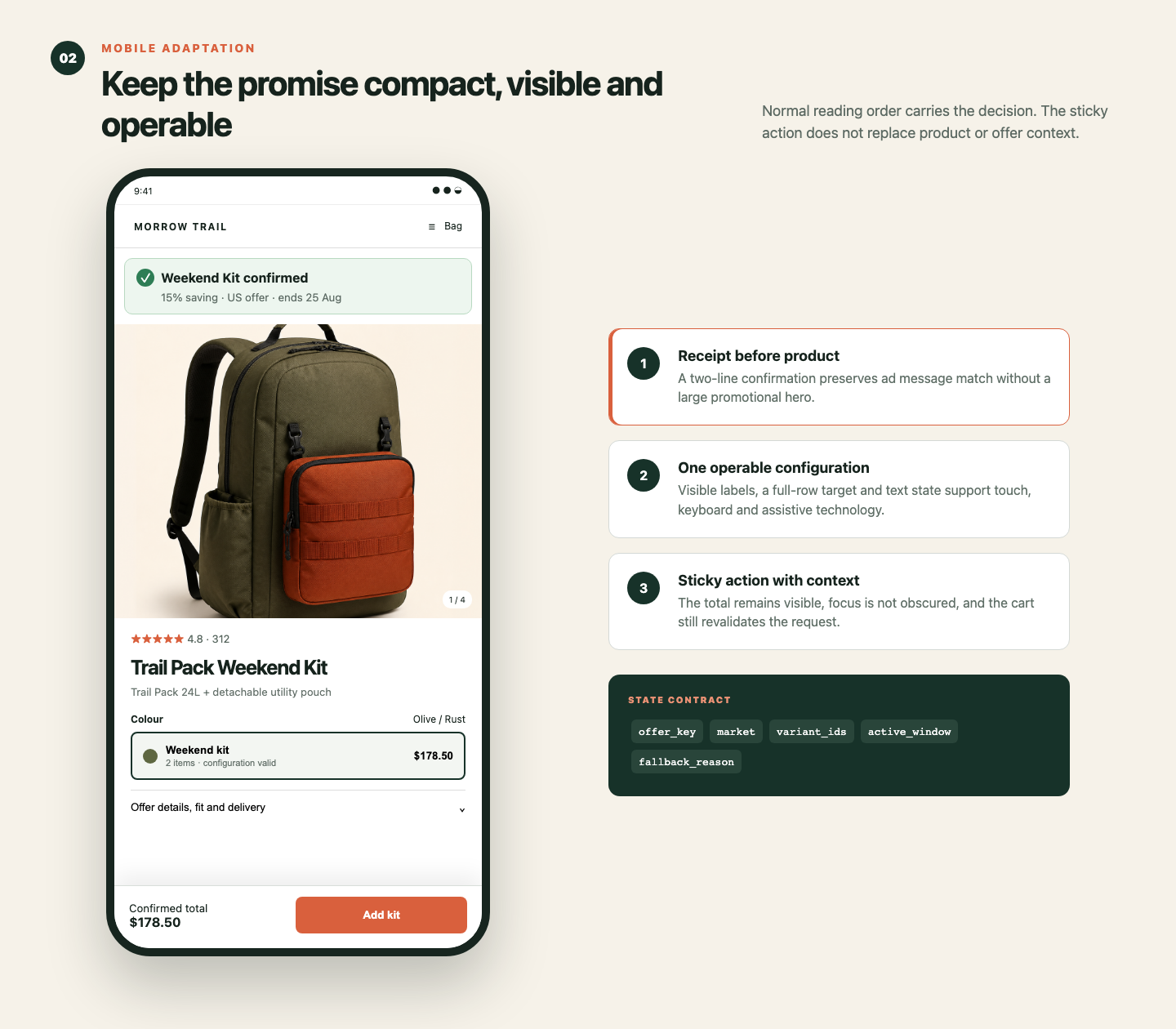
On desktop, use a two-column decision workspace. Product configuration and evidence sit on the left; a sticky summary sits on the right. On mobile, place a compact offer receipt first, keep configuration in normal reading order, and use a sticky action that never hides keyboard focus.
Make failure states part of the conversion design
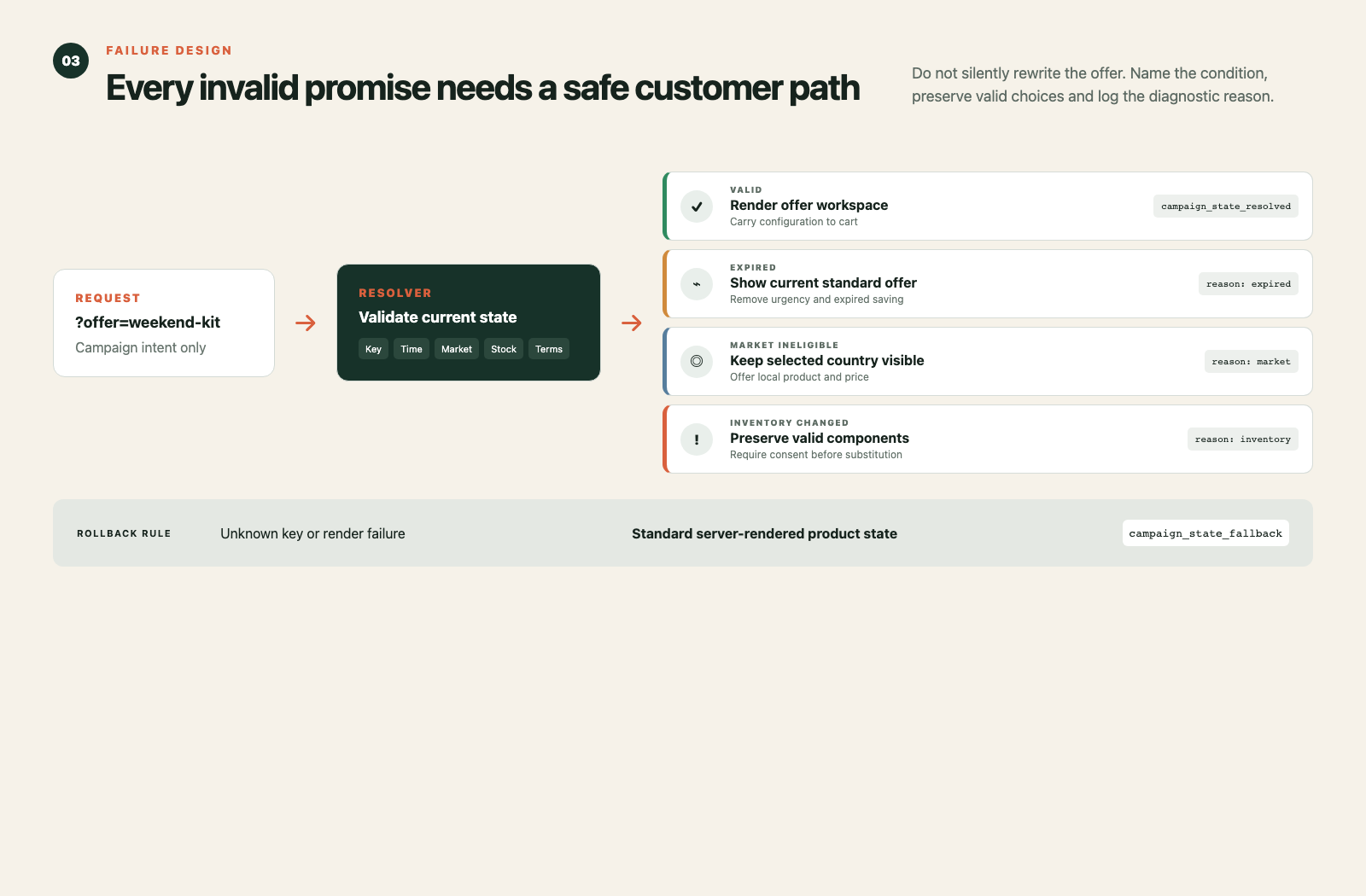
- Unknown key: render the standard product state and log the routing failure.
- Expired offer: remove promotional urgency, explain that the campaign ended, and show the current valid buying option.
- Ineligible market: keep the shopper’s selected country visible and offer the local product or standard price.
- Inventory changed: preserve valid components, identify the unavailable item, and require confirmation before substitution.
- Section render failed: keep the server-rendered content, avoid a blank module, and report the failure.
Shopify’s Section Rendering API can return HTTP 200 while an individual section is null. The interface therefore needs per-section fallbacks, not only a successful-request check.
Shopify implementation sequence
Use one reusable JSON landing template rather than cloning the full page for every campaign. Store the campaign contract in a structured source such as a storefront-visible metaobject.
- Read and allowlist the campaign key.
- Resolve the campaign record and active window.
- Check the active Shopify market and eligible products.
- Render the valid state or named fallback.
- Add the selected variants through a locale-aware Ajax Cart API request.
- Request the cart drawer and status region through bundled section rendering.
- Replace optimistic UI with the server-rendered price, discount, and availability result.
Cart permalinks can preload variants and discounts, but Shopify documents that selling plans do not work with cart permalinks. Use them only when their limitations match the campaign. They are not a universal replacement for a stateful landing page.
For accessibility, give every option a visible label and accessible name. Announce price, availability, and cart changes through an appropriate status region without moving focus unnecessarily. Keep focus visible above any sticky mobile CTA.
Measure offer integrity, not only conversion
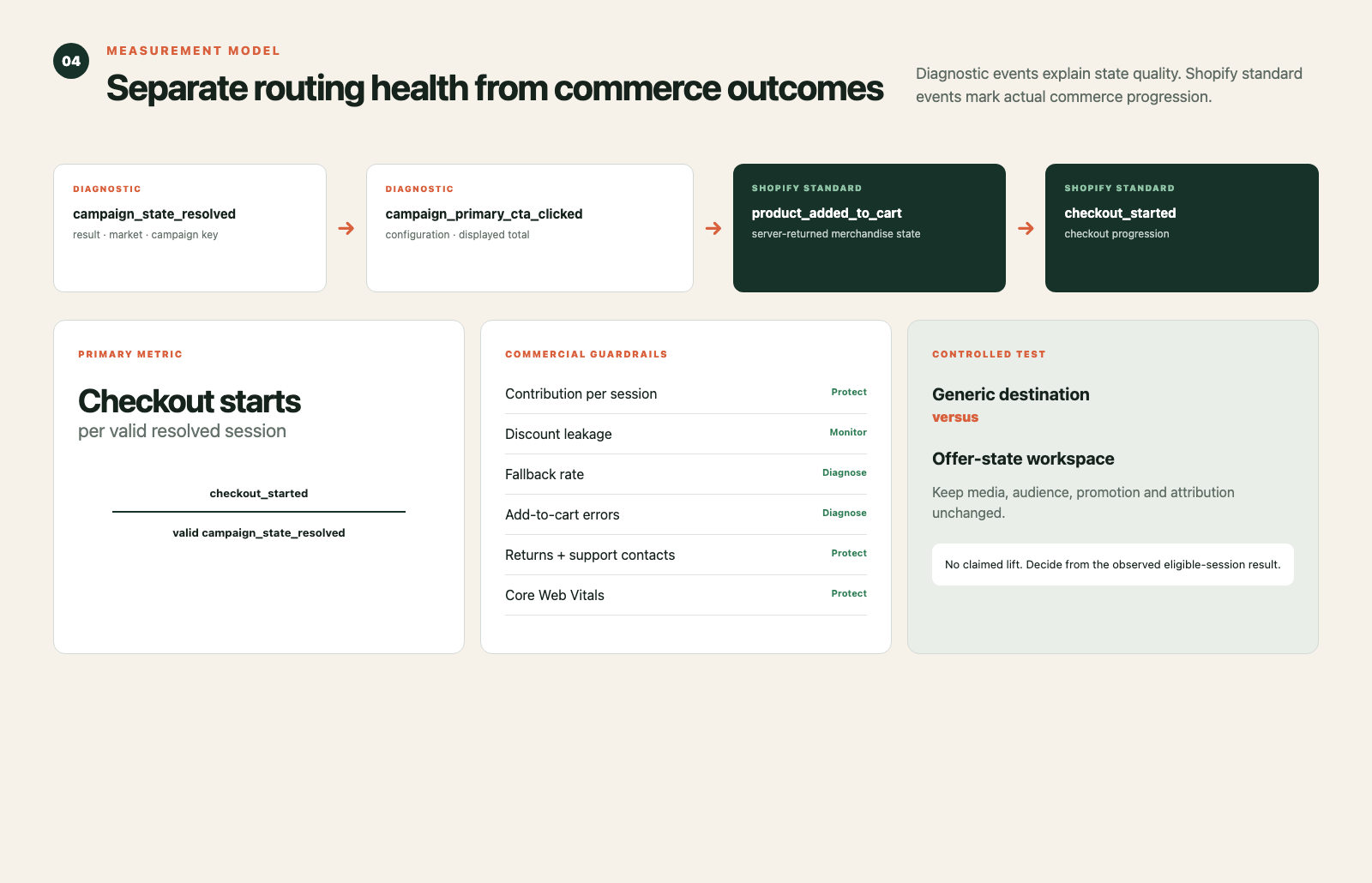
Add diagnostic events before the standard commerce events.
- ✓campaign_state_resolved with campaign key and result
- ✓campaign_state_fallback with the failure reason
- ✓campaign_configuration_changed
- ✓campaign_primary_cta_clicked
- ✓Shopify product_added_to_cart
- ✓Shopify checkout_started
The primary metric should be checkout starts per valid resolved session. Add-to-cart rate alone can hide price or eligibility surprises that appear one step later.
Protect contribution per session, discount cost, fallback rate, add-to-cart errors, page performance, support contacts, and returns. Never claim a lift before a controlled test.
Run one controlled campaign test
Choose one paid campaign with a stable product set and meaningful message-match problem. Split traffic between the existing generic destination and the offer-state page. Keep media, audience, promotion, and attribution rules unchanged.
Hypothesis: resolving a governed campaign promise into a valid product and cart state will improve checkout starts per eligible session without increasing discount leakage, fallback errors, returns, or support contacts.
Run an implementation preflight before sending traffic: expired key, unsupported market, sold-out variant, slow response, JavaScript failure, keyboard flow, and screen-reader status announcement.
When not to build it
Do not add a router for one evergreen campaign with no variant, market, or timing differences. Do not use it to hide inconsistent pricing. Do not personalize the page when the source data cannot reliably validate the promise.
If campaign pages are drifting away from your Shopify offer and cart logic, Inficial can help map the contract, design the interface, and instrument the test.
Sources
- JSON templates, Shopify developer documentation, accessed August 21, 2026
- Dynamic data sources, Shopify developer documentation, accessed August 21, 2026
- Shopify Markets, Shopify developer documentation, accessed August 21, 2026
- Cart API reference, Shopify developer documentation, accessed August 21, 2026
- Section Rendering API, Shopify developer documentation, accessed August 21, 2026
- Create cart permalinks, Shopify developer documentation, accessed August 21, 2026
- product_added_to_cart, Shopify developer documentation, accessed August 21, 2026
- checkout_started, Shopify developer documentation, accessed August 21, 2026
- Understanding SC 4.1.3: Status Messages, W3C Web Accessibility Initiative, accessed August 21, 2026
- What’s New in WCAG 2.2, W3C Web Accessibility Initiative, accessed August 21, 2026