
If your Shopify conversion rate fell at the same time sessions surged, pause before changing campaigns, creative, merchandising, or checkout. First, split the report into human and bot sessions. Validate the measurement before you diagnose the experience.
Why a blended conversion rate can mislead
Shopify calculates online-store conversion rate from sessions and sessions that completed checkout. Automated traffic can add sessions without behaving like a typical shopper, changing the denominator and potentially moving the reported rate.
Not all bots are hostile. Search-engine indexing, social-media link previews, price-comparison tools, and monitoring services can all create automated visits. The goal is not to block every bot; it is to separate likely human and automated activity when analysing customer behaviour.
What Shopify’s bot filter does
Shopify analyses events within an online-store session, then classifies the overall session as human or bot. The classification is deliberately conservative: Shopify would rather miss some bots than incorrectly label a genuine customer as automated traffic.
- In Shopify admin, go to Analytics → Reports.
- Open a sessions-related report.
- Add Human or bot session under Dimensions.
- Review the human and bot rows together.
- If needed, add the same field under Filters, select Human, and apply the filter.
Starting with the dimension preserves the composition of total traffic. The human-only filter then creates a focused view for customer-behaviour analysis.
An illustrative example
The numbers below are illustrative, not client data.
| Session type | Sessions | Completed checkout | Conversion rate |
|---|---|---|---|
| All sessions | 20,000 | 400 | 2.00% |
| Human | 16,000 | 392 | 2.45% |
| Bot | 4,000 | 8 | 0.20% |
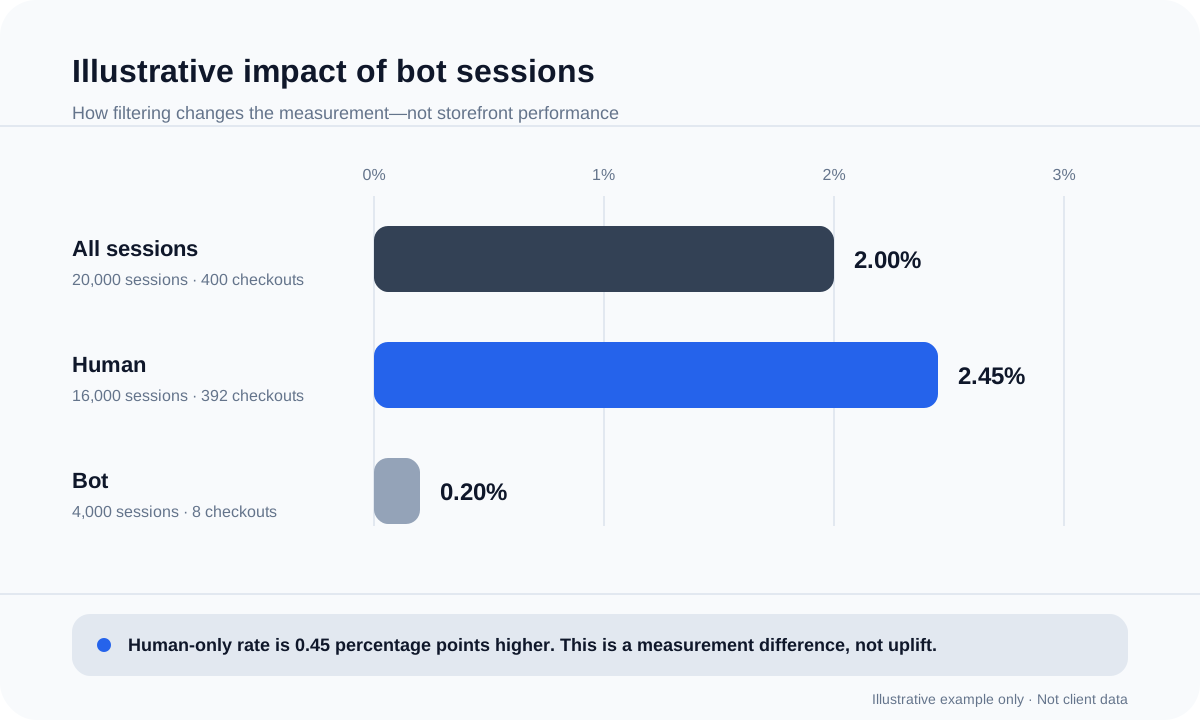
Nothing on the storefront improved when the filter was applied. It only changed the question from “How did all classified sessions behave?” to “How did sessions classified as human behave?” Calling the difference conversion uplift would be incorrect.
If a traffic spike appears mainly in the bot row while human sessions and human conversion remain stable, a checkout redesign is unlikely to be the first conclusion. If the human-only rate also declines, investigating customer-facing friction becomes more reasonable.
Three limits to check
- Bot filtering applies only to new incoming data from October 7, 2025. Older sessions cannot be classified retrospectively.
- Bot detection is not available for Headless and Hydrogen storefronts.
- The capability applies only to sessions-related metrics; it is not a universal cleaning layer for every report or analytics platform.
A practical diagnosis sequence
Define when the movement started, which markets or channels changed, and whether a campaign, sale, app, tracking change, QA exercise, or load test occurred at the same time. Then add the Human or bot session dimension and record all-session, human, and bot views.
Compare like with like. Short windows can be volatile, so compare periods with similar marketing plans and enough context to avoid mistaking normal variation for a structural problem.
Finally, decide what the evidence supports. A bot-heavy spike may call for cleaner reporting and monitoring. A sustained decline in the human-only view may justify deeper work across acquisition quality, product discovery, offer clarity, performance, or checkout.
Pre-experiment measurement checklist
- ✓Confirm the data is from October 7, 2025 onwards.
- ✓Confirm the storefront is not Headless or Hydrogen.
- ✓Confirm the report uses sessions-related metrics.
- ✓Add the dimension before applying the human-only filter.
- ✓Record all-session, human, and bot results.
- ✓Compare equivalent periods, markets, and campaign conditions.
- ✓Annotate launches, sales, integrations, and tracking changes.
- ✓Keep the reporting view consistent in future reviews.
Measurement quality comes before experimentation
A conversion-rate drop is a prompt to investigate, not proof that the storefront has become less persuasive. Separating bot sessions is a fast, bounded check that improves the quality of the question your CRO programme is trying to answer.
Inficial can review measurement quality, reporting scope, and diagnostic assumptions before experiments are prioritised. The aim is not to promise uplift; it is to make sure decisions begin with evidence you can trust.
Sources