
A Meta dashboard can show an attractive return on ad spend while your Shopify profit is flat. The opposite can happen too: Meta may influence orders that another report credits elsewhere. Increasing budget before checking the measurement chain turns that disagreement into a bigger risk.
For European Shopify founders, the answer is not to force every dashboard to match. It is to confirm that the setup is coherent, consent is respected, purchase events are believable, and spend decisions still work against store economics.
Why reported ROAS is not a scaling decision
Return on ad spend (ROAS) divides attributed revenue by advertising cost. It does not subtract product cost, discounts, fulfilment, payment fees, returns, or shipping subsidy. A campaign can clear a ROAS target and still contribute too little profit.
Attribution adds another layer. Shopify supports several attribution models, including last non-direct click, last click, first click, any click, and linear. Shopify also warns that its marketing reports can differ from third-party reports because platforms assign credit differently and may sync on different schedules.
That disagreement is not automatically a tracking failure. It becomes dangerous when nobody can explain the definitions, the gap changes suddenly, or the order and revenue totals are implausible.
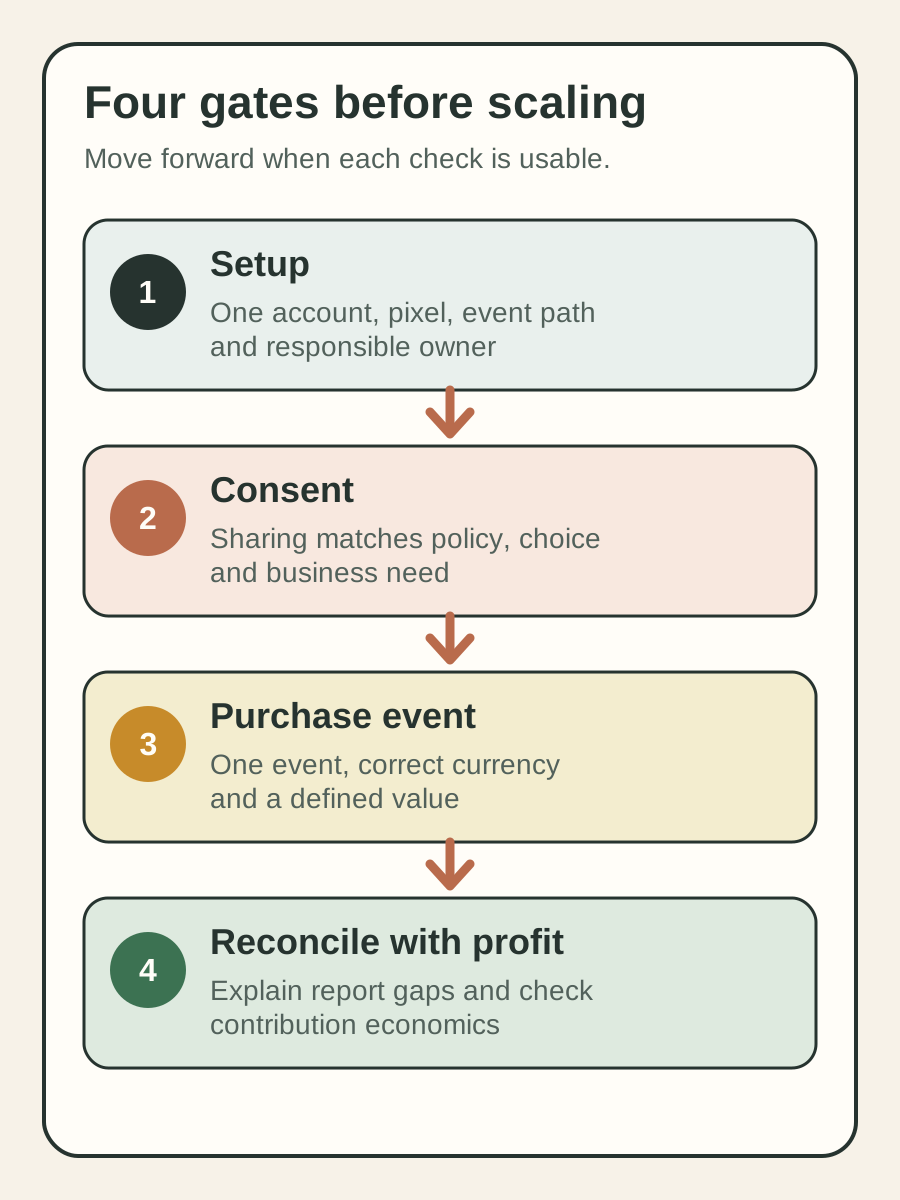
Use four gates before increasing budget
1. Confirm one owned connection
Record the Meta business account, ad account, dataset or pixel, Shopify store, and responsible owner. In Shopify, confirm which pixel is connected through Facebook and Instagram by Meta.
Then check for older theme code, tag-manager tags, agency scripts, or apps that may send the same browser event. Shopify specifically warns that leaving manually added Meta pixel code in the theme after using its Meta channel can create duplicate or incorrect reporting.
2. Check consent and data sharing
Shopify currently offers Standard, Enhanced, and Maximum data-sharing levels. Enhanced and Maximum use the Conversions API as well as the Meta pixel and can share customer information for matching.
More sharing is not a free accuracy switch. Meta says the Conversions API is not designed to bypass App Tracking Transparency or European privacy rules. Shopify says pixels operate according to consent in configured regions, including the European Economic Area and the UK.
Review the selected level, privacy policy, cookie banner, consent integration, and actual business need with the appropriate privacy owner. This article is operational guidance, not legal advice.
3. Test the purchase event
Use a documented test order or an approved platform test flow. Confirm that a purchase appears once, against the expected pixel, with the expected currency and a plausible value.
Do not assume the event value equals net product revenue. Shopify documents its Meta order-value event as the total price, including duties, taxes, and discounts. That definition can differ from the sales figure used in a profit report. Write down the exact value definition before comparing ROAS or margin.
4. Reconcile without forcing a match
Choose one recent, stable period and align time zone, currency, campaign scope, and refund treatment. Compare four views using written definitions.
Meta
Record spend and attributed purchase value. Ask what the platform credited.
Shopify marketing
Record orders and sales attributed to the channel. Ask how Shopify assigned credit.
Shopify store
Record total orders and net sales. Ask whether the channel view is plausible in context.
Finance
Record contribution profit after variable costs and ad spend. Ask whether the decision still makes commercial sense.
Record the absolute and percentage gaps, then explain them where evidence allows. Attribution model, consent, cross-device behavior, delayed syncing, returns, and duplicate events can all affect the comparison. An unexplained change is a reason to investigate. A familiar, documented difference can be a usable operating boundary.
Run this founder test this week
Pick one active European market and one stable seven-day period. Complete the four-gate worksheet without changing campaigns.
- Name the connected account, pixel, owner, and every known event source.
- Capture the chosen data-sharing level and consent path.
- Verify one approved purchase test from storefront to Events Manager.
- Reconcile Meta, Shopify attribution, total store sales, and contribution profit using written definitions.
- Set a stop condition for the next budget change, such as a duplicate event, unexplained currency issue, or contribution loss beyond your approved limit.
The output is a one-page measurement record. It should state what each number means, who owns anomalies, and which metric can pause scaling.
What this audit cannot prove
A clean signal chain does not prove that Meta caused every attributed order. It does not measure incrementality, which asks what would have happened without the ads. A holdout or other controlled design is needed for that stronger question.
Tracking also cannot rescue a weak offer, tired creative, poor landing page, or low repeat value. Some operators reasonably argue that creative and merchandising deserve attention before technical cleanup. The practical answer is sequencing: repair material measurement faults, then improve the commercial inputs. Do not delay every creative test until attribution feels perfect.
Finally, do not select Maximum data sharing solely to chase a higher reported ROAS. The right setting depends on consent, policy, risk, and the data you genuinely need.
Inficial can help review the Shopify measurement chain, resolve implementation gaps, and turn attribution uncertainty into controlled growth decisions.
Sources
- Measuring marketing performance, Shopify Help Center, accessed August 15, 2026
- Meta pixel, Shopify Help Center, accessed August 15, 2026
- Facebook data sharing, Shopify Help Center, accessed August 15, 2026
- About Conversions API, Meta Business Help Center, accessed August 15, 2026
- Configuring customer privacy settings, Shopify Help Center, accessed August 15, 2026