
A polished color swatch can still send the wrong item to cart. The image may show navy while the hidden variant ID still points to black. A size may look available until the buyer selects a material. A campaign link may open the intended variant, then lose that state after the theme replaces the URL.
These are not cosmetic selector defects. They are contradictions inside a commerce state machine.
For product-page optimization, the useful unit of work is not the picker component. It is the complete variant state shared by the visible choice, product media, price, availability, URL, purchase controls, and eventual cart line.
The picker is a commerce state machine
Reader question: What actually changes when a buyer selects an option?
Shopify models each purchasable combination as a variant. A variant can carry its own price, availability, media, SKU, quantity rules, and selling-plan relationship. Shopify's theme guidance says a new variant selection should update product media and price as well as the selector itself.[1]
option values -> resolved variant -> displayed offer -> cart payload -> returned cart lineThe browser can also arrive with state already present. Shopify supports variant deep links through the variant query parameter. Its Liquid selected_or_first_available_variant can return a selected variant even when that variant is unavailable.[2] A theme that treats this helper as proof of purchasability can display a valid identity with an invalid buying action.
The non-obvious CRO risk is silent substitution. If a shopper requests blue and large, then the theme quietly falls back to the first available red and small variant, the page appears functional while breaking the buyer's decision. A blocked CTA with a precise recovery message is often better than a successful add for the wrong item.
Define one variant-state contract before redesign
Reader question: Which value is authoritative on every product-page surface?
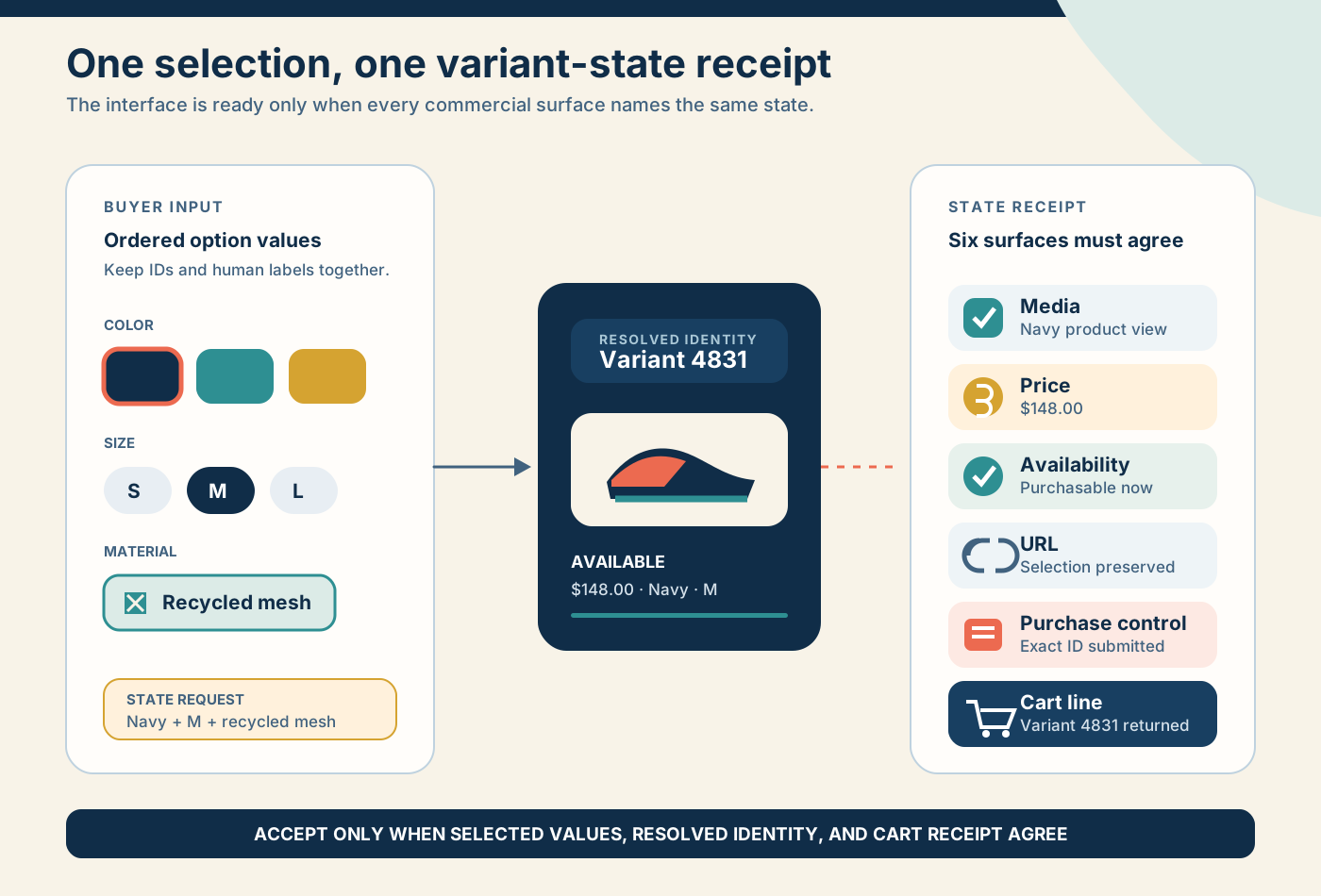
Write a contract before changing swatches, dropdowns, or product-page layout. Use these fields:
| Contract field | Required decision | Failure evidence |
|---|---|---|
| Selected values | Ordered option-value IDs and human labels | Visual choice differs from form state |
| Resolution | Variant ID, or explicit incomplete or invalid state | Hidden variant ID remains stale |
| Offer | Price, compare-at price, unit price, selling plan, quantity rules | Price or future charge belongs to another variant |
| Media | Featured media ID and gallery behavior | Image does not match selected combination |
| Availability | Purchasable, sold out, unpublished, market-ineligible, or unknown | CTA remains active for an unavailable variant |
| URL | Product URL plus supported selection state | Refresh, share, or back navigation loses the choice |
| Cart | Submitted variant ID, quantity, selling plan, properties | Returned cart line contradicts the page |
| Analytics | Product ID, variant ID, selection path, result | Events cannot reconstruct the decision |
Do not let the DOM become the contract. Record the intended relationship first, then test the DOM, network request, and returned line against it.
Separate four states that weak pickers collapse
Reader question: What should the page do when no purchasable variant resolves?
Shopify's product_option_value.available is contextual. For a Color, Size, and Material product, availability for Size depends on the selected Color, while Material depends on both preceding values.[3] That is different from asking whether a word such as Large exists anywhere in the product.
| State | Meaning | Interface behavior | Recovery |
|---|---|---|---|
| Unselected | The buyer has not completed the required choice | Keep CTA disabled and name the missing option | Focus or link to the missing group |
| Impossible | No variant exists for the chosen combination | Preserve the attempted values and explain the conflict | Show valid adjacent choices without auto-selecting |
| Unavailable | A variant exists but cannot currently be purchased | Keep identity visible and CTA disabled | Offer waitlist, alternate variant, or clear next step when appropriate |
| Available | One purchasable variant resolves | Update all dependent surfaces and enable the action | Submit the exact resolved identity |
Shopify also supports granular option_values URLs. Its high-variant guidance warns that when an option-value combination has no associated variant, both selected_variant and selected_or_first_available_variant can return null.[4] Null is a meaningful state. It should not be converted into an arbitrary default merely to keep the button active.
Avoid hiding every unavailable value by default. A visible sold-out size can communicate range and support a waitlist. An impossible combination may deserve a disabled state. A discontinued value may need removal. Decide by shopper task and recovery value, not by one global CSS rule.
Keep six storefront surfaces synchronized
Reader question: What must update atomically after one option change?
- Selection: checked inputs, labels, swatches, and focus state.
- Merchandising: image, gallery position, variant copy, badges, and supporting details.
- Commercial offer: price, compare-at price, unit price, subscription terms, and quantity constraints.
- Availability: stock message, pickup or delivery promise, market eligibility, and CTA state.
- Continuity: URL, browser history behavior, refresh state, share link, and campaign parameters.
- Commit: hidden form fields, Ajax request, returned cart line, cart drawer, and checkout handoff.
The update order matters. Disable the purchase action while a server-rendered section or availability request is unresolved. Reject late responses from an earlier selection. Re-enable the CTA only after the current state owns every dependent surface.
This prevents a race condition where a buyer taps red, quickly taps blue, and the slower red response overwrites the blue image or hidden variant ID.
Shopify's Ajax Cart API adds a variant by ID and returns the resulting line items. It can also return sold-out or quantity errors.[7] The response is the commit receipt. Compare its variant_id, quantity, properties, selling plan where present, price context, and variant title with the state shown at the moment of submission.
Support high-variant products without shipping the catalog
Reader question: How should a theme resolve choices when products have hundreds of variants?
Shopify supports up to 2,048 variants per product by default.[6] That does not mean every theme should serialize the complete variant collection into the page.
Shopify recommends using product.options_with_values and the contextual product_option_value object, then deferring detailed variant loading when needed. Its performance guidance specifically advises against iterating or serializing the complete variant set and shows how to request a section using selected option-value IDs.[4][5]
- Render meaningful option groups and current contextual availability on the server.
- Send stable option-value IDs, not only display labels.
- Scope the update to the product section that initiated it.
- Cancel or ignore stale responses.
- Update only the dependent section or fragments.
- Preserve a loading state that does not pretend the old variant is still active.
- Cache by product, market, and ordered option-value state only when invalidation is understood.
- Test the largest real product, not a three-variant demo.
Shopify's Dawn reference theme is useful implementation evidence, not a design mandate. Dawn's product section declares URL-update behavior, and its option renderer carries selected, availability, variant URL, and sold-out or unavailable states.[8] If a custom theme replaces those mechanics, it inherits responsibility for the same state guarantees.
Test state transitions, not screenshots
Reader question: Which scenarios expose contradictions before customers do?
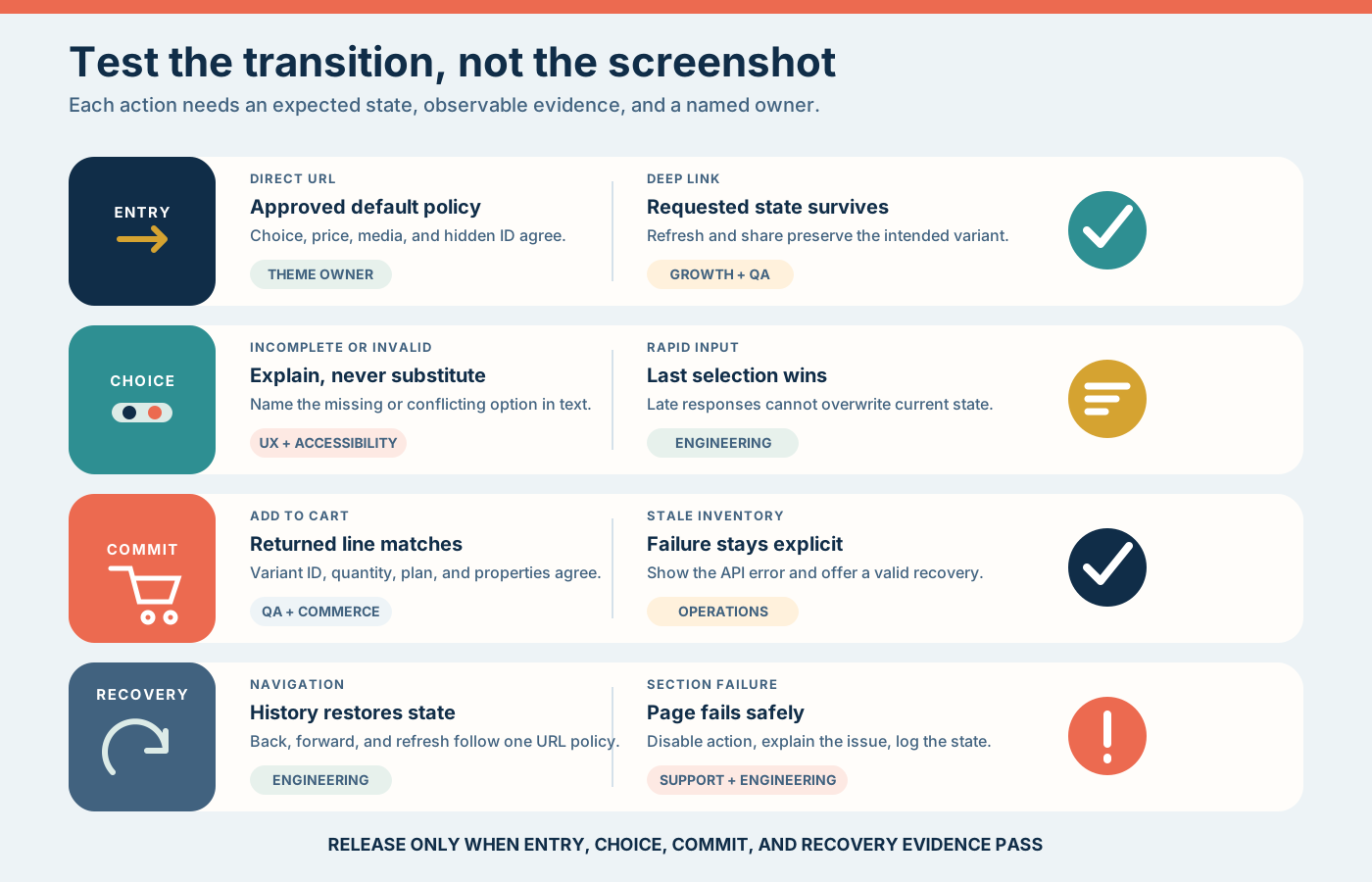
| Scenario | Expected result | Evidence |
|---|---|---|
| Direct product URL | Approved default policy applies | Selected values, price, media, CTA, hidden ID |
| Deep-linked available variant | Requested variant remains selected | URL, visible labels, server data, cart line |
| Deep-linked sold-out variant | Identity remains visible but purchase is blocked | Message, disabled CTA, recovery route |
| Incomplete choice | Missing group is named | Focus order, text instruction, no stale ID |
| Impossible combination | Attempt is preserved and explained | No silent fallback, valid alternatives offered |
| Rapid three-choice sequence | Last input wins | Request order, final DOM, submitted ID |
| Browser back, forward, refresh | State follows the approved URL policy | URL and visible state agree |
| Add to cart | Returned line matches the state receipt | Variant ID, quantity, properties, price context |
| Market or inventory change | Stale availability fails safely | Error message, refresh path, no wrong substitution |
| JavaScript or section failure | Buyer sees a recoverable state | Disabled action, useful error, logged failure |
Run the matrix on keyboard, touch, and screen-reader paths. WCAG 2.2 requires labels or instructions for inputs and text identification of detected errors. Color and visual styling can support the message, but they should not carry it alone.[9]
Measure decision quality without inventing uplift
Reader question: How do we know whether the new state model improved the buying decision?
Do not begin with conversion rate. Begin with contradiction and recovery signals.
Use a custom event taxonomy such as the following. These names are illustrative, not Shopify platform events:
variant_option_changed
variant_state_resolved
variant_combination_invalid
variant_unavailable_seen
variant_state_error
add_to_cart_attempted
cart_variant_mismatch
Include product ID, resolved variant ID when present, ordered option labels or IDs, entry state, result state, market, template version, and experiment cohort. Do not send unnecessary customer information.
| Metric | Why it matters | Guardrail |
|---|---|---|
| Completed variant decisions per eligible product session | Shows whether buyers reach a valid choice | Exclude products with no required decision |
| Invalid-combination recovery rate | Shows whether recovery guidance works | Monitor repeated loops |
| Cart mismatch rate | Detects the most serious contradiction | Target zero and investigate every case |
| Add-to-cart success after valid state | Separates picker failure from broader purchase friction | Check API errors and stock changes |
| Revenue or contribution per eligible session | Connects UX to commercial outcome | Watch returns, cancellations, margin, and support contacts |
| Selection latency | Detects slow state resolution | Segment by device and product complexity |
A conversion change without a lower contradiction rate is ambiguous. A lower mismatch rate with stable commercial performance can still justify the release because it removes customer and support risk.
Release by product cohort with rollback evidence
Reader question: How should the team ship a new picker without risking the full catalog?
Start with one cohort that exposes the real problem: apparel with color and size, furniture with finish and dimension, or equipment with model and compatibility. Include the most complex product in that cohort.
- Capture the current contract and transition evidence.
- Implement the new state resolver behind a template, section, or feature flag.
- Run automated contract tests against representative product fixtures.
- Complete keyboard, touch, screen-reader, deep-link, and cart tests.
- Release to one controlled product cohort.
- Monitor state errors, cart mismatches, selection latency, add-to-cart success, and commercial guardrails.
- Keep the prior section or template ready until the observation window closes.
Rollback should restore the previous product section and URL policy together. Reverting only the visible picker while leaving new state code, event listeners, or section responses in place can preserve the defect under an older interface.
Know when a custom picker is the wrong investment
Reader question: When should the team keep the native implementation?
- Most products have one simple option and no observed selection failure.
- The requested design is only cosmetic.
- Merchandising cannot maintain option names, swatches, media, or availability rules.
- A product configurator, bundle, or separate products would model the offer more honestly.
- The theme cannot own monitoring and regression tests after release.
- The expected learning cannot be separated from simultaneous price, offer, media, and traffic changes.
The advanced choice is often restraint. Improve labels, focus behavior, sold-out messaging, and cart verification before replacing a reliable native state model.
Take one safe action this week
Reader question: What can the team inspect without changing the live store?
Choose five products: the highest-traffic product, the largest option matrix, one product with sold-out values, one campaign-deep-linked product, and one product with a selling plan or custom properties.
For each, record selected option values, resolved variant ID, media ID, displayed price, availability message, URL, submitted payload, and returned cart line across desktop and mobile. Do not change the theme. Mark every contradiction and missing owner.
That receipt will show whether the next investment belongs in content, catalog structure, native theme configuration, or a custom variant-state implementation.
Inficial can audit product-page state, design a focused CRO hypothesis, implement Shopify theme changes, and validate the result through storefront, cart, accessibility, performance, and commercial evidence.
No commercial relationship, sponsorship, affiliate arrangement, or endorsement involving Shopify or an app provider is known or implied.
Sources
- Shopify developer documentation: Support product variants, accessed August 26, 2026
- Shopify developer documentation: Liquid product object, accessed August 26, 2026
- Shopify developer documentation: Liquid product option value object, accessed August 26, 2026
- Shopify developer documentation: Support high-variant products, accessed August 26, 2026
- Shopify developer documentation: Avoid over-fetching product variants, accessed August 26, 2026
- Shopify developer documentation: ProductVariant object, accessed August 26, 2026
- Shopify developer documentation: Ajax Cart API reference, accessed August 26, 2026
- Shopify Dawn reference theme: Main product and variant-option implementation, accessed August 26, 2026
- W3C: Web Content Accessibility Guidelines 2.2, accessed August 26, 2026