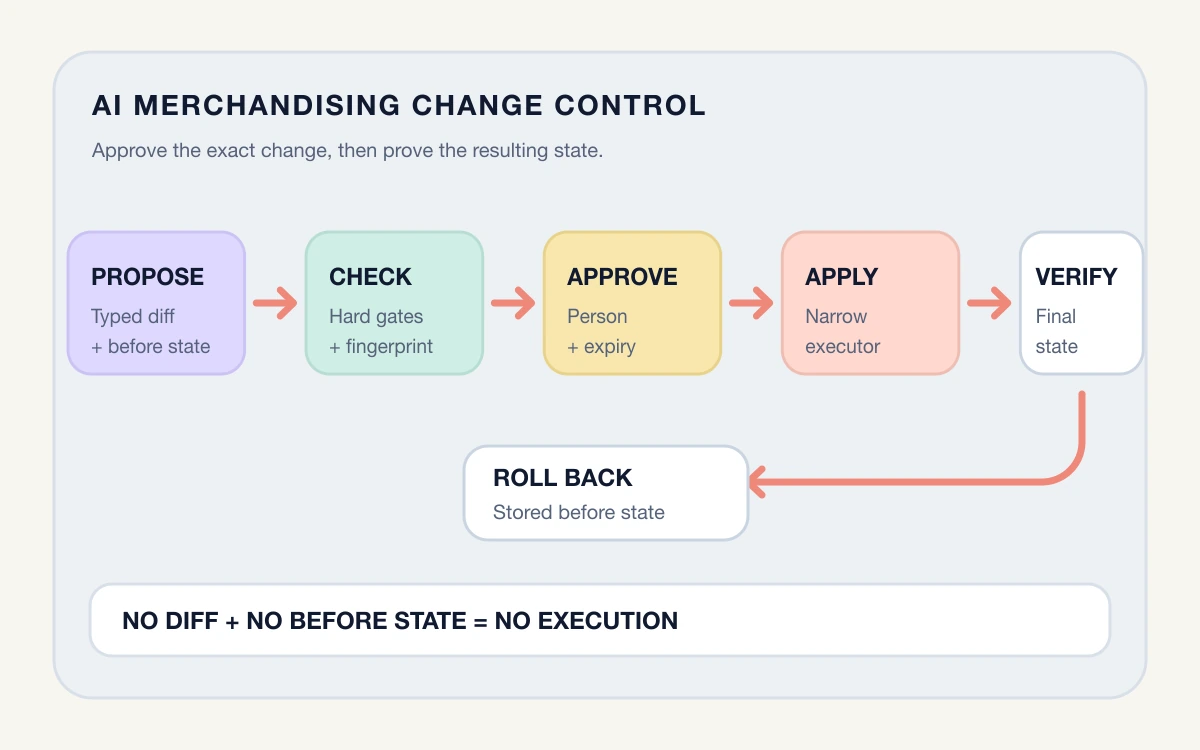

Shopify Sidekick can now work with supported third-party apps to answer questions, find information, and help complete tasks. That creates a useful new operating surface. A merchant can ask about campaign performance or loyalty activity without moving through several dashboards, then reach the right app screen with relevant context already staged.
The convenience is real, but it changes the management question. It is no longer enough to ask whether an app is installed and useful. Teams also need to understand what Sidekick can retrieve from it, which actions it can stage, who reviews the result, and what evidence should remain after the work is complete.
Shopify places important boundaries around this flow. Sidekick asks for approval before it uses an installed app, and that activation applies to the current conversation. Store changes also require merchant approval. For app actions, Shopify describes a flow in which Sidekick navigates to the relevant app page with context filled in so the merchant can confirm before a change is made.
Those safeguards are the starting point, not the whole operating model. This article gives US ecommerce leaders a practical control framework for deciding which Sidekick-assisted workflows are ready to use, which need tighter review, and which should remain outside conversational AI for now.
What changes when apps become available through Sidekick
A traditional app workflow has visible boundaries. A team member opens the app, chooses a report or record, makes a change, and saves it. The interface signals which system is in use and usually exposes the available fields.
A conversational workflow compresses those steps. The person states an outcome in natural language, Sidekick interprets the request, selects relevant context, and may involve a supported app. Shopify says Sidekick can use app data to answer questions and can route merchants to the correct app page for an action.
That compression saves navigation, but it can hide assumptions. Consider a request such as, "Find our best campaigns and prepare a similar promotion for slow-moving products." Several decisions sit inside one sentence:
- Which period defines "best"?
- Is performance judged by revenue, margin, conversion, or another measure?
- Which inventory source determines that a product is slow moving?
- Does "prepare" mean recommend an idea, create a draft, or stage a live change?
- Who checks exclusions, offer rules, brand language, and margin exposure?
The risk does not come from conversational input by itself. It comes from allowing an ambiguous request to cross data, interpretation, and action boundaries without making those boundaries visible.
Separate questions, drafts, and actions
The first control is classification. Put each use case into one of three lanes before deciding how much review it needs.
Questions retrieve or summarize information
A question asks for an answer but should not change a record. Examples include finding campaign results, summarizing review themes, or locating a subscription issue.
Shopify's developer policy says Sidekick data extensions should remain read-only, with mutations placed in action extensions where the merchant confirms the change. This makes read-only work a sensible starting point, but the answer still needs interpretation. A result can be incomplete because the requested date range, attribution method, metric definition, or app data is incomplete.
For any recurring question, record the source, filters, date range, metric definition, and expected output. If a leader would challenge the same answer in a dashboard, the conversational version deserves the same challenge.
Drafts prepare work for editing
A draft creates material that remains inactive until someone reviews and publishes, sends, or applies it. Product descriptions, campaign copy, merchandising recommendations, report narratives, and proposed workflow changes can fit here.
Draft work is often reversible, but its consequence varies. A draft product description for an internal sandbox is different from a prepared discount configuration that can affect every checkout. Define where the draft lives, who edits it, and which facts must be checked before it can advance.
The review should focus on the decision, not only grammar. Check source data, audience, offer economics, exclusions, dates, regulated claims, brand constraints, and operational capacity.
Actions change business state
An action changes a record, configuration, workflow, customer outcome, or financial position. Shopify documents Sidekick tasks such as editing products or orders, and states that the proposed store change must be reviewed and approved.
For supported third-party app actions, Shopify describes navigation to the appropriate app page with relevant context already filled so the merchant can confirm the action. That confirmation is valuable because it preserves a human checkpoint. It does not answer whether the instruction was correct, whether the selected record was the intended one, or whether downstream automations will react safely.
Before using an action repeatedly, identify:
- The object and fields that may change
- The affected customers, orders, products, campaigns, or workflows
- Downstream automations and integrations
- The evidence visible at review time
- The person authorized to approve
- The rollback or correction method
- The signal that confirms the change behaved as intended
Use four controls for every Sidekick workflow
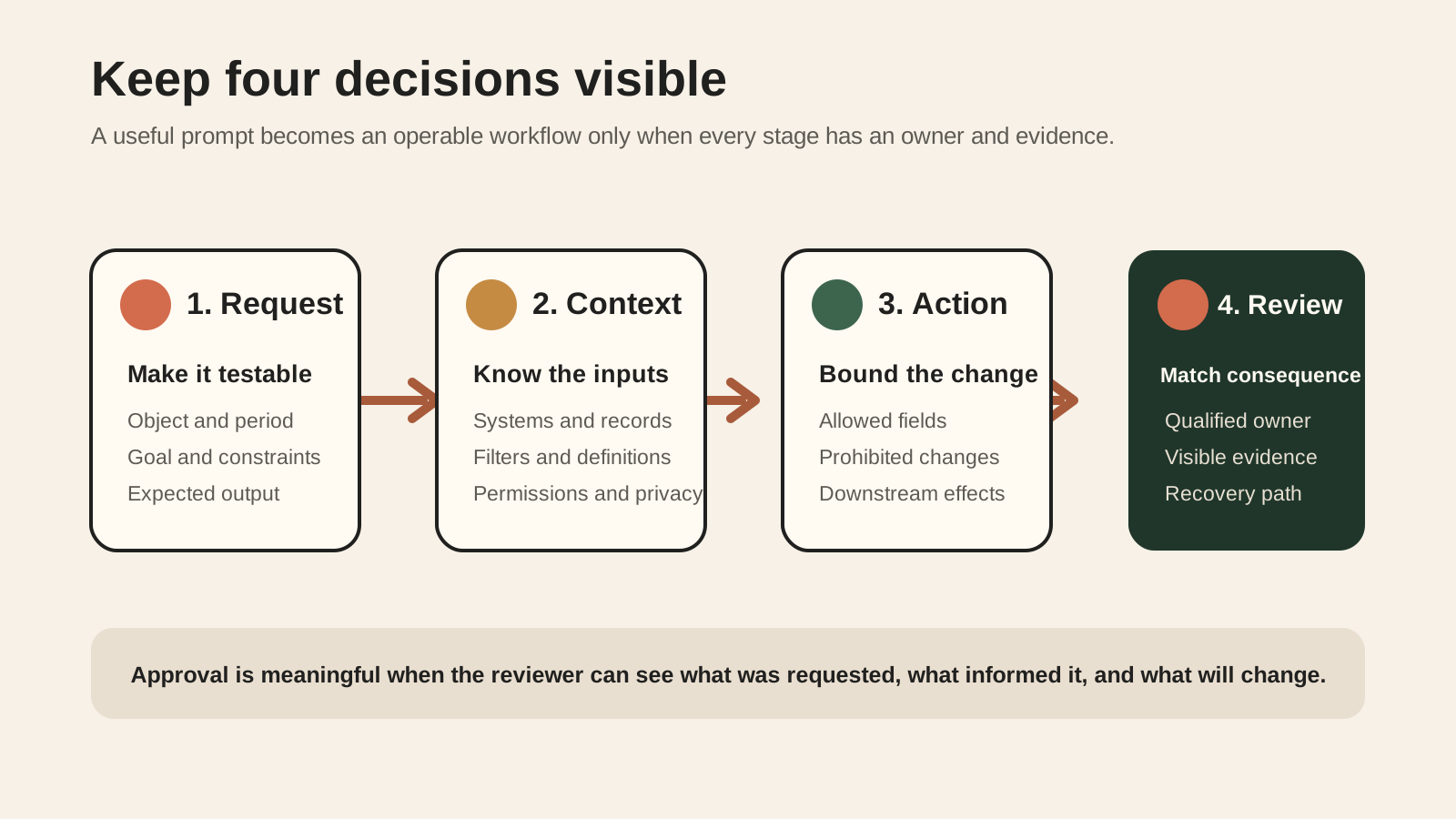
The four controls below turn a useful prompt into an operable business process.
Request: make the instruction testable
A strong request defines the object, period, goal, constraints, and requested output. It should be possible for another qualified person to read the instruction and understand what a correct result would contain.
Instead of asking, "Improve the products that are not selling," ask for a ranked analysis of products with inventory above an agreed threshold and sales below an agreed threshold during a defined period. Ask for recommendations only, exclude products already scheduled for clearance, and request the evidence beside each recommendation.
The point is not to make prompts long. It is to remove ambiguity that would otherwise be resolved invisibly.
Context: know which data shaped the answer
Sidekick can use the current Shopify admin page as context, and users can mention specific products, orders, customers, collections, or installed apps. Supported app extensions can expose app data so Sidekick can return a tailored result.
For a material decision, ask which systems and time ranges shaped the answer. Check whether the chosen app contains the complete record and whether its metric definitions match the team's reporting standard.
App permissions matter here. Shopify's app management area shows which store areas a third-party app can view or edit, recent activity, unused access, and categories of personal data the app can access. Review that underlying access before adding conversational convenience. Sidekick does not turn a broadly permissioned app into a narrowly permissioned one.
Action: define exactly what may change
Use a written action boundary. It can be as simple as:
This workflow may prepare changes to campaign names, subject lines, and scheduled dates. It may not change audience consent, discount economics, customer records, or send status.
The boundary helps reviewers distinguish expected edits from scope expansion. It also gives developers and app owners a clearer test case.
Shopify requires app extension descriptions and action definitions to stay specific about their domain and supported operations. Shopify also requires data retrieval and mutations to remain separated, with merchant confirmation for actions. Merchants should apply the same clarity internally even when they are not building the extension.
Review: match scrutiny to consequence
Every proposed change needs a named reviewer with enough context and authority to assess it. A merchandising specialist may review product grouping. Finance may need to review a high-value transfer or discount exposure. Customer service should assess a workflow that changes refund or support behavior.
Define what the reviewer must see:
- The original request
- The source data or records used
- The proposed before and after state
- Material assumptions and exclusions
- Expected customer and operational effects
- The rollback or correction path
A visible approval step is useful only when the reviewer can make an informed decision within it.
Match review effort to impact and reversibility
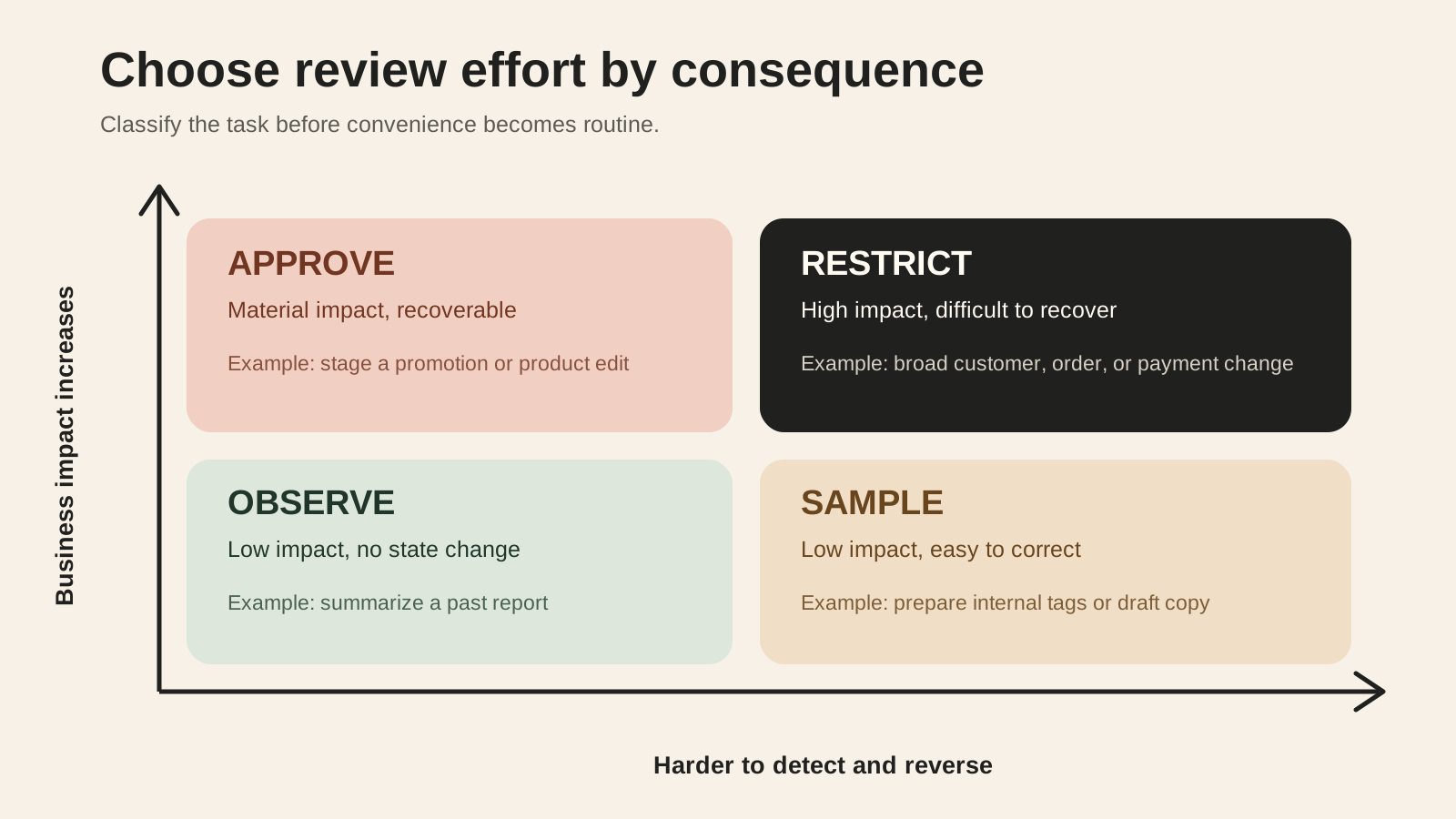
Not every workflow deserves the same process. Use two questions:
- How much harm could an incorrect result cause?
- How easily can the change be detected and reversed?
| Review mode | Suitable pattern | Example | Minimum control |
|---|---|---|---|
| Observe | Low impact, no state change | Summarize campaign results | Check source, range, and metric definition |
| Sample | Low impact, easy to reverse | Prepare internal tags or draft copy | Review a sample and monitor error rate |
| Approve | Material impact, reversible with effort | Stage a promotion or product update | Review every change, dependencies, and rollback |
| Restrict | High impact, difficult to reverse | Broad customer, order, inventory, payment, or send-status change | Keep outside the workflow until stronger controls exist |
The categories can change as the team learns. A repeated draft task may move from approve to sample after the scope is stable, inputs are controlled, error patterns are known, and monitoring works. A seemingly simple task should move in the opposite direction if it triggers broad automation or touches sensitive data.
Run a controlled pilot before wider adoption
Start with one workflow, one owner, and representative test cases. Avoid launching several app-assisted actions at once because failures then become difficult to attribute.
Use this pilot sequence:
- Define the desired business outcome and the task lane: question, draft, or action.
- Review the installed app's view, edit, and personal-data access in Shopify admin.
- Write a bounded request and expected result.
- Test normal, incomplete, ambiguous, and exception cases.
- Compare answers with the source app and existing reports.
- For actions, inspect the exact staged change before approval.
- Confirm downstream workflows, notifications, and integrations behave as expected.
- Record errors, corrections, review time, and unresolved assumptions.
- Decide whether to expand, revise, restrict, or stop the workflow.
Use real structure but safe scope. For example, a lifecycle team could begin by asking a supported app to retrieve campaign results for a past period. The team can compare the response with the app's report, document metric definitions, and test follow-up questions. Only after the retrieval is reliable should it consider staging a new campaign task, and that action should retain a separate approval step.
Do not evaluate the pilot only on time saved. Track whether the output was correct, whether review effort decreased, whether errors were caught before action, and whether the team could reconstruct what happened.
Set permissions, ownership, and evidence
Conversational access should fit the store's existing governance, not become a shortcut around it.
Create a small workflow register with these fields:
- Workflow name and business purpose
- Shopify area and third-party app involved
- Data viewed and records that may change
- User roles allowed to request the work
- Reviewer and backup reviewer
- Approval evidence required
- Expected frequency and volume
- Downstream systems affected
- Monitoring signal and owner
- Recovery method
- Next review date
Review the app itself in Shopify admin. Shopify exposes permission, privacy, recent activity, extension, function, and pixel information for third-party apps. Remove or correct unused access through the normal app-governance process when appropriate. Do not assume that a conversational workflow limits the app to the fields mentioned in a prompt.
Also decide how to handle conversation memory. Shopify says Sidekick stores chat history across browser sessions and can remember preferences and past interactions. A user can turn memory off for a conversation, review stored information, ask Sidekick to forget details, or delete a conversation.
That makes memory a workflow design choice. A reusable merchandising preference may be helpful. A temporary exception, sensitive investigation, or one-time commercial condition may not belong in long-lived conversational context. Teams should decide which information is appropriate before entering it, then use Shopify's memory controls where needed.
Know when Sidekick should not be the operating surface
Keep a workflow outside Sidekick when the reviewer cannot see enough evidence, the action is too broad, or recovery is unclear.
Common reasons to stop include:
- The request depends on a metric with no agreed definition.
- The app lacks complete or timely source data.
- A single approval can affect many customers or orders without a usable preview.
- The action triggers downstream systems that have not been tested.
- Sensitive personal or commercial information would be exposed unnecessarily.
- The reviewer lacks authority or expertise for the consequence.
- The team cannot identify the original request, proposed change, or final result later.
- The correction path is slower or riskier than performing the task through the existing interface.
Shopify's safeguards reduce accidental action, and its Sidekick extension policy includes deploy-time and runtime checks. It also requires app extension behavior to stay aligned with the app's stated function and blocks promotional misuse inside Sidekick. These platform controls are valuable. Store-specific controls remain necessary because Shopify cannot define each merchant's margin limits, approval authority, customer promises, or operational dependencies.
Use this merchant review checklist
- ✓The workflow is classified as a question, draft, or action.
- ✓The request names the object, period, goal, constraints, and expected output.
- ✓The Shopify and app data used by the workflow is known.
- ✓The app's view, edit, privacy, and recent activity information has been reviewed.
- ✓The allowed action and prohibited changes are explicit.
- ✓A qualified reviewer and backup reviewer are named.
- ✓The reviewer can see the request, source evidence, and proposed change.
- ✓Normal, ambiguous, incomplete, and exception cases have been tested.
- ✓Downstream automations and integrations have been checked.
- ✓Monitoring, correction, and rollback are defined.
- ✓Conversation memory is appropriate for the information being used.
- ✓The pilot is measured on accuracy, review effort, caught errors, and traceability, not only speed.
- ✓High-impact or hard-to-reverse tasks remain restricted until stronger evidence and controls exist.
- ✓The workflow has a date and owner for the next review.
Inficial can help your team identify useful AI commerce workflows, connect the right Shopify and app capabilities, define approval controls, and test the operating model before wider adoption.
Sources
- Shopify Help Center: Getting help and guidance from Sidekick
- Shopify.dev: Sidekick app extensions
- Shopify Help Center: Getting started with Sidekick
- Shopify developer changelog: Sidekick app extensions available today
- Shopify Help Center: Sidekick
- Shopify Help Center: Managing apps
- Shopify Help Center: Sidekick memory and personalization
- Shopify developer changelog: App Store requirements for Sidekick app extensions